View canceled lab query report
The Cancelled Manual Query report displays all the canceled lab queries per category—for instance, "Urinalysis," "Hematology," and so on—or lab test. The report includes data on the query topic, creator, assignee, cancelation reason, and other useful details.
-
In the EDC application header, select the REPORTS tab.
-
On the page that opens, in the left pane, select the Query Report subtab to expand the list of available reports and select Lab Query Report.
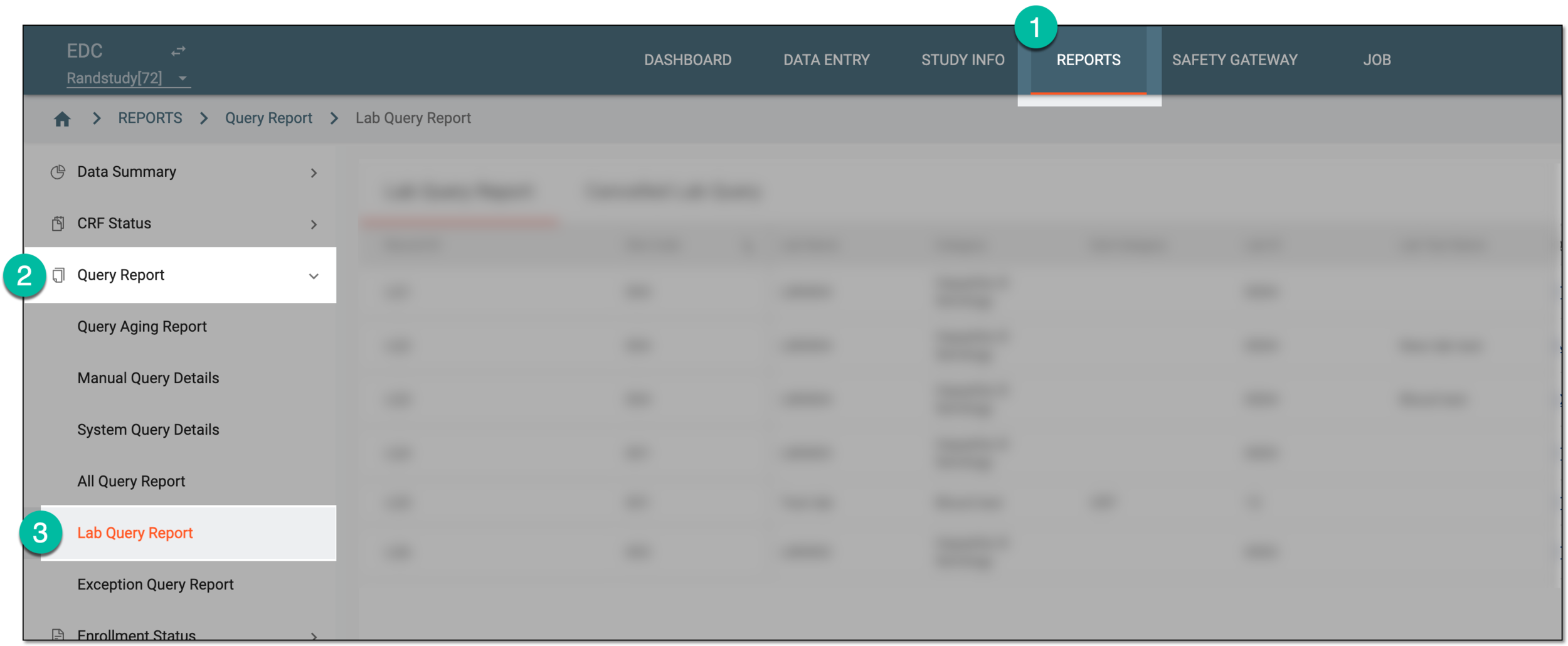 Figure 1. Accessing lab query report
-
On the page that appears, select the Cancelled Lab Query tab.
-
In the resulting report, review the canceled manual query details as explained in the following table.
 Figure 2. Reviewing canceled lab query report
Column
Details
Record ID
Represents the unique identifier assigned to the canceled query when it was opened.
Site Code
Represents the code of the site to which the case report form (CRF) with the canceled query belongs.
Lab Name
Represents the name of the lab in which the canceled query resided.
Category
Represents the category of the lab test for which the canceled query was generated, for instance, Urinalysis.
Sub-Category
Represents the subcategory of the lab test data, for instance, the subcategory of LB is Hematology.
Currently, in the EDC application, the sub-category value is not used. This value is preset for studies that use the domain name (LB, DM, and so on) as a category, then the subcategory is Hematology, Urinalysis, and so on.Lab ID
Represents the unique ID of the lab in which the canceled query resided.
Lab Test Name
Represents the name of the laboratory test for which the canceled query was generated, such as Bilirubin, Glucose, and so on.
Query Topic
Represents the topic (inquiry text) of the canceled query.
Queried By
Represents the name of the user who opened the query.
Owner Role
Represents the user role currently responsible for lab query handling in the EDC system.
This is needed in the case that during the study, the sponsor decides to change the role in charge of lab query handling in the system. Then, the Creation Role value remains as is, but the owner role reflects the new role assigned to query management.
For instance, the user role that has been responsible for opening queries in EDC is "DM_001." Then the sponsor decided, that the users of the role "DM_002" must be in charge of query creation. Now in the report, you can see that Creation Role is "DM_001," however, Owner Role is "DM_002."
Creation Role
Represents the role of the user who opened the query, such as CRC, CRA, PI, or else.
Creation Date
Represents the date when the query was opened.
Assigned To
Represents the role of the user to whom the query was assigned before canceled.
Status
Represents the query status at the moment of cancelation.
Cancelled Reason
Represents the reason entered by the user upon canceling the query.
Cancelled Date
Represents the date and time when the query was canceled.
You have studied the canceled lab query report details. You can also export this report data to your computer.