View blinded item audit report
The Blind Item Audit report of the IWRS application represents an audit trail for each item (drug) registered in the IWRS system. In other words, it stores data on all changes made to a particular item.
Important
To view this report, you must have the Blind Item Audit permission granted to your user role via the ADMIN application.
-
In the IWRS application header, select the REPORT tab.
-
On the page that opens, in the left pane, select Inventory Report > Blind Item Audit.
-
In the Blind Item Audit table that opens, view the audit trail details of each item available in the IWRS system as explained in the following table.
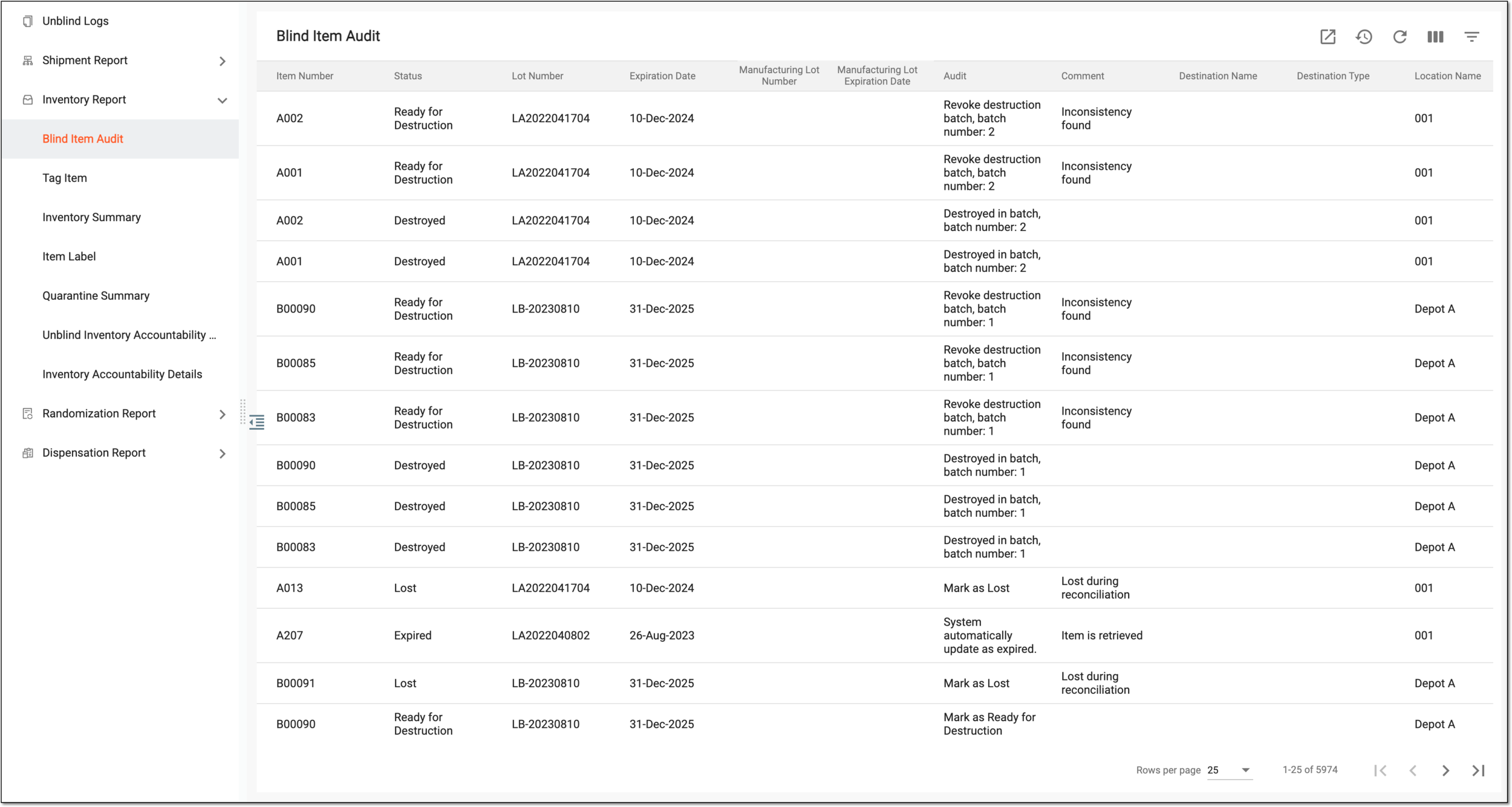 Figure 1. Viewing audit trail of items registered in IWRS
Tip
From the workspace toolbar, select Visible Columns
 to choose the columns you want to show or hide
from the report before viewing it.
to choose the columns you want to show or hide
from the report before viewing it.Column
Details
Item Number
Represents the unique identifier of the item for which the details are displayed.
Status
Represents the current status of the item in the site or depot inventory, such as Available, Ready for Destruction, Lost, and others.
Lot Number
Represents the unique identifier of the packaging lot to which the particular item belongs.
Lot Expiration Date
Represents the expiry date of the packaging lot to which the particular item belongs.
Manufacturing Lot Number
Represents the unique identifier of the manufacturing lot to which the particular item belongs.
Manufacturing Lot Expiration Date
Represents the expiry date of the manufacturing lot to which the particular item belongs.
Audit
Describes the details of the action performed with the item with auxiliary information to help users track the needed instances.
For instance, in the audit details for adding the item to the shipment, you can find the shipment number to further locate and track this shipment in the IWRS system.
Comment
Represents the comments and notes added by users to the item upon processing it in the system, for instance, upon releasing the item to the destination, changing item disposition in the inventory, or else.
Destination Name
Represents the name of the site or depot to which the item must be shipped. The value in this column is mainly needed for shipment auditing.
Destination Type
Represents the destination type of the item, such as Subject or Site.
Location Name
Represents the name of the institution where the item auditing has taken place.
For example, if the shipment auditing occurred at depot "A" before the item is shipped to site "001", then "Depot A" can be a location name, and "Site 001" can be named a destination.
Location Type
Represents the type of the institution—site or depot—where the item is currently stored or accounted for.
For instance, if the item is currently in the Available status at the site inventory, its location is Site. However, if the item is being shipped to the site from the depot and its status is In Transit, the location of this item is currently Depot. That is because until received by the site, the item is accounted for at the depot.
User Name
Represents the name of the user who has performed the operation on the item.
Action Time
Represents the date and time when the operation has been performed on the item.
You have viewed the blinded item audit report. You can also export the report data to work with it offline.