Study decommissioning list
Study decommissioning is the final stage of study management in the eClinical system as it refers to formally ending your trial once it is completed, suspended, or terminated. The decommissioning procedure is usually performed by the project management (PM) team, who typically oversee the planning, execution, and completion of the clinical trial.
In eClinical, the ADMIN application is a final link in the chain of decommissioning activities. Certain preconditions must be met to be able to see your study in the decommissioning list of ADMIN:
-
Data collection, review, and management are over, and the study is hardlocked in EDC.
-
Files are properly reviewed and organized, and the study is locked in eTMF.
-
All subject and drug-related procedures are completed, and the study is locked in IWRS.
-
The data coding process is finalized and locked in CODING.
-
The study decommissioning is initiated in CTMS.
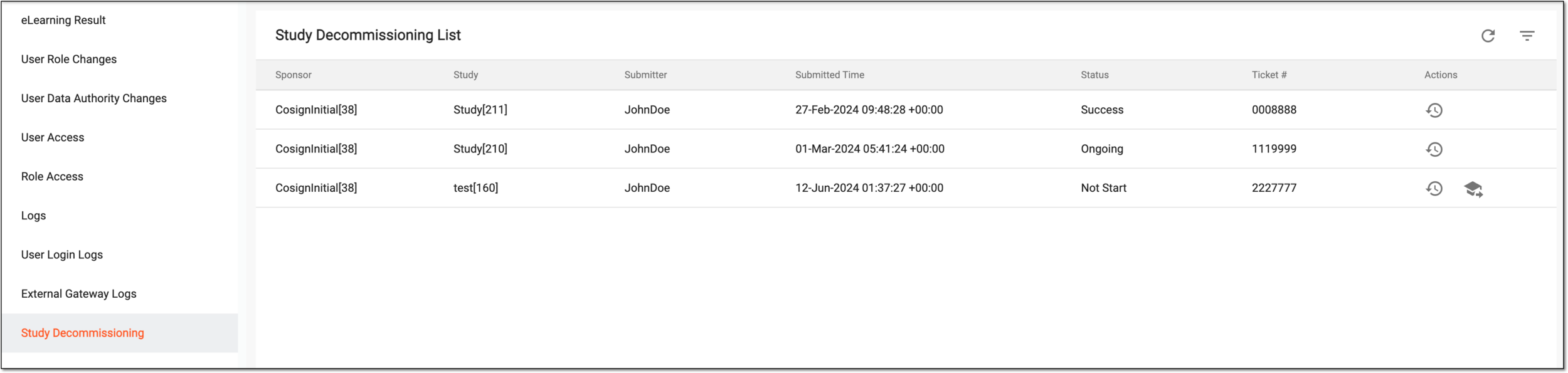
Once the study is added to the decommissioning list, you can track its status and details, as explained in the following table.
|
Column |
Details |
|---|---|
|
Sponsor |
Represents the name of the sponsor to whom the decommissioned study belongs. |
|
Study |
Represents the name of the decommissioned study. |
|
Submitter |
Represents the name of the user who initiated study decommissioning in CTMS. |
|
Submitted Time |
Represents the date, time, and timezone of when the study decommissioning is initiated in CTMS. |
|
Status |
Represents the current decommissioning status of the study:
|
|
Ticket # |
Represents the identifier number of the ticket with which the study decommissioning task can be tracked in the OKTA system. The ticket number is pulled from CTMS, where it is entered upon study decommissioning initiation. |