Delete integration setting
The integration enables the automation of data transfers between IWRS and various vendor data providers. Currently, IWRS supports the exchange of shipment data with the vendors' SFTP file servers.
In IWRS, you can establish the shipment data providers for your study by adding vendors to the list of integrations. However, once the integration is irrelevant and you no longer cooperate with a certain vendor, you can delete this integration setting from the system to cease all the related operations with order and dispatch file exchange.
Important
Note that deleting a vendor leads to the deletion of all the order and dispatch integration settings configured for it.
-
In the IWRS application header, select the INTEGRATION tab.
-
From the left pane, select the Integration Setting subtab.
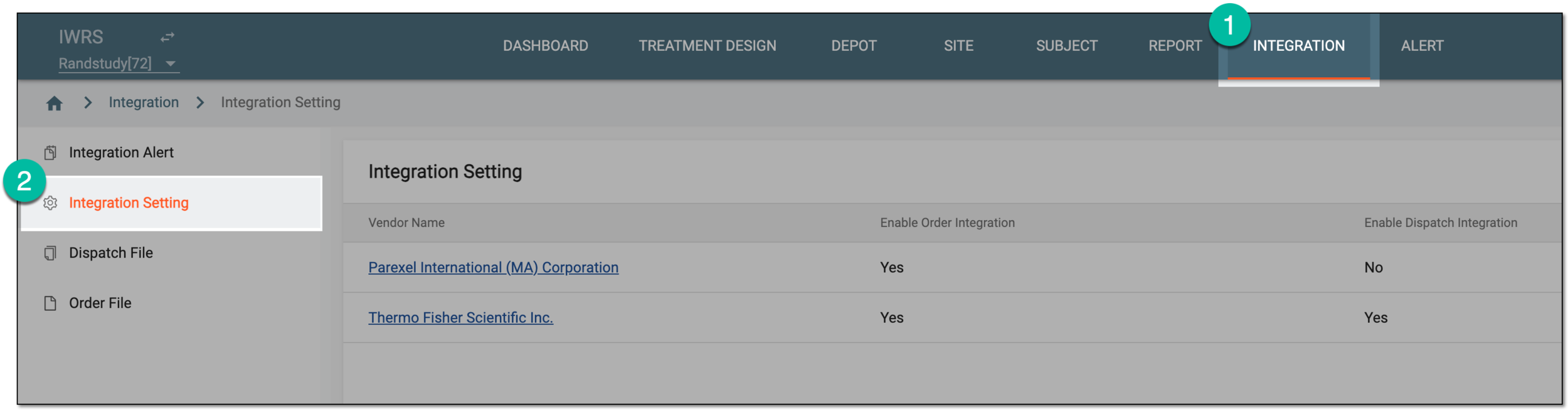 Figure 1. Accessing integration setting
-
In the Integration Setting table that opens, locate the vendor setting that you want to remove. Then from the Actions column next to it, select Delete
 .
. Figure 2. Deleting vendor setting
-
In the confirmation dialog that appears, select
 to proceed with deletion.
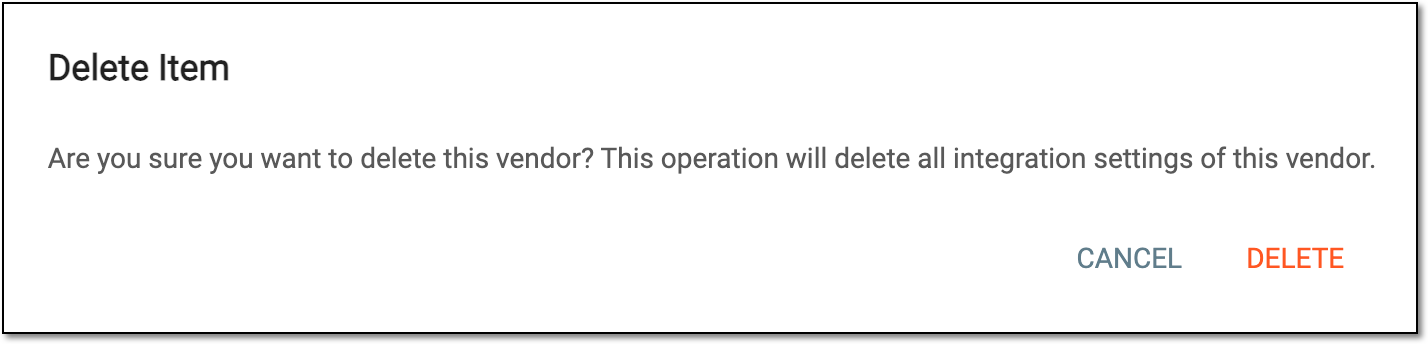 Figure 3. Confirming vendor setting deletion
Once saved, the vendor is removed along with all its order and dispatch integration settings.