View study sites and depots
A study refers to a research investigation designed to evaluate the safety, efficacy, and other relevant aspects of a medical intervention, such as a drug, device, or treatment. Studies are conducted by a sponsor to gather data and evidence to support regulatory approval and contribute to the scientific understanding of medical interventions and preventions for existing ailments.
The basic study entities are created via the ADMIN interface according to clinical trial specifications defined by the sponsor. The more advanced study details as well as the creation of sites and depots are maintained in the CTMS application after the corresponding sponsor is granted access. In the ADMIN application, you can view what sites and depots are associated with the study across different lifecycles. This information provides a comprehensive overview of the logistical and operational elements of the study, contributing to its effective coordination throughout the trial.
Tip
A site refers to a specific location, such as a hospital, clinic, or research center, where the clinical trial is conducted. Clinical sites serve as physical locations where investigators interact with study participants, collect data, and administer investigational treatments.
A depot refers to a facility or storage location designated for storing and distributing investigational products (for example, drugs or devices) used in the study. Depots facilitate the maintenance of proper storage conditions, handling logistics, and ensuring the delivery of investigational products to sites.
-
In the ADMIN application header, select the HIERARCHIES tab.
-
On the page that opens, from the toolbar of the left pane, select the needed lifecycle.
 Figure 1. Selecting lifecycle
-
Then select either
 or
or  depending on what entities you want to view for the study.
 -
In the same left pane, drill down the needed company and sponsor to select the study for which you want to see the site/depot list.
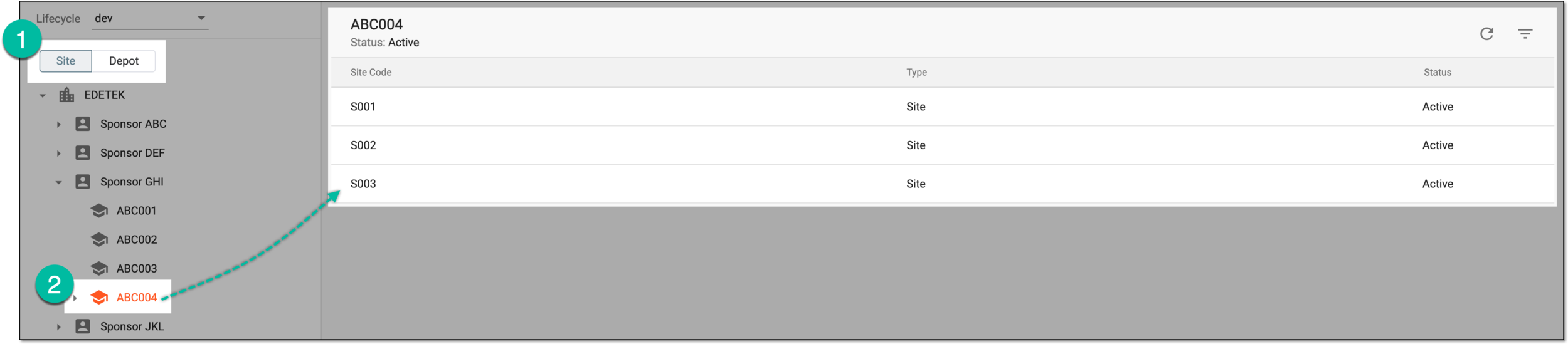 Figure 2. Viewing study sites
The list of study sites or depots is displayed in the contents panel.