Depot inventory by summary
Under the Inventory > By Summary tab, the statistics are given for all items accounted for in a depot. The data can be organized by product units or container units based on your study configurations.
Important
If no container units are configured in IWRS, then all operations in Inventory occur in product units.
The inventory summary provides you with the complete picture of how many items or containers of different product are there in a depot. Each value in the table that is not zero is an active link for you to navigate to the By Item tab for more detailed statistics.
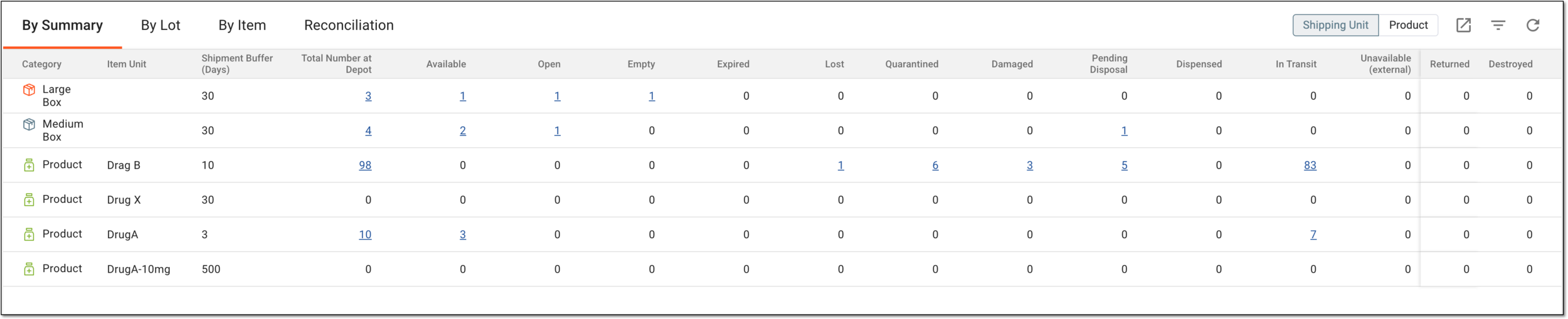
In the following table, you can find the description of each element of the By Summary tab.
|
Element |
Details |
|---|---|
|
Shipping Unit/Product |
Switch between these filters to display the inventory statistics either by both shipping units (containers and products) or only by products.
|
|
Category |
Represents one of the following:
|
|
Item Unit |
Represents the name of the product.
|
|
Shipment Buffer (Days) |
Represents the buffer period in days set for the shipment of the product or container unit to prevent untimely drug expiry.
|
|
Total Number at Depot |
Represents the total number of product or container units that are currently at the depot in various dispositions excluding the items of the Destroyed disposition. Select this number to go to the Selecting this number navigates you to the By Item tab, where the statistics for the item unit are displayed. |
|
Available |
Represents the number of product or container units that are available for shipment. Select this number to go to the Selecting this number navigates you to the By Item tab, where the statistics for the item unit are displayed and filtered by the Available disposition. |
|
Expired |
Represents the number of expired product or container units. Select this number to go to the Selecting this number navigates you to the By Item tab, where the statistics for the item unit are displayed and filtered by the Expired disposition. |
|
Lost |
Represents the number of lost product or container units. Select this number to go to the Selecting this number navigates you to the By Item tab, where the statistics for the item unit are displayed and filtered by the Lost disposition. |
|
Quarantined |
Represents the number of quarantined product or container units. Select this number to go to the By Item tab, where the statistics for the item unit are displayed and filtered by the Abnormal group of disposition. |
|
Damaged |
Represents the number of damaged product or container units. Select this number to go to the By Item tab, where the statistics for the item unit are displayed and filtered by the Abnormal disposition. |
|
Pending Disposal |
Represents the number of product or container units that have to be returned or are ready to be destroyed. Select this number to go to the By Item tab, where the statistics for the item unit are displayed and filtered by the Pending Disposal disposition. |
|
Dispensed |
Represents the number of product or container units that are dispensed from the depot. Select this number to go to the By Item tab, where the statistics for the item unit are displayed and filtered by the Dispensed disposition. |
|
In Transit |
Represents the number of product or container units that are currently transferred to different depots, sites, or elsewhere. Select this number to go to the By Item tab, where the statistics for the item unit are displayed and filtered by the In Transit disposition. |
|
Returned |
Represents the number of product or container units that are returned to the supplier by the depot. Select this number to go to the By Item tab, where the statistics for the item unit are displayed and filtered by the Returned disposition. |
|
Destroyed |
Represents the number of product or container units that are destroyed by the depot. Select this number to go to the By Item tab, where the statistics for the item unit are displayed and filtered by the Destroyed disposition. |
Important
There can be more columns in the table if any custom item dispositions are created for your study.