Factor list management
In IWRS, a factor is a condition that influences subject randomization and drug dispensation. The factors can be age, gender, health condition, and so on.
The factors you create in the Factor List module are then used as cohort inclusion criteria or as a treatment-determining characteristic in the subject dispensing plan.
For example, the age factor assigned as cohort inclusion criteria determines to which cohort the subject is assigned upon randomization. Once the subject is valid for drug dispensation, their treatment plan can also be dictated by the range of specific factors, such as their health condition, gender, age, or the cohort to which they belong.
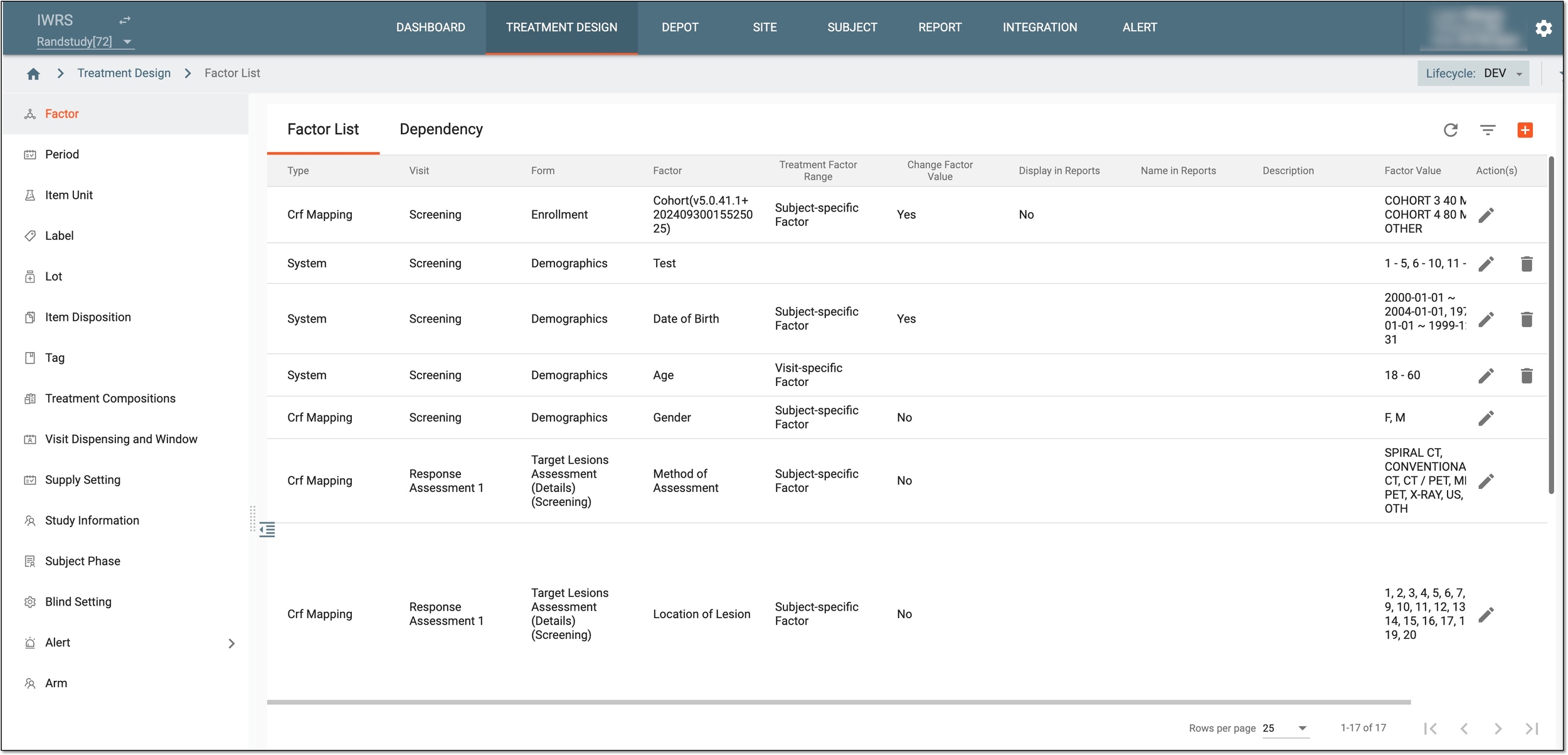
All the factors previously created in the IWRS application are displayed under the TREATMENT DESIGN > Factor module. You can learn more about the details available in Factor List in the following table.
|
Column |
Details |
|---|---|
|
Type |
Represents the factor type and determines how the factor has been created: |
|
Visit |
Represents the visit name of the mapped factor (only for factors of the CRF Mapping and Read Only types). |
|
Form |
Represents the form name of the mapped factor (only for factors of the CRF Mapping and Read Only types). |
|
Factor |
Represents the factor name, namely:
|
|
Treatment Factor Range |
Represents the range when the factor must be set: |
|
Change Factor Value |
Represents if it is allowed or restricted to changing the factor value for a subject: |
|
Display in Reports |
Represents if it is enabled in the system to display the factor value in the subject list and randomization reports. |
|
Name in Reports |
Represents the name of the factor that is displayed in the subject list and randomization reports. This one can be different from the factor name, for instance, it can be shorter to keep your report naming concise. |
|
Description |
Represents a detailed description of the factor (only for factors of the Manual type). |
|
Factor Value |
Represents the value of the factor. For instance, for the "Date of Birth" factor, values are the ranges of dates: "2000-01-01 ~ 2004-01-01" and "1970-01-01 ~ 1999-12-31."
|
|
Factor Text |
Represents the text defined to depict the factor value. For instance, for the "Date of Birth" factor, where the values are the ranges of dates—"2000-01-01 ~ 2004-01-01" and "1970-01-01 ~ 1999-12-31"—the text depicts the age group to which the subjects of the respective birth date belong: "Young adult" and "Adult."
|
In this section of the user guide, you can learn how to manage your factor list using the following actions: