Analyze compliance report for eDiary
In EDC, a comprehensive and configurable compliance report depicts the statistics of form completion via the eDiary mobile app. This helps assess the efficiency of mobile app usage for data entry in a study and understand if there are gaps in form completion that affect compliance with study requirements.
-
In the EDC application header, select the REPORTS tab.
-
From the left pane of the page that opens, select eCOA and eDiary Report > Compliance Report.
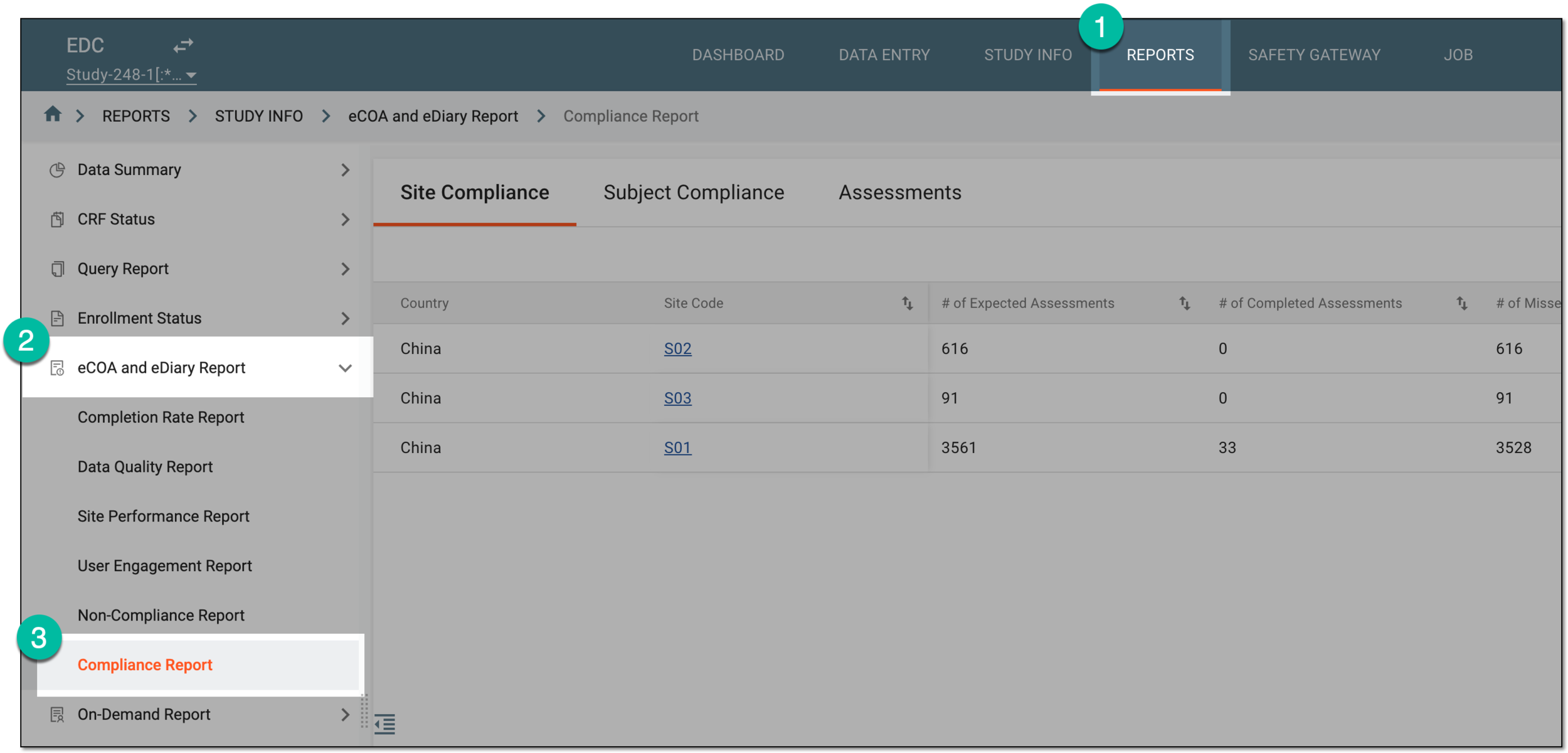 Figure 1. Accessing compliance report
-
On the page that opens, from the Report View dropdown list on the workspace toolbar, select the needed view to arrange the displayed data accordingly. The All option is selected by default to display the most comprehensive data set for analysis.
Tip
You can set up compliance report views as needed to add more or edit existing options.
 Figure 2. Selecting compliance report view
-
Once the report view is set as needed, analyze the data as follows.
The statistics are given by site to analyze the overall data completion rates via the eDiary mobile app at various study locations.
 Figure 3. Analyzing site compliance report
Element
Details
Country
Represents the country where the site is located, whose compliance statistics are analyzed.
Site Code
Represents the unique identifier of the site whose compliance statistics are analyzed.
Select the site code to access the subject compliance report for this site.
# of Expected Assessments
Represents the total number of forms whose data entry and editing timeframes have passed, and the data is either entered or not, with no further possibility to be changed.
# of Completed Assessments
Represents the number of forms whose data entry and editing timeframes have passed and that are already completed by the subjects of the site via their eDiary app.
# of Missed Assessments
Represents the number of forms whose data entry and editing timeframes have passed and that were not completed by the subjects of the site via their eDiary app.
Compliance Rate (%)
Represents the ratio (in percentage) of the number of forms that must be completed to forms that have not yet been completed, forming an indicator of data entry efficiency at a particular site. The report is sorted by this rate in ascending order by default.
The statistics are given by subject to analyze the data completion rates via mobile apps by individuals participating in a study.
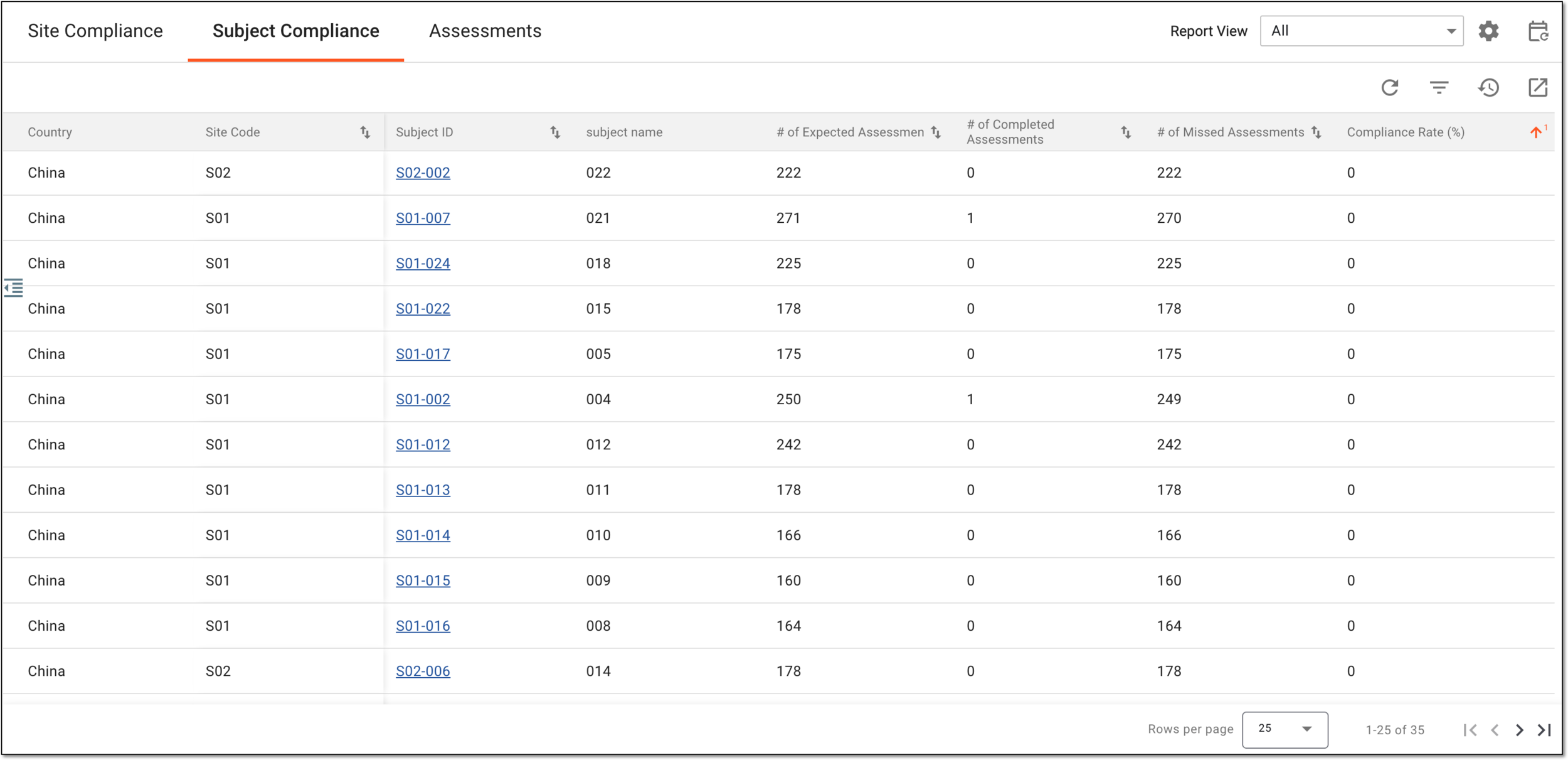 Figure 4. Analyzing subject compliance report
Element
Details
Country
Represents the country where the site and subject are located, whose compliance statistics are analyzed.
Site Code
Represents the site where the subject belongs, whose compliance statistics are analyzed.
[Unique ID Label]
Represents the unique identifier of the subject whose compliance statistics are analyzed.
Select the subject ID to access the compliance assessment details for this subject.
The column name depends on the unique ID label configuration of your study in IWRS.There can be as many subject ID columns as there are additional IDs configured for your study.# of Expected Assessments
Represents the total number of forms whose data entry and editing timeframes have passed and that are already completed via the eDiary app.
# of Completed Assessments
Represents the number of forms whose data entry and editing timeframes have passed and that are already completed via the eDiary app.
# of Missed Assessments
Represents the number of forms whose data entry and editing timeframes have passed and that were not completed via the eDiary app.
Compliance Rate (%)
Represents the ratio (in percentage) of the number of completed forms out of the total number of expected forms, producing an indicator of data entry efficiency and compliance with study expectations for a particular subject. The report is sorted by this rate in ascending order by default.
The statistics are given by all forms that are expected to be completed via the eDiary mobile app disregarding their data entry and editing timeframes.
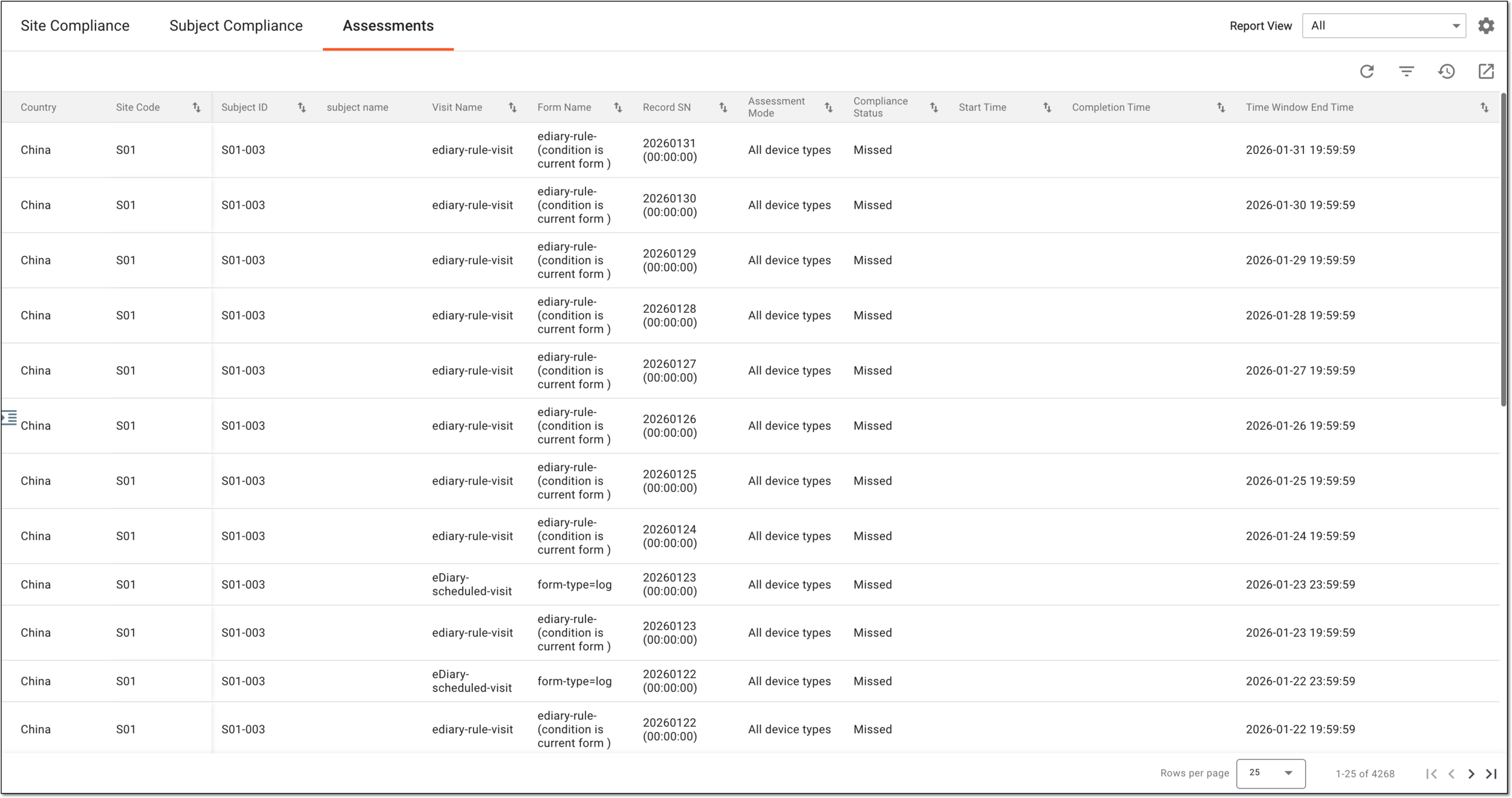 Figure 5. Analyzing compliance assessment details
Element
Details
Country
Represents the country where the site and subject are located, whose compliance statistics are analyzed.
Site Code
Represents the site where the subject belongs, whose compliance statistics are analyzed.
[Unique ID Label]
Represents the unique identifier of the subject whose compliance statistics are analyzed.
The column name depends on the unique ID label configuration of your study in IWRS.There can be as many subject ID columns as there are additional IDs configured for your study.Visit Name
Represents the name of the visit to which belongs the form that must be completed via eDiary.
Form Name
Represents the name of the form that must be completed via eDiary.
Record SN
Represents the sequential number of the record in the form that must be completed via eDiary.
Assessment Mode
Represents who can enter data into the form using their devices:
-
All device types: the form can be completed by both subjects using eDiary and site professionals using their devices.
-
Home/eDiary devices: the form can be completed only by subjects using eDiary.
-
Site/ePRO devices: the form can be completed only by site professionals using their devices.
Compliance Status
Represents one of the following:
-
Completed: the form was completed during the set data entry and editing timeframe and is considered as compliant.
-
Not Completed: the form is not completed, and the set data entry and editing window is still open.
-
Missed: the form was not completed during the set data entry and editing timeframe and is considered non-compliant.
Start Time
Represents the date and time when the data entry has started for the form record in eDiary. This value is missing for the form records that are not completed.
Completion Time
Represents the date and time when the form record has been completed in eDiary. This value is missing for the form records that are not completed.
Time Window End Time
Represents the date and time when the data entry and editing timeframe ended for the form record. The report is sorted by this date in descending order by default.
-
Once you have analyzed the compliance report for the study, you can also export the report for offline access if needed.