Dispensing window management
In IWRS, by configuring dispensing visits, you can define which dispensing packages and under which conditions are given to subjects during their treatment visits. You can also configure dispensation windows to outline specific time frames for each dispensation.
The dispensing window configuration is version-bound. Such versioning helps you keep track of changes in these configurations applied to all or specific sites or subjects. This also satisfies international multisite studies, where different locations and subjects can follow their own dispensation schedules.
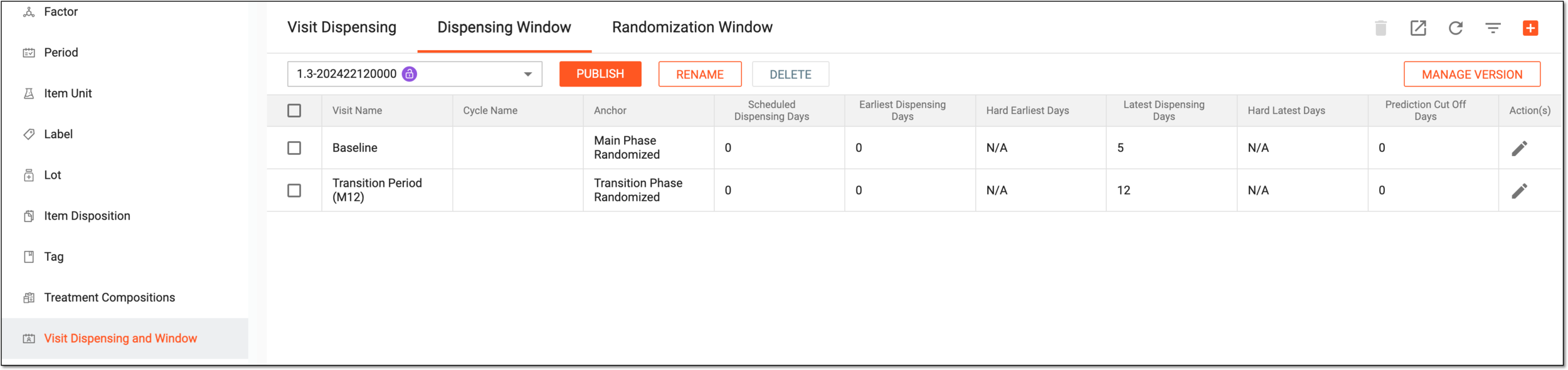
All the dispensing windows previously configured in the IWRS application are displayed under the Dispensing Window page with their respective properties and available options as explained in the following table.
|
Column |
Details |
|---|---|
|
Visit Name |
Represents the name of a dispensing visit during which the dispensing package must be given to a subject. |
|
Cycle Name |
Represents the name of the cycle to which belongs the visit during which the dispensation must occur. |
|
Anchor |
Represents the event, the date of occurrence of which serves as a starting point for a dispensing window. For instance, the subject is supposed to start receiving certain medications once they are randomized. Let us assume the date when the subject phase is changed to Randomized is 1 July, and this is the anchor date for this subject's dispensing window. |
|
Scheduled Dispensing Days |
Represents the number of days from the anchor date to the scheduled dispensation of a drug. For instance, the subject is supposed to get a certain medication four days after they are randomized. Thus, to calculate the scheduled dispensation date, the system considers the date when the subject phase is changed to Randomized and adds four days. Let us assume the randomization occurred on 1 July, so the scheduled dispensation date is 5 July. |
|
Earliest Dispensing Days |
Represents the number of days before the scheduled dispensation date that outlines the earliest time frame during which the subject can be given the medication. For instance, the subject is supposed to get a certain medication on 5 July. Nevertheless, some factors can influence the dispensation, like the subject's incapacity to arrive at the site. Thus, we arrange an acceptable dispensation window and configure that the drug can be received the earliest three days before the scheduled date. This way, the dispensation window starts on 2 July. |
|
Hard Earliest Days |
Represents the minimum number of days required before a dispensing can take place. It sets a lower limit on when the dispensing window can begin. For example, if the hard earliest days are set to 3, it means that a dispensing cannot occur until at least three days have passed since the previous visit. This ensures that a specific period elapses before the next dispensing can be initiated. |
|
Latest Dispensing Days |
Represents the number of days after the scheduled dispensation date that outlines the latest time frame during which the subject can be given the medication. If the dispensation does not occur before or on this date, then it is considered overdue. For instance, the subject is supposed to get a certain medication on 5 July. Nevertheless, some factors can influence the dispensation, like the subject's incapacity to arrive at the site. Thus, we arrange an acceptable dispensation window and configure that the drug can be received the latest three days after the scheduled date. This way, the dispensation window ends on 8 July. |
|
Hard Latest Days |
Represents the maximum number of days allowed for the start of a dispensing window. It sets an upper limit on when the window can begin. If the hard latest days are set to, let us say, 10, it means that a dispensing must start within 10 days of the previous event. Beyond this timeframe, the system does not permit the initiation of the dispensing window. |
|
Prediction Cut Off Days |
Represents the number of days after the latest dispensation date—the end of the dispensing window—for the system to stop calculating this dispensation for the item inventory prediction. Let us assume the dispensation was supposed to occur before 8 July, but it did not, and the inventory cut-off starts in two days. Then on 10 July, the system no longer considers this dispensation when planning sufficient inventory for all upcoming dispensations. |
You can learn more about the dispensing window configuration in the following sections:
In IWRS, a set of items to be dispensed (given) to a particular subject in a course of their treatment.
An occurrence in a clinical trial in which the subject comes to a site to receive treatment, undergo some tests, or complete other required procedures.
A specific phase that a subject has to complete in the course of a clinical trial to move further to the next phase. For instance, Screening, Enrolled, Randomized, and others.
 |
In eClinical, subject phases are designed individually for each study via the SD application, although they are referenced in others, like IWRS or EDC.