Analyze comment report
In EDC, while working with case report forms (CRFs), you can open comments on specific form fields (items) with data to provide any auxiliary information for the users who will address the form afterward or for yourself. A comment in a CRF is a useful tool for EDC users to have traceable and transparent communication on data elements in the form of notes.
To ensure the traceability and transparency of comments in CRFs, you can review all comments that were ever added to the EDC system via one comprehensive report.
Important
Note that for blinded users the sensitive data—blinded forms with comments—are hidden and missing from the comment report.
-
In the EDC application header, select the REPORTS tab.
-
From the left pane of the page that opens, select Comment Report.
-
On the Comment Report page that opens, review the details of comments added in CRFs as explained in the following table.
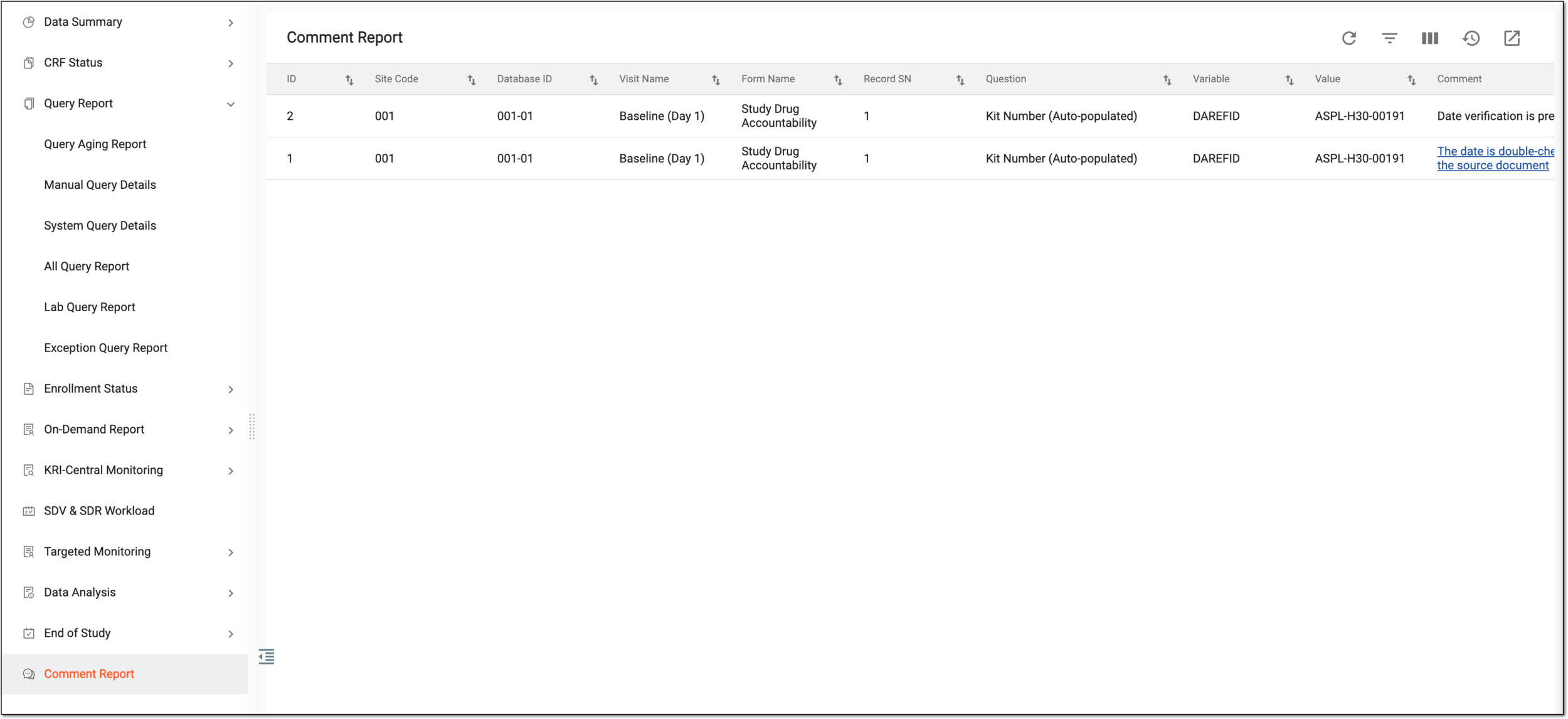 Figure 1. Viewing comment report
Column
Details
ID
Represents the unique identification number assigned to the comment in EDC upon creation.
Site Code
Represents the unique identification number of the site at which was entered CRF data for which the comment is added.
[Unique ID Label]
Represents the unique identification number of the subject for whose CRF data the comment is added.
The column name depends on the unique ID label configuration of your study in IWRS.If there are additional IDs configured for your study, you see as many such columns as there are IDs.Visit Name
Represents the name of the visit to which belongs the CRF to which the comment is added.
Form Name
Represents the name of the CRF to which the comment is added.
Record SN
Represents the sequential number of the record within a CRF for which the comment is added.
Question
Represents the item within the CRF for whose data the comment is added.
Variable
Represents the database variable that stores the data element for which the comment is added.
For instance, the data for the Birth Date (dd-mmm-yyyy) question is stored in the demographics (DM) domain under the BRTHDAT.
Value
Represents the data (answer) entered into the CRF item (question) for which the comment is added.
Comment
Represents the text of the added comment. For active comments, the value is also a hyperlink that brings you to the CRF page where the comment exists.
 Figure 2. Accessing comment on CRF page
Comment By
Represents the name of the system user who added the comment.
Creation Datetime
Represents the exact date and time when the comment is added.
Status
Represents the current activation status of the comment—Active or Inactive.
Inactivation Type
If the comment is inactive, this represents the inactivation type—if it is done manually by the user or automatically by the system.
Final Modified Date
Represents the date of the latest amendment performed with the comment—editing or inactivation.
Final Modified By
Represents the name of the user who performed the latest amendment with the comment—edited or inactivated it.
You have reviewed the comprehensive report on CRF comments of your study.