View subject item accountability report
The Subject Item Accountability report of the IWRS application is the item (drug) accountability log that helps you analyze the receipt, disposition, and accountability of the investigational drug. It is updated every time, for example, a drug is dispensed or returned, a shipment is received, and so on. With it, you can track the site to which the drug is delivered, the subject for whom this drug is intended, the visit at which the subject receives the drug, and so on.
If you access the Subject Item Accountability report from an unblinded role, the report reveals the name of the item unit whose shipment details are stored in this report, whereas if you access the report from a blinded role this data is hidden.
Important
To view this report, you must have the Subject Item Accountability permission granted to your user role via the ADMIN application.
-
In the IWRS application header, select the REPORT tab.
-
On the page that opens, in the left pane, select Dispensation Report > Subject Item Accountability.
-
In the Subject Item Accountability table that opens, view the accountability log of the items (investigational drugs) registered in IWRS in the following table.
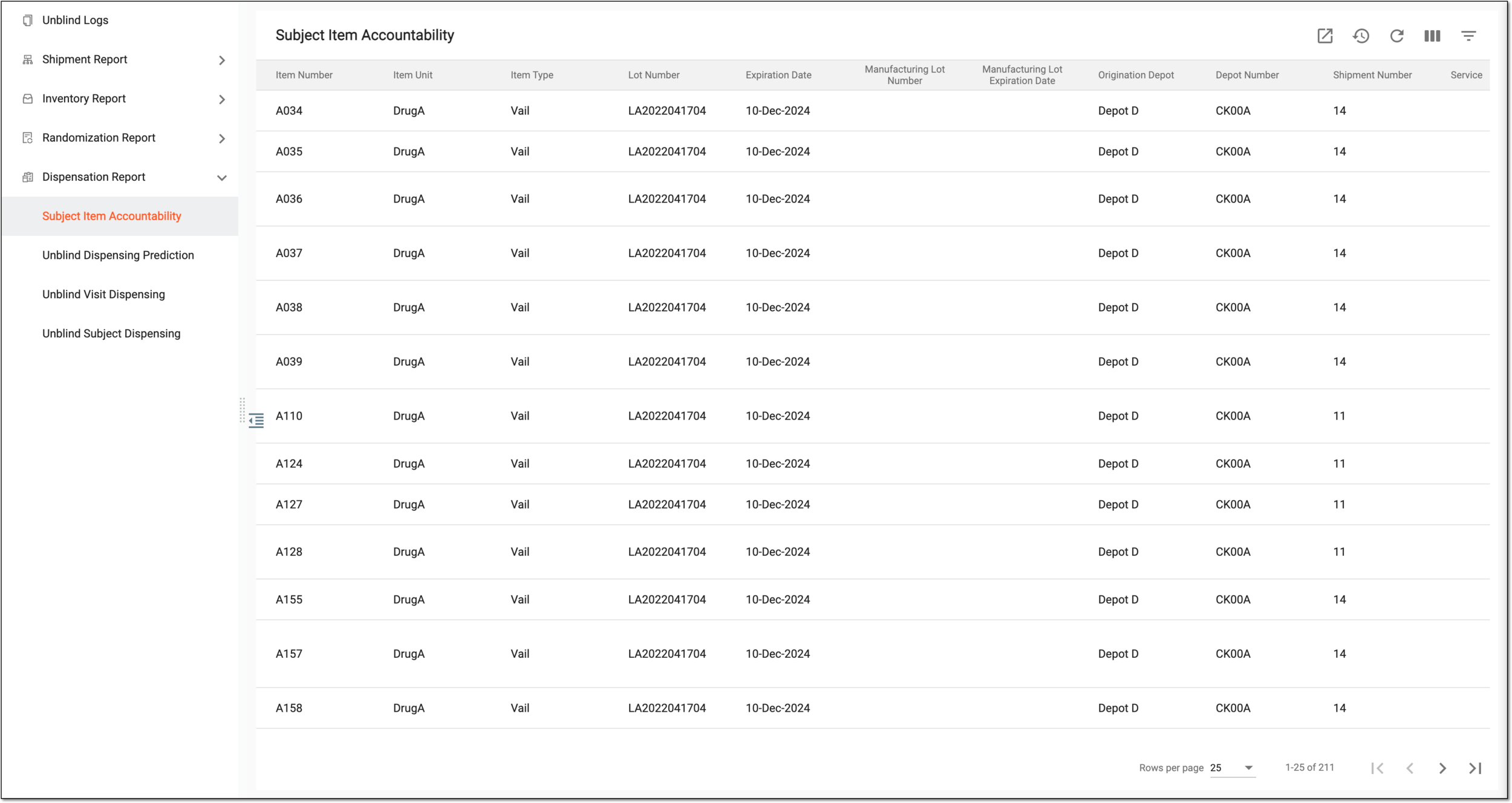 Figure 1. Viewing accountability log of investigational drugs
Tip
From the workspace toolbar, select Visible Columns
 to choose the columns you want to show or hide
from the report before viewing it.
to choose the columns you want to show or hide
from the report before viewing it.Column
Details
Item Number
Represents the unique number (identifier) assigned to the item.
Item Unit
Represents the name of the item (for instance, Aspirin 5mg, Aspirin 10mg, and so on).
Item Type
Represents the type of the item.
-
Vail: the item unit is a liquid medication.
-
Dose: the item unit is a solid medication.
Lot Number
Represents the identifier of the lot to which the particular item belongs.
Expiration Date
Represents the expiry date of the lot to which the particular item belongs.
Origination Depot
Represents the name of the depot to which the item is shipped before it is allocated to a particular site. If the field is empty, there is no origination depot, and the item is released directly to a site.
Depot Number
Represents the depot number where the drug is dispensed or returned.
Shipment Number
Represents a unique number assigned to a shipment of the item.
Service
Represents the name of the express service vendor that performs the shipment.
Tracking ID
Represents the ID number by which the item being shipped can be tracked.
Shipment Created Date
Represents the date when the shipment has been requested.
Shipment Dispatch Date
Represents the date when the shipment has been dispatched.
Shipment Received Date
Represents the date when the shipment has been received.
Site Code
Represents the unique code of the site to which the drug is delivered.
Site Name
Represents the name of the site where the drug is delivered.
[Unique ID Label]
Represents the identifier of the subject for whom the item is intended.
The column name depends on the unique ID label configuration of your study.Visit Name
Represents the name of the visit at which the item is dispensed to the intended subject.
Dosing Factor
Represents the condition under which the particular item dosage is assigned to the subject.
Dose Assigned
Represents the name of the dose assigned.
Dispensing Type
Represents the way the item is dispensed to a subject.
-
Scheduled: the item is scheduled to be dispensed during a specific subject visit.
-
Replacement: the item dispensed to a subject replaces another item previously assigned to a subject.
-
Unscheduled: the item is dispensed to a subject during an unscheduled visit due to certain factors.
-
Manual: the item is manually selected and dispensed to a subject.
Dispensing Date
Represents the date when the item is dispensed to a subject.
Dispensing By
Represents the name of who dispensed the item to the subject.
Dispensing Comments
Represents the comment left by a certain site employee responsible for dispensing the item to the subject.
Subject Return Date
Represents the date on which the subject has returned the item.
# of Subject Returned
Represents the number of subitems (for instance, tablets) returned by the subject.
# of Lost
Represents the number of subitems (for instance, tablets) that are lost by the subject.
Subject Return Comments
Represents the comments left upon the item return.
Return Shipment Number
Represents the number of the return shipment.
Return Shipment Service
Represents the service of the return shipment.
Return Shipment Tracking ID
Represents the tracking ID of the return shipment. It is the number through which an item is tracked.
Return Shipment Dispatch Date
Represents the date when the return shipment has been dispatched.
Return Shipment Receipt Date
Represents the receipt date of the return shipment.
Destruction Date
Represents the date when the item has been destroyed.
Destroyed By
Represents the name of the user who has destroyed the item.
Destruction Reason
Represents the reason why the item has been destroyed.
-
You have viewed the subject item accountability report. You can also export the report data to work with it offline.