View shipment summary report
The Shipment Summary report of the IWRS application provides you with information about all the shipments in a study including order number, current status, origin, and so on. It helps the user to know the status of all the shipments in a study.
Important
To view this report, you must have the Shipment Summary permission granted to your user role via the ADMIN application.
-
In the IWRS application header, select the REPORT tab.
-
On the page that opens, in the left pane, select Shipment Report > Shipment Summary.
-
In the Shipment Summary table that opens, view the details of all the shipments in a study explained in the following table.
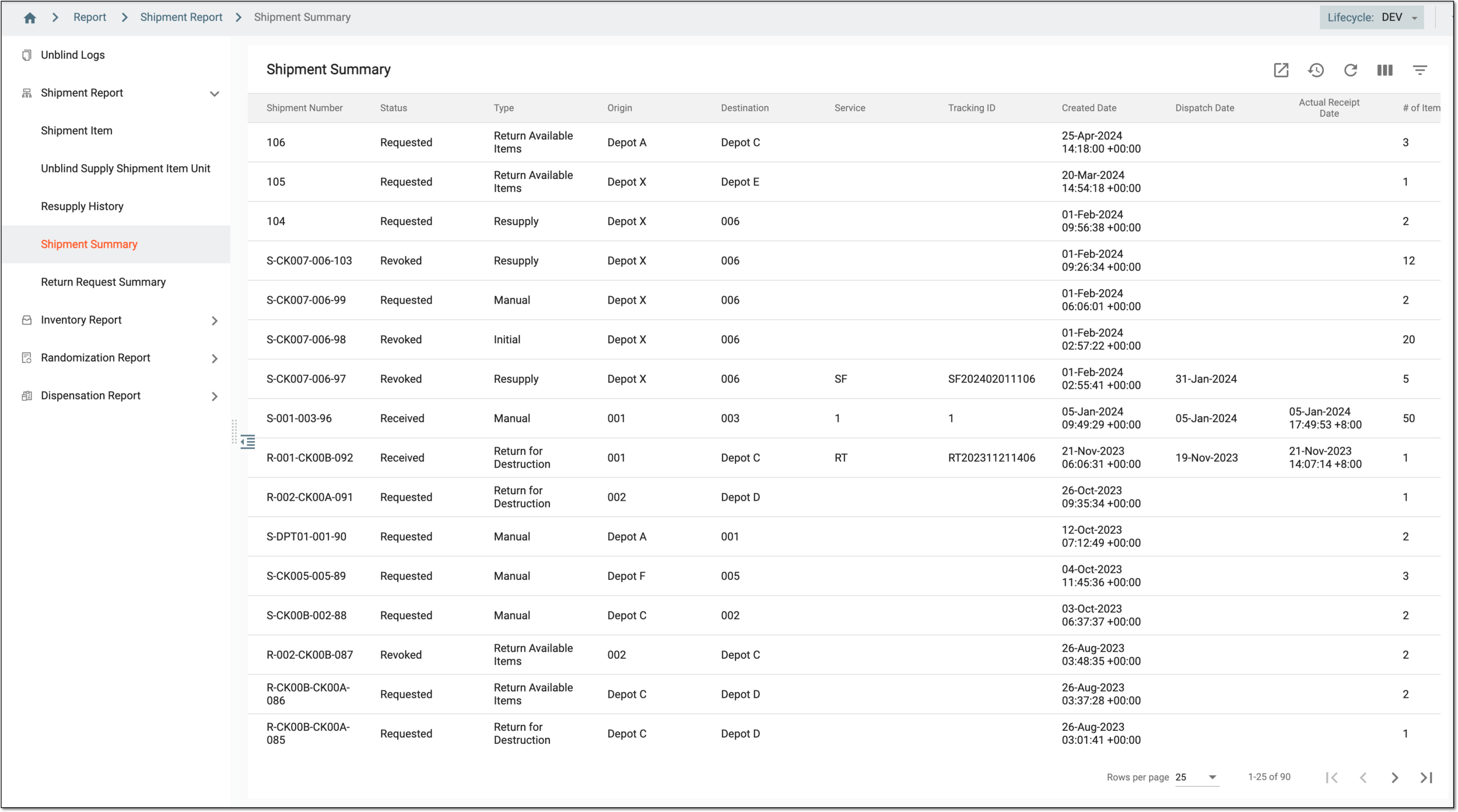 Figure 1. Viewing shipment summary report
Tip
From the workspace toolbar, select Visible Columns
 to choose the columns you want to show or hide
from the report before viewing it.
to choose the columns you want to show or hide
from the report before viewing it.Element
Details
Shipment Number
Represents the shipment number for which the shipment details are displayed.
Status
Represents the shipment status, such as Requested, Revoked, Partially Received, In Transit, and others.
Type
Represents the shipment type, such as:
-
Manual: the shipment is initiated by a specific user.
-
Initial: this is the first shipment of the site.
-
Resupply: this shipment is generated by the system to resupply the site according to the supply plan.
-
Return for Destruction: the shipment items are ready for destruction.
-
Return Available Items: the available shipment items are returned.
Origin
Represents the location from where the shipment has been sent.
Destination
Represents the destination where the items must be shipped.
Service
Represents the name of the logistics company that transfers the drugs.
Tracking ID
Represents the ID number by which the item being shipped can be tracked.
Created Date
Represents the date when the shipment has been requested.
Dispatch Date
Represents the date of the shipment dispatch.
Actual Receipt Date
Represents the date of actual receipt of the shipment.
# of Items
Represents the total number of items in a unit sent for shipment.
-
You have viewed the shipment summary report. You can also export the report data to work with it offline.