View return request summary
The Return Request Summary report in the IWRS application provides you with information about all the return requests in the study along with their current status. It helps the user view the status of the return requests in the study along with additional information such as origin, destination, shipment number, and so on.
Important
To view this report, you must have the Return Request Summary permission granted to your user role via the ADMIN application.
-
In the IWRS application header, select the REPORT tab.
-
On the page that opens, in the left pane, select Shipment Report > Return Request Summary.
-
In the Return Request Summary report that opens, view the details of the return requests in a particular study as explained in the following table.
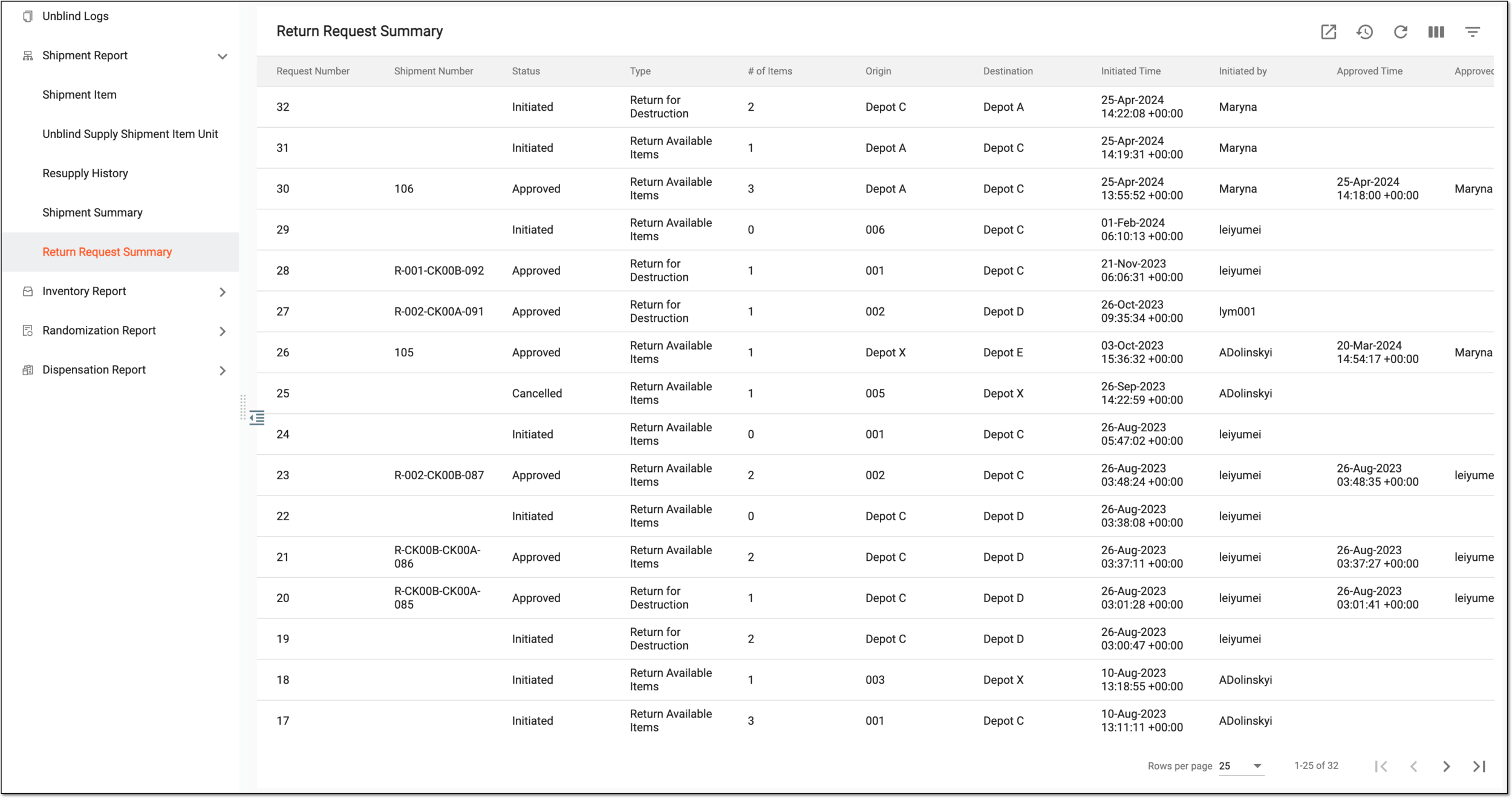 Figure 1. Viewing return request summary report
Tip
From the workspace toolbar, select Visible Columns
 to choose the columns you want to show or hide
from the report before viewing it.
to choose the columns you want to show or hide
from the report before viewing it.Element
Details
Request Number
Represents the unique request number generated upon the creation of a new return request.
Shipment Number
Represents the number of the shipment against which the return request is sent.
Status
Represents the status of the return request, such as Requested, Revoked, Partially Received, In Transit, and others.
Type
Represents the type of return request such as:
-
Return for Destruction: the shipment item is ready for destruction after return.
-
Return Available Items: the available shipment items are returned.
# of Items
Represents the total number of items sent for the return request.
Origin
Represents the origin from where the return request is sent.
Destination
Represents the destination where the return request is to be received.
Initiated Time
Represents the time when the return request was started.
Initiated By
Represents the username who initiated the request.
Approved Time
Represents the time when the return request is approved. This field remains empty if the return request is not approved.
Approved By
Represents the username who approved the return request.
Cancelled Time
Represents the time when the return request is cancelled. This field remains empty if the return request is not cancelled.
Cancelled By
Represents the username who cancelled the return request. This field remains blank if the return request is not cancelled.
-
You have viewed the return request summary report. You can also export the report data to work with it offline.