View unblinded supply shipment item unit report
The Unblind Supply Shipment Item Unit report in the IWRS application helps you quickly determine the quantity of each item unit included in a shipment. This report is very similar to the Unblind Shipment Item report as it also contains information about the shipping history of the item unit, including its destination, expiration date, and so on. Nevertheless, the Unblind Shipment Item report helps you trace the shipping history at the level of a single item, and the Unblind Supply Shipment Item Unit report concentrates on item unit data.
Important
To view this report, you must have the Unblind Supply Shipment Item Unit permission granted to your user role via the ADMIN application.
-
In the IWRS application header, select the REPORT tab.
-
On the page that opens, in the left pane, select Shipment Report > Unblind Supply Shipment Item Unit.
-
In the Unblind Supply Shipment Item Unit table that opens, view the shipment details of all item units registered in the IWRS in the following table.
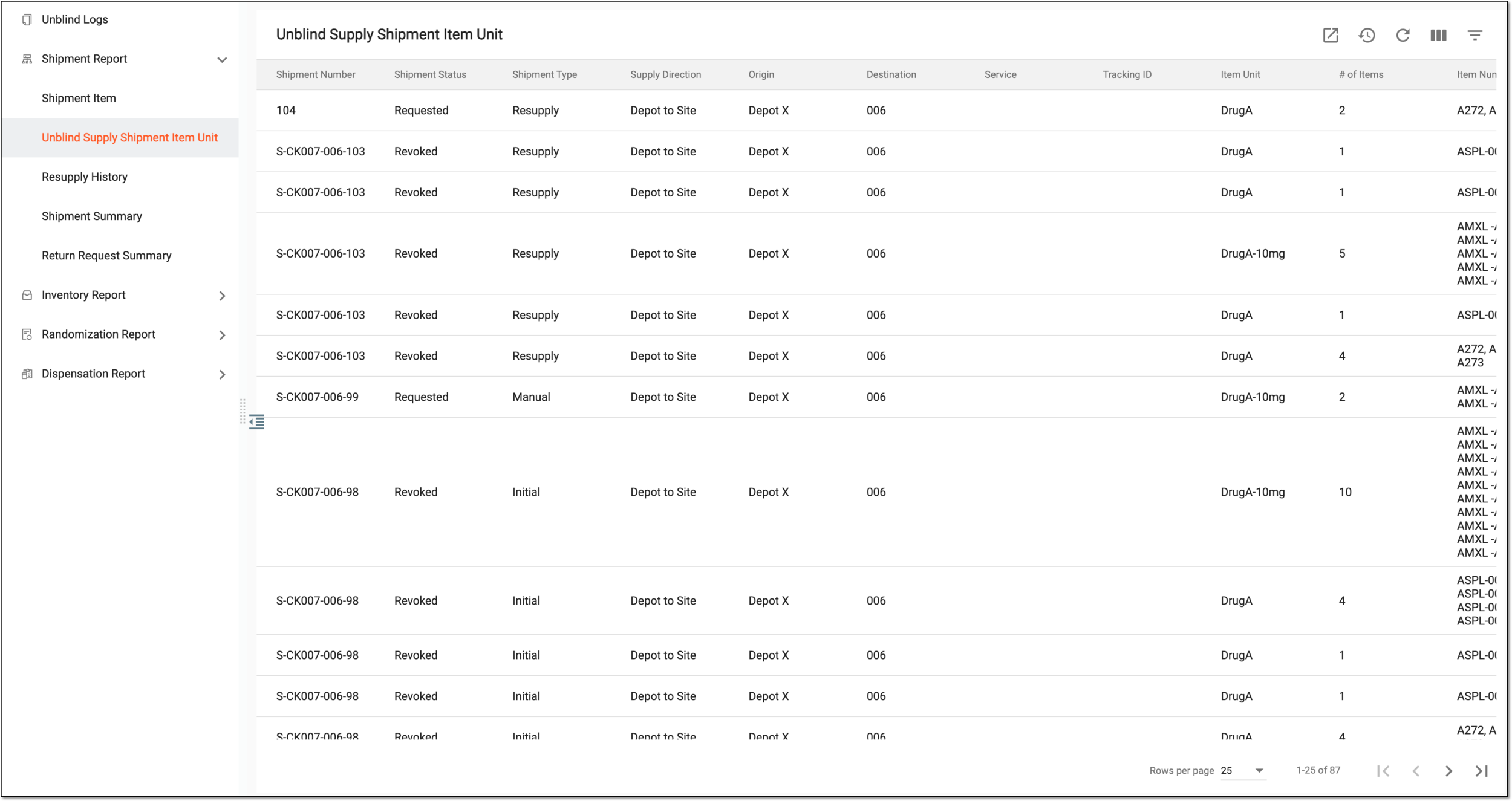 Figure 1. Viewing shipment details of item units
Tip
From the workspace toolbar, select Visible Columns
 to choose the columns you want to show or hide
from the report before viewing it.
to choose the columns you want to show or hide
from the report before viewing it.Column
Details
Shipment Number
Represents the shipment number for which the shipment details are displayed.
Shipment Status
Represents the shipment status, such as Requested, Revoked, Partially Received, In Transit, and others.
Shipment Type
-
Manual: this shipment is initiated by a specific user.
-
Initial: this is the first shipment of the site.
-
Resupply: this shipment is generated by the system to resupply the site according to the supply plan.
Supply Direction
Represents the direction of supply of the shipment, such as Depot to Site, Site to Site, or else.
Origin
Represents the location from where the shipment has been sent.
Destination
Represents the destination to which the item unit must be shipped.
Service
Represents the name of the express service vendor that performs the shipment.
Tracking ID
Represents the ID number by which the item unit being shipped can be tracked.
Item Unit
Represents the name of the item unit being shipped (for instance, Aspirin 5mg, Aspirin 10mg, and so on).
# of Items
Represents the number of items contained in a unit.
Item Numbers
Represents the numbers (unique identifiers) of items of the same item unit that belong to the specific shipment.
Lot Number
Represents the identifier of the packaging lot to which the particular item unit belongs.
Expiration Date of Lot
Represents the default expiry date of the packaging lot.
Created Date
Represents the date when the shipment has been requested.
Created By
Represents the name of the user who has created the shipment request.
Dispatch Date
Represents the date of the shipment dispatch.
Dispatched By
Represents the name of the user who has dispatched the shipment.
Revoked Date
Represents the date when the shipment has been revoked (canceled).
Revoked By
Represents the name of the user who has revoked (canceled) the shipment.
Actual Receipt Date
Represents the date of actual receipt of the shipment.
Received Date
Represents the date when the shipment has been received.
-
You have viewed the unblinded supply shipment item unit report. You can also export the report data to work with it offline.