View data processing rules
The View data processing rules functionality permits you to access and review the existing data processing rules that dictate how data is handled during the coding phase. The primary purpose of this capability is to provide a detailed examination of the rules currently in place, ensuring transparency and understanding of the data processing framework.
With the ability to view data processing rules, you can do the following:
-
Inspect rule details: access and review the specifics of each rule, including its conditions, logic, and parameters, to understand how data processing is being managed.
-
Verify compliance: confirm that the rules are in alignment with study standards and regulatory requirements, ensuring that data processing adheres to established guidelines.
-
Analyze rule effectiveness: evaluate the impact of each rule on data handling to identify any areas that may require adjustments or improvements for enhanced accuracy and consistency.
-
In the Medical Coding application header, select the CONFIGURATION tab.
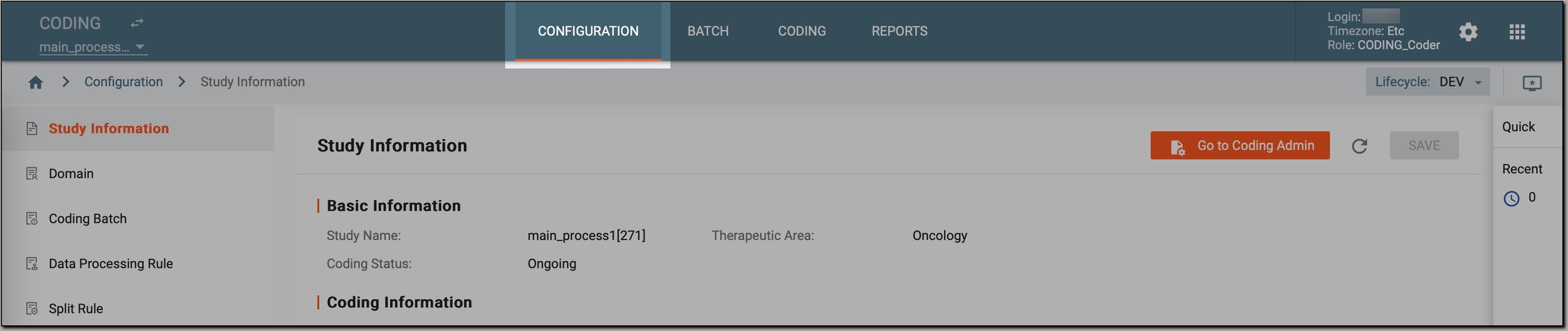 Figure 1. Accessing coding configurations
-
In the left pane, select Data Processing Rule.
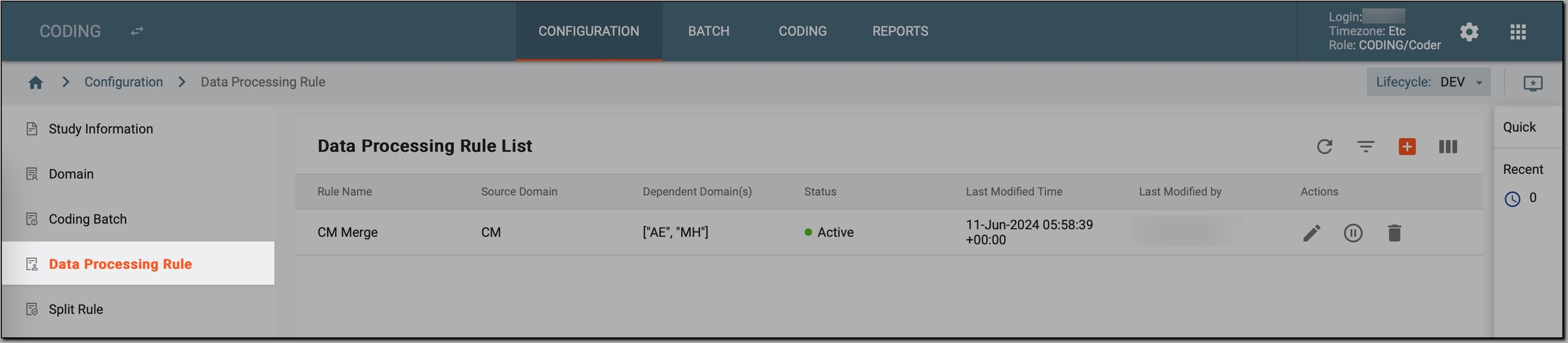 Figure 2. Accessing data processing rules
-
In the Data Processing Rule List table, view the available data processing rules defined for your study and their details as explained in the following table.
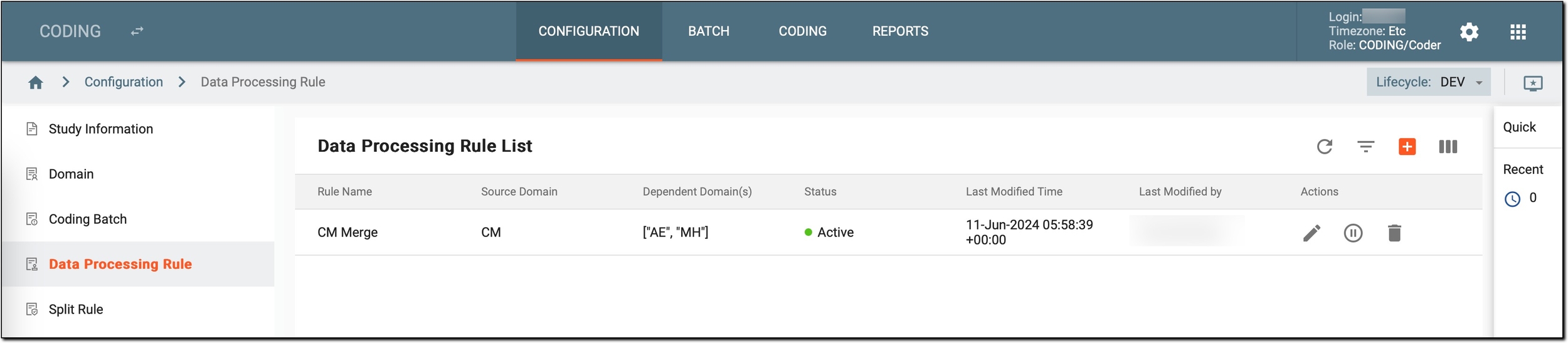 Figure 3. Reviewing configured data processing rules
Column
Details
Rule Name
Displays the name assigned to each data processing rule. This name serves as an identifier for the rule and provides a quick reference to its purpose or function.
Source Domain
Indicates the primary domain from which data is sourced for processing by this rule. The source domain is where the rule retrieves or operates on data.
Dependent Domain(s)
Lists any additional domains that are affected by or rely on the rule. These dependent domains may interact with the source domain or use the output generated by the rule.
Status
Shows the current operational status of the rule:
-
Active: the rule can be used for data coding. Active rules can be applied during the data processing phase, influencing how data is interpreted and managed according to the specified conditions and logic.
-
Inactive: the rule cannot be used for data coding at present. Inactive rules are excluded from the data processing workflows, meaning they do not affect how data is handled or interpreted. This status allows for temporary suspension of a rule’s application while retaining it in the system for potential future use.
Last Modified Time
Records the date and time when the rule was last updated. This provides a timeline of modifications and helps track recent changes to the rule.
Last Modified by
Indicates the user who last made changes to the rule. This column helps identify who is responsible for recent updates and modifications.
-
-
To view the exact rule configurations, next to the needed rule, select Edit
 . Then, in the code editor that opens,
examine the code to understand the specific conditions, logic, and parameters defined for the rule.
. Then, in the code editor that opens,
examine the code to understand the specific conditions, logic, and parameters defined for the rule.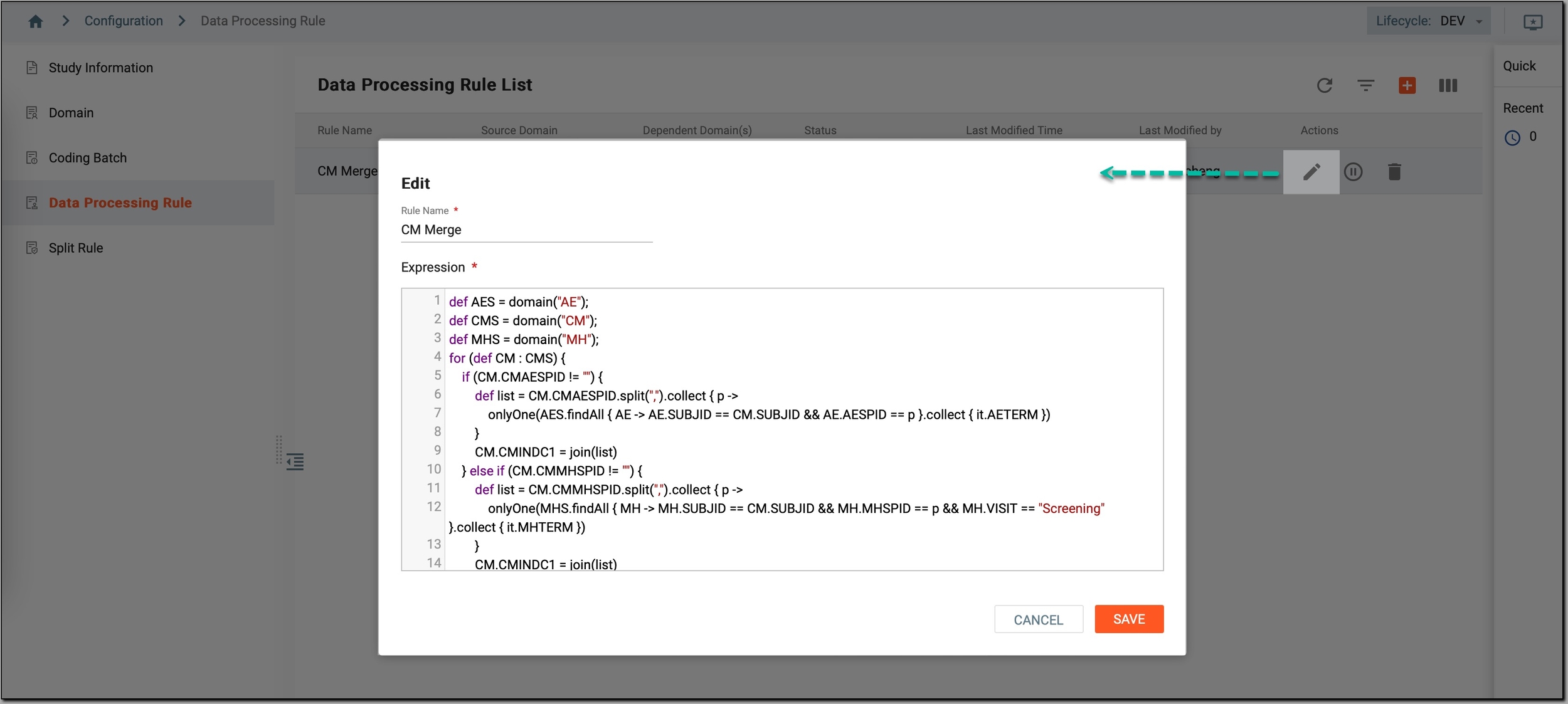 Figure 4. Reviewing rule configurations
To understand how to review the rule, let’s examine this sample code.
def AES = domain("AE");
def CMS = domain("CM");
def MHS = domain("MH");
for (def CM : CMS) {
    if (CM.CMAESPID != "") {
        def list = CM.CMAESPID.split(",").collect { p ->
            onlyOne(AES.findAll { AE -> AE.SUBJID == CM.SUBJID && AE.AESPID == p }.collect { it.AETERM })
        }
        CM.CMINDC1 = join(list)
    } else if (CM.CMMHSPID != "") {
        def list = CM.CMMHSPID.split(",").collect { p ->
                        onlyOne(MHS.findAll { MH -> MH.SUBJID == CM.SUBJID && MH.MHSPID == p && MH.VISIT == "Screening" }.collect { it.MHTERM })
        }
        CM.CMINDC1 = join(list)
    } else if (CM.REMHSPID != "") {
        def list = CM.REMHSPID.split(",").collect { p ->
                        onlyOne(MHS.findAll { MH -> MH.SUBJID == CM.SUBJID && MH.MHSPID == p && MH.VISIT == "Re-Screening" }.collect { it.MHTERM })
        }
        CM.CMINDC1 = join(list)
    } else if (CM.CMINDC == "OTH") {
        CM.CMINDC1 = CM.CMREASOTH
    } else if (CM.CMINDC == "PROPHYLAXIS") {
        CM.CMINDC1 = CM.CMINDC
    } else if (CM.CMINDC == "STUDY INDICATION") {
        CM.CMINDC1 = CM.CMINDC
    } else {
        CM.CMINDC1 = ""
    }
    if (CM.CMROUTE != "OTHER") {
        CM.CMROUTE1 = CM.CMROUTE
    } else if (CM.ROUTEOTH != "" && CM.CMROUTE == "OTHER") {
        CM.CMROUTE1 = CM.ROUTEOTH
    } else {
        CM.CMROUTE1 = ""
    }
}
return CMS;
Reviewed code explanation
-
Domain definitions:
def AES = domain("AE");
def CMS = domain("CM");
def MHS = domain("MH");
AES, CMS, MHS: these lines define the domains (datasets) used in the rule. AES refers to the "AE" domain, CMS refers to the "CM" domain, and MHS refers to the "MH" domain.
-
Loop through CMS records:
for (def CM : CMS) {This loop iterates over each record in the CMS domain, processing each one according to the specified conditions.
-
Conditional processing:
-
Processing based on CMAESPID:
if (CM.CMAESPID != "") { def list = CM.CMAESPID.split(",").collect { p -> onlyOne(AES.findAll { AE -> AE.SUBJID == CM.SUBJID && AE.AESPID == p }.collect { it.AETERM }) } CM.CMINDC1 = join(list) }-
Condition: checks if CMAESPID is not empty.
-
Processing: splits CMAESPID into individual IDs, retrieves corresponding terms from the AES domain, and joins them into a list assigned to CM.CMINDC1.
-
-
Processing based on CMMHSPID:
else if (CM.CMMHSPID != "") { def list = CM.CMMHSPID.split(",").collect { p -> onlyOne(MHS.findAll { MH -> MH.SUBJID == CM.SUBJID && MH.MHSPID == p && MH.VISIT == "Screening" }.collect { it.MHTERM }) } CM.CMINDC1 = join(list) }-
Condition: checks if CMMHSPID is not empty.
-
Processing: splits CMMHSPID, retrieves corresponding terms from the MHS domain where the visit is "Screening," and joins them into a list assigned to CM.CMINDC1.
-
-
Processing based on REMHSPID:
else if (CM.REMHSPID != "") { def list = CM.REMHSPID.split(",").collect { p -> onlyOne(MHS.findAll { MH -> MH.SUBJID == CM.SUBJID && MH.MHSPID == p && MH.VISIT == "Re-Screening" }.collect { it.MHTERM }) } CM.CMINDC1 = join(list) }-
Condition: checks if REMHSPID is not empty.
-
Processing: splits REMHSPID, retrieves corresponding terms from MHS where the visit is "Re-Screening," and joins them into a list assigned to CM.CMINDC1.
-
-
Handling other conditions:
else if (CM.CMINDC == "OTH") {
    CM.CMINDC1 = CM.CMREASOTH
} else if (CM.CMINDC == "PROPHYLAXIS") {
    CM.CMINDC1 = CM.CMINDC
} else if (CM.CMINDC == "STUDY INDICATION") {
    CM.CMINDC1 = CM.CMINDC
} else {
    CM.CMINDC1 = ""
}
Conditions: checks specific values of CM.CMINDC and assigns corresponding values to CM.CMINDC1.
-
-
Routing handling:
if (CM.CMROUTE != "OTHER") {
    CM.CMROUTE1 = CM.CMROUTE
} else if (CM.ROUTEOTH != "" && CM.CMROUTE == "OTHER") {
    CM.CMROUTE1 = CM.ROUTEOTH
} else {
    CM.CMROUTE1 = ""
}
Conditions: checks the value of CM.CMROUTE and assigns either CM.CMROUTE or CM.ROUTEOTH to CM.CMROUTE1.
-
Return statement:
return CMS;
Purpose: returns the modified CMS domain with updated values based on the processing rules.
Once reviewed, you have understood how the code processes each CMS record based on conditions related to CMAESPID, CMMHSPID, REMHSPID, and other fields. The code dynamically updates fields such as CMINDC1 and CMROUTE1, reflecting various data handling rules.
-
-
Once done, in the code editor, select
 to exit it.
Now, you have reviewed the exact rule configurations and understood the detailed logic and parameters defining how the rule processes data.