Delete ICF tracking record
ICF tracking log is a functionality used to track the distribution, collection, and status of Informed Consent Forms (ICFs) from participants in the trial. It is a management tool that ensures proper documentation and completion of all steps related to informed consent throughout the trial process.
To start tracking ICF completion for subjects of your study in CTMS, you need to add ICF tracking records to your log and complete the forms as per the selected ICF tracking log template.
However, there might be the need to remove some of the records that are added by mistake or become irrelevant to your study.
Important
You can only delete Inactive ICF tracking records. Before deletion, inactivate the record.
-
Access the study management page in one of the following ways:
-
In the CTMS application header, select the DASHBOARD tab and then select the study dashboard of your interest.
 Figure 1. Accessing study management from dashboard
-
In the CTMS application header, select the STUDY MANAGEMENT tab. Then from the Study Data List table, select the study name of your interest.
 Figure 2. Accessing study management from study data list
-
-
On the page that opens, from the left pane, select ICF > ICF Tracking Log.
-
In the ICF Tracking Log table that appears, go to the record that you want to remove. Then from the Action(s) column next to it, select More
 > Delete
  .
.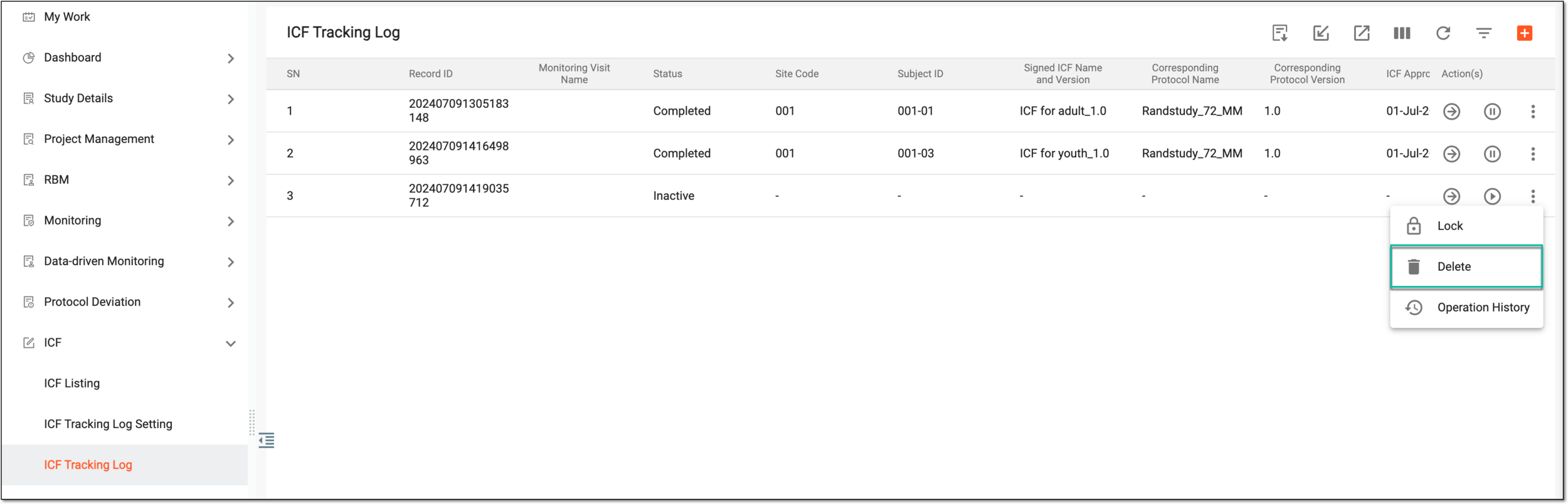 Figure 3. Deleting ICF tracking record
-
In the Reason dialog that opens, provide the reason for deletion and to confirm your action, select
 .
.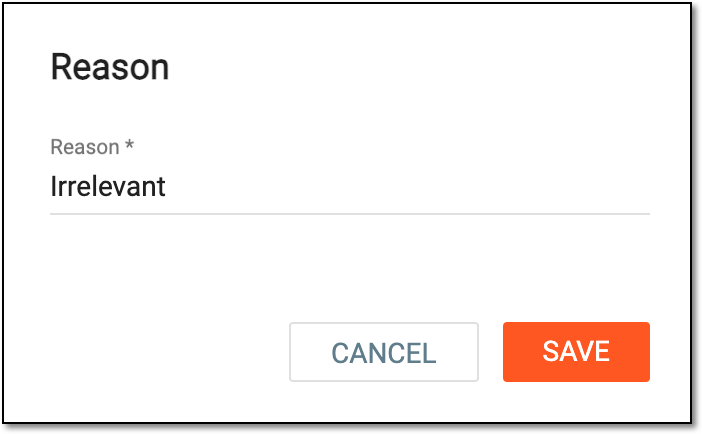 Figure 4. Providing reason for deletion
Once confirmed, the ICF tracking record is deleted.