Select ICF tracking log template for study
ICF tracking log is a functionality used to track the distribution, collection, and status of Informed Consent Forms (ICFs) from participants in the trial. It is a management tool that ensures proper documentation and completion of all steps related to informed consent throughout the trial process.
To configure proper tracking of ICF completion, you need to select one of the previously configured ICF tracking log templates to associate it with your study.
-
Access the study management page in one of the following ways:
-
In the CTMS application header, select the DASHBOARD tab and then select the study dashboard of your interest.
 Figure 1. Accessing study management from dashboard
-
In the CTMS application header, select the STUDY MANAGEMENT tab. Then from the Study Data List table, select the study name of your interest.
 Figure 2. Accessing study management from study data list
-
-
On the study management page that opens, from the left pane, select ICF > ICF Tracking Log Setting.
-
On the ICF Tracking Log Setting page that opens, from the General Information block, select the template as explained in the following table.
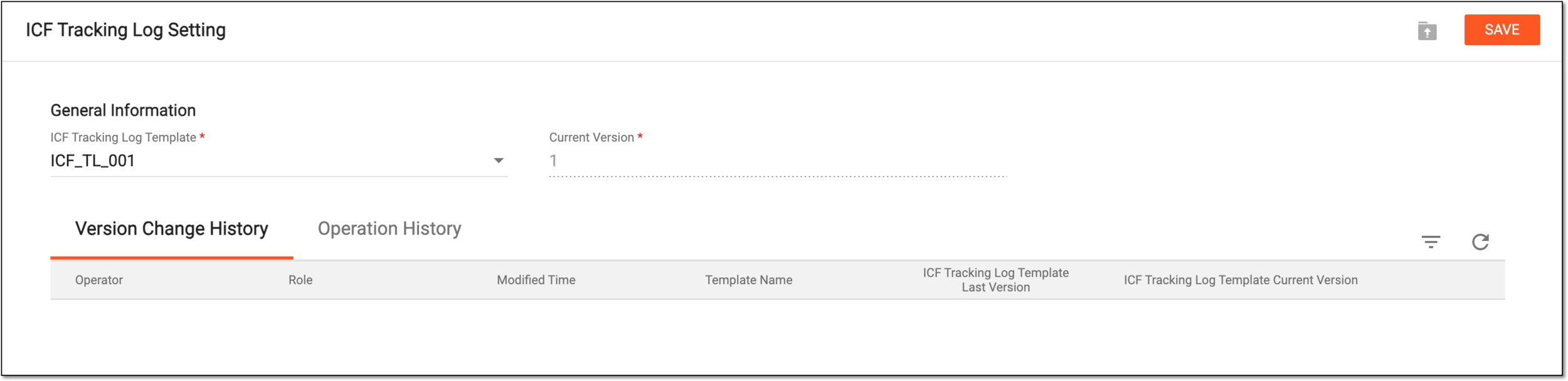 Figure 3. Selecting ICF tracking log template
Tip
In the following table, mandatory elements are marked with an asterisk (*).
Element
Details
ICF Tracking Log Template*
Select the ICF tracking log template that satisfies your study requirements.
Current Version*
Represents the latest version of the selected ICF tracking log template currently available in the system. The field is autofilled by the system, the selection cannot be changed manually.
SAVE
Select
 to save the changes.
Important
If there already are any ICF tracking log records using the currently selected template, you cannot change the template unless you inactivate or remove the existing records.
 Figure 4. Receiving error on ICF template change
Once saved, the selection is applied and the ICF tracking log template is associated with the study.