View subject tier assignment result
Target source data verification (TSDV) is a more complex and sophisticated type of SDV setting as it provides an opportunity to perform more selective configurations compared to global or general types.
The TSDV setting includes the configuration of the TSDV plans that consist of various blocks and tiers to facilitate subject allocation based on certain criteria and design a selective TSDV procedure for various CRFs.
Once your TSDV plans are activated, you can review the result of subject allocation between different tiers of your plans.
-
In the EDC application header, select the STUDY INFO tab.
-
In the left pane of the page that opens, expand SDV and select the SDV Result tab.
-
On the page that opens, select the Subject Tier Assignment tab, and in the table that appears, analyze the result of the subject assignment between the TSDV plan tiers as explained in the following table.
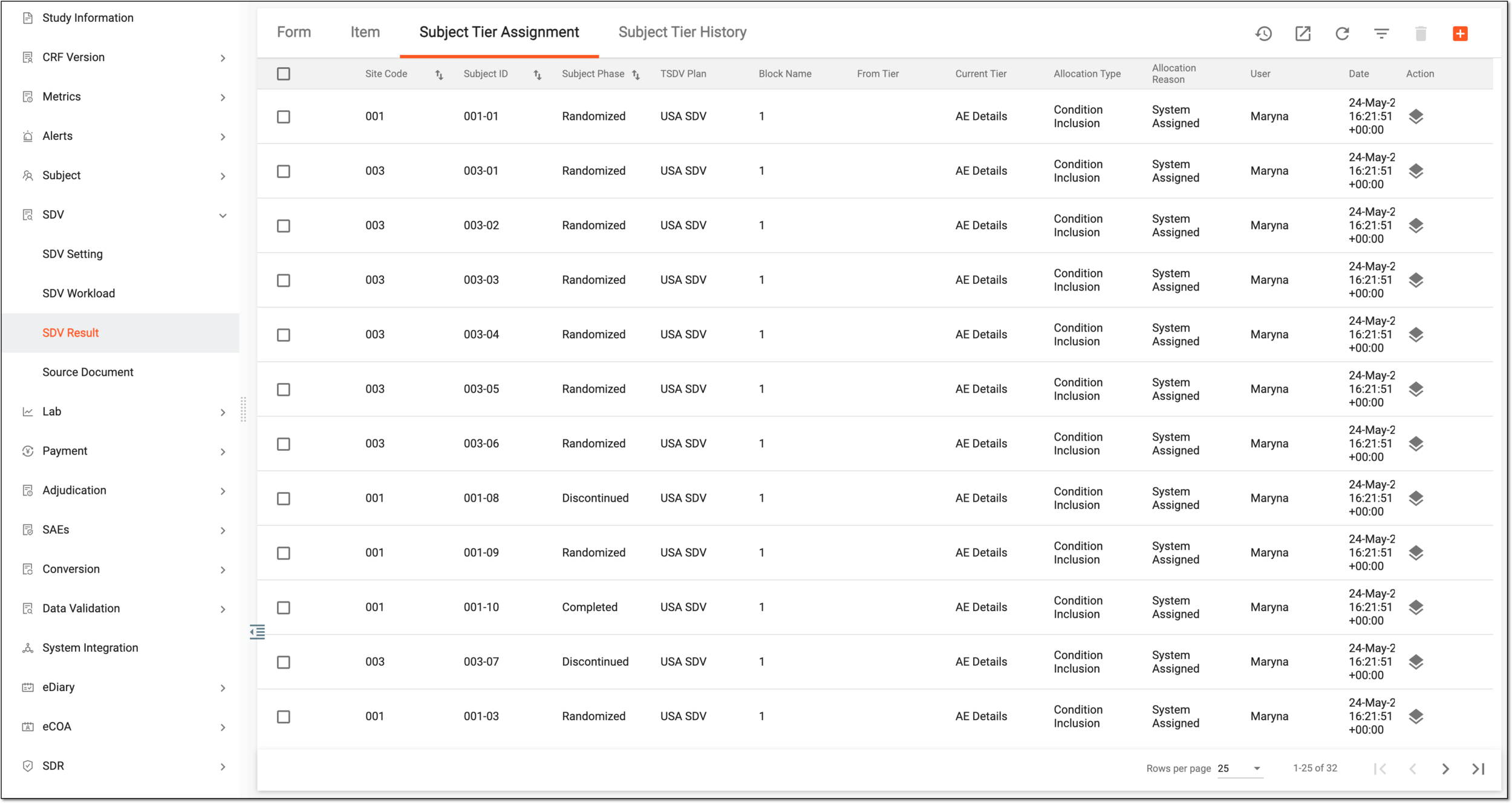 Figure 1. Analyzing subject tier assignment results
Column
Details
Site Code
Represents the code of the site to which belongs the subject.
Subject ID
Represents the unique identifier of the subject for whom the tier allocation is performed.
Subject Phase
Represents the subject phase during which the tier allocation is performed.
TSDV Plan
Represents the name of the TSDV plan to which belongs the tier of subject allocation.
Block Name
Represents the serial number of the block within the TSDV plan to which belongs the tier of subject allocation.
From Tier
Represents the name of the tier within the TSDV plan from which the subject is reassigned to another if such reassignment is made.
Current Tier
Represents the name of the tier within the TSDV plan to which the subject is currently assigned.
Allocation Type
Represents the type of subject allocation as follows:
-
Condition Inclusion: the subject is allocated to the tier by the system based on the satisfied inclusion conditions configured for the TSDV plan.
-
Manual Inclusion: the subject is allocated to the tier manually by the user due to a custom reason.
Allocation Reason
Represents the reason for subject allocation to a specific tier. It can be System Assigned, meaning that the subject is allocated by the system based on inclusion criteria, or it can be a custom reason specified by the user upon overriding allocation or adding a new tier assignment manually.
User
Represents the name of the user who manually allocated the subject or created the TSDV plan according to which the subject is allocated by the system.
Date
Represents the date of the subject allocation to a tier.
-
You have reviewed the subject tier assignment results of the TSDV setting.
A specialized document in a clinical trial designed to collect the subject data.
See also eCRF.
A specific phase that a subject has to complete in the course of a clinical trial to move further to the next phase. For instance, Screening, Enrolled, Randomized, and others.
 |
In eClinical, subject phases are designed individually for each study via the SD application, although they are referenced in others, like IWRS or EDC.