Analyze lab normal range details
In general, normal ranges are defined as a set of acceptable values acquired from laboratory tests.
In the EDC application, you can configure normal ranges for each lab test held for your study subjects at a certain site.
In this section, you can learn how to access and review the normal ranges configured for your study per site and lab category to understand the current order of subject data interpretation.
-
In the EDC application header, select the STUDY INFO tab.
-
In the left pane, select Lab > Site Normal Range.
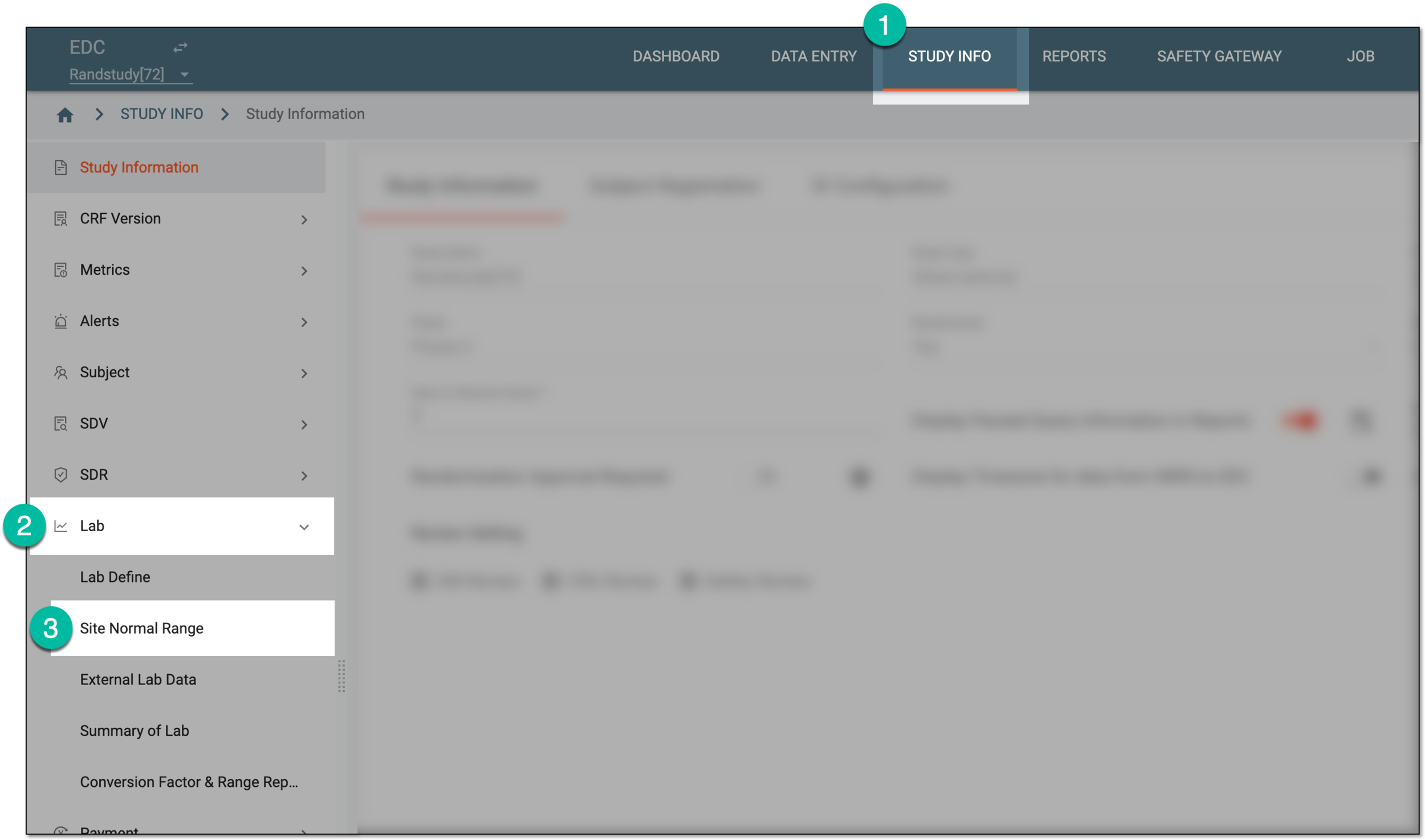 Figure 1. Accessing normal range list
-
In the Normal Range List table that appears, for the needed lab name, select Info
 .
. Figure 2. Accessing site normal range details
-
On the page that opens, the details of all normal ranges for a certain category can be studied under the Quantitative Test and Qualitative and Semiquantitative Test tabs as follows.
A quantitative test is a laboratory test that measures the exact amount or concentration of a substance in a sample with the result being expressed as a precise numeric value, often with units of measurement, such as milligrams per deciliter, parts per million, and so on.
For instance, a blood glucose test is quantitative—it provides a specific numeric value for the concentration of glucose in the blood, such as 90 mg/dL.
The details of the quantitative tests' normal ranges can be interpreted as explained in the following table.
 Figure 3. Studying site normal ranges for quantitative tests
Tip
Turn on the Display Extreme Limit Range toggle to enable more details of the normal range limits as explained in the following table. If turned off, only the Lab Test Name, Lower Value, Upper Value, and Category fields are available.
Element
Details
Lab Test Name
Represents the name of the lab test for which the normal range is configured as specified when adding normal range to the system or editing the details for the existing one.
Lower Value
Represents the lower acceptable value of the laboratory test result. This is the lowest value which is considered to be normal, and any figure below the lower value is considered abnormal.
Upper Value
Represents the upper acceptable value of the laboratory test result. This is the highest value which is considered to be normal, and any figure above the upper value is considered abnormal.
Category
Represents the category of lab test data, for instance, Hematology or Urinalysis.
Standard Category
Represents the classification of the lab test that is defined by a clinical industry. These are based on unique measures defined by the clinical industry that are not available in the system.
For instance, the Chemistry ++ category refers to the advanced level of chemists and chemical procedures that take place for the test.
This column is only available if the Display Extreme Limit Range toggle is turned on.Standard Test Name
Represents the name of the lab test that is defined by a clinical industry. These are based on unique measures defined by the clinical industry that are not available in the system.
For instance, the standard test name of Chemistry++ can be LACTATE DEHYDROGENASE, which is a category of enzyme found in tissue, and the test conducted for it requires advanced chemical procedures.
This column is only available if the Display Extreme Limit Range toggle is turned on.Standard Test Code
Represents the unique identifier used by the clinical industry to refer to the lab test, for instance, the code for LACTATE DEHYDROGENASE is LDH.
This column is only available if the Display Extreme Limit Range toggle is turned on.SI Unit
Represents the unit with which the lab test is measured, for instance, hemoglobin is measured in grams per liter (g/L).
This column is only available if the Display Extreme Limit Range toggle is turned on.Standard Lower Extreme Limit
Represents the utmost baseline value of the standard lab test. The range reported within this limit requires immediate action.
This column is only available if the Display Extreme Limit Range toggle is turned on.Standard Upper Extreme Limit
Represents the utmost baseline value of the standard lab test. The range reported within this limit requires immediate action.
This column is only available if the Display Extreme Limit Range toggle is turned on.Conversion Factor
Represents the numerical value used to convert the unit used in the lab test to the SI unit.
This column is only available if the Display Extreme Limit Range toggle is turned on.A qualitative test is a laboratory test that provides the assessment or measurement that produces categorical or descriptive results. An example of a qualitative test in EDC can be symptom assessment—evaluation of the presence, severity, or characteristics of a patient's symptoms using categorical scales, such as mild, moderate, and severe.
A semiquantitative test is a laboratory test that provides approximate measurements of a substance, often yielding results in categories (for instance, normal and abnormal) or numerical ranges that are not highly precise. An example of semiquantitative tests can be urine protein tests, bilirubin levels, and so on.
The details of the qualitative and semiquantitative tests' normal ranges can be interpreted as explained in the following table.
 Figure 4. Studying site normal ranges for qualitative and semiquantitative tests
Element
Details
Lab Test Name
Represents the name of the lab test for which the normal range is configured as specified when adding normal range to the system or editing the details for the existing one.
Data Entry Type
Represents how the test result interpretation is to be entered into the CRF—manually by site personnel or automatically judged by the system.
-
Site Entry: the value for this test result interpretation is configured to be entered manually by the personnel completing CRF at the site.
-
System Auto Fill: the value for this test result interpretation is configured to be automatically filled by the system based on the defined assessment logic.
Specify the test result for indicator as normal
Represents the test result value or multiple values that are to be considered normal by the system. Test result indicators other than those specified here are to be considered abnormal by the system.
This parameter is only available for the System Auto Fill data entry
                                        type. For Site Entry, the value is not applicable and remains empty.
Lower Value
Represents the lowest value of the test result that is considered normal for a patient, and any value lower than this is considered abnormal.
For the Site Entry type, this value is displayed in the lab data form to help the site personnel assess
                                        the normality of the actual test result. For the System Auto Fill type, this value determines the lower limit of the range for the system to assess the
                                        test result normality.
Upper Value
Represents the highest value of the test result that is considered normal for a patient, and any value higher than this is considered abnormal.
For the Site Entry type, this value is displayed in the lab data form to help the site personnel assess the normality of the actual test result. For the System Auto Fill type, this value determines the upper limit of the range for the system to assess the test result normality. -
You have studied the details of normal ranges configured for all tests pertinent to a certain lab.