Create new CRF version
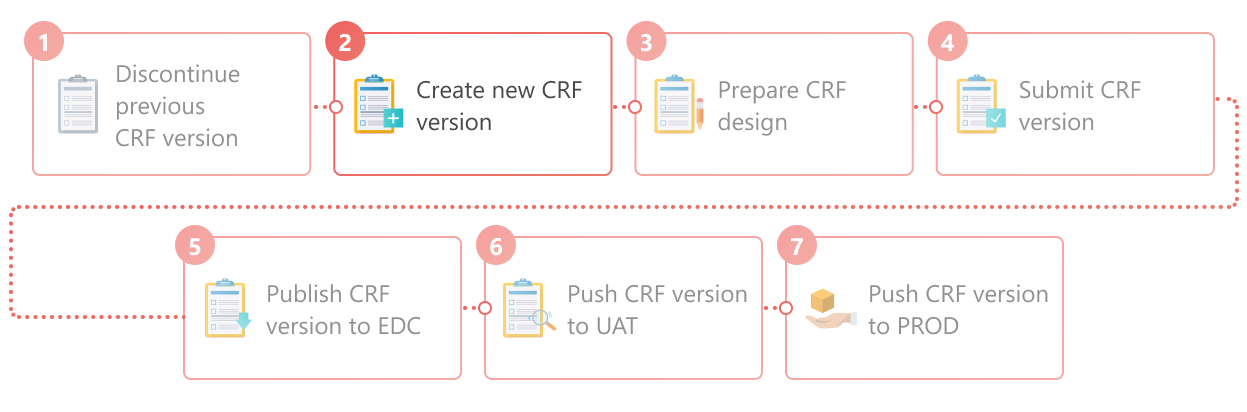
A CRF stands for case report form, a document used in clinical trials to collect and record study data. As the trial evolves, new insights or challenges may emerge, requiring changes to the CRF. These modifications, especially after data collection has commenced in the EDC system, lead to what is known as versioning. This process involves adapting the CRF to new protocol requirements or data collection processes during the clinical trial.
CRF versioning is a common instrument for updating CRF design after collecting additional insights and observations. So, after the previous study's CRF version has already been published to EDC, you can create a new one to reflect the required updates.
Important
Before creating a new CRF version, the previous one must be discontinued.
Important
For hierarchical study design, where there is a master study and its substudies, ensure that you have created and published to EDC the CRF version for the master study before creating a new CRF version for the substudy. This ensures that the system references the appropriate CRF version of the master study in the substudy.
-
In the Study Designer application header, select the VERSIONING tab.
 Figure 2. Accessing CRF versions
-
From the workspace toolbar of the Version Information table that appears, select New Item
 .
. Figure 3. Selecting to create new CRF version
-
In the New Version dialog that appears, provide CRF version details as explained in the following table.
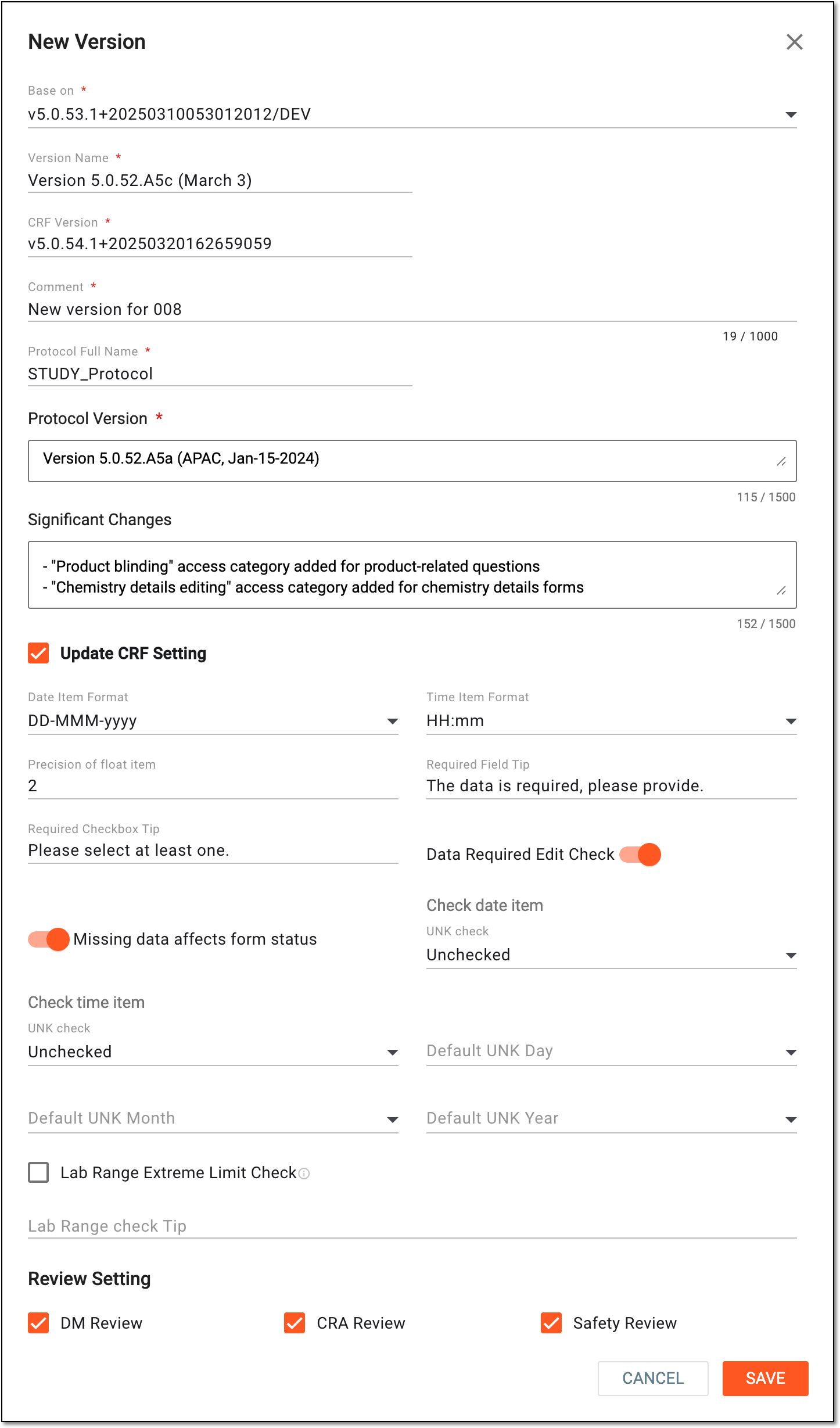 Figure 4. Creating new CRF version
Tip
In the following table, mandatory elements are marked with an asterisk (*).
Element
Details
Base on*
Select the previous CRF version based on which you want to create a new one.
Version Name*
Enter the updated version name of the CRF version and the date when the version is created.
The CRF Creation Date field does not appear in the cover page of the CRF version reports, so you have to manually enter the CRF creation date after the version name.Master Version
Represents the CRF version of the master study that is currently published to EDC in the same lifecycle—DEV, UAT, or PROD. This version is referenced by the substudy during CRF design and version submission.
The value is autopopulated by the system and cannot be manually changed. This field is only available when creating a CRF version for a substudy.CRF Version*
Enter a custom version of the CRF to comply with the protocol of your study.
Comment*
Enter a reason that explains the need for creating a new CRF version.
Protocol Full Name*
Enter the full protocol name of the new CRF version.
Protocol Version*
Enter the protocol versions of the CRF.
A CRF can be linked to multiple protocol versions.Significant Changes
Enter the significant changes that were applied to the new CRF version.
These changes help the users better understand what the changes are and why they were implemented.Update CRF Setting
Select this checkbox to provide CRF version details.
Date Item Format*
Select the default date format to display on date fields when designing the CRF.
Time Item Format*
Select the default hour format to display on time fields when designing the CRF.
Precision of float item*
Select the default precision number for all float items when designing the CRF.
Required Field Tip*
Enter the text that is displayed when you hover over the CRF fields that are required when entering data in the EDC application.
Required Checkbox Tip
Enter the text that is displayed when you hover over the CRF fields with checkboxes when entering data in the EDC application.
Data Required Edit Check
Select this checkbox if you want all CRF date fields to undergo edit check validation.
Missing data affects form status
Select this checkbox if you want the missing date data to affect the status of CRFs when entering data in the EDC application.
Check date item
UNK check*
Select one of the following options:
-
Unchecked: when entering data to CRFs in EDC, the system does not check if the date values are indicated as UNK (unknown).
-
Not allow: when entering data to CRFs in EDC, no option is available to select the UNK (unknown) value for date fields.
-
Generated EC: when entering data to CRFs in EDC, the system generates the edit check system query if there are UNK (unknown) values in date fields.
Check time item
UNK check*
Select one of the following options:
-
Unchecked: when entering data to CRFs in EDC, the system does not check if the time values are indicated as UNK (unknown).
-
Not allow: when entering data to CRFs in EDC, no option is available to select the UNK (unknown) value for time fields.
-
Generated EC: when entering data to CRFs in EDC, the system generates the edit check system query if there are UNK (unknown) values in time fields.
Default UNK Day
Select the default day number to be considered during date calculation or comparison if the UNK (unknown) value is entered as a day on the CRF.
Default UNK Month
Select the default month to be considered during date calculation or comparison if the UNK (unknown) value is entered as a month on the CRF.
Default UNK Year
Select the default year to be considered during date calculation or comparison if the UNK (unknown) value is entered as a year on the CRF.
Lab Range Extreme Limit Check
Select this checkbox so the system uses the specified lower and upper extreme limit ratio set in the Lab Admin module when checking the laboratory test results.
Lab Range check Tip
Enter the text that is displayed when you hover over the CRF fields if the laboratory test results exceed the lower or upper extreme limit.
Review Setting
DM Review
Select this checkbox to enable the data manager (DM) review of the study data.
If the DM review is not required, clear the checkbox.
CRA Review
Select this checkbox to enable the clinical research associate (CRA) review of the study data.
If the CRA review is not required, clear the checkbox.
Safety Review
Select this checkbox to enable the safety review of the study data.
If the safety review is not required, clear the checkbox.
SAVE
Select
 to create a new CRF version.
CANCEL
Select
 to stop creating a new CRF version.
 -
Once saved, a new CRF version is created. You can now introduce changes to this CRF version by working on its design.
An eClinical application that is mainly used to collect and manage subject data during clinical trials. It integrates with the Study Designer (SD) application and uses preconfigured there case report forms (CRFs) to complete data collection and management. It also provides an audit trail, data alert, source data verification (SDV), payment management, adjudication, and other functions as well as supports data export according to the CDISC ODM standard.
Get to know all the possibilities of the app with the comprehensive EDC User Guide.
An overarching clinical trial protocol designed to achieve clinical trial objectives under a unified framework. This approach simplifies clinical development by introducing multiple substudies to operate under the same regulatory and operational entity.
An individual component of a master study protocol with its specific objectives, such as evaluating a product, dose, or subject category. Substudy inherits the core structure and governance from the master one but has its own endpoints.
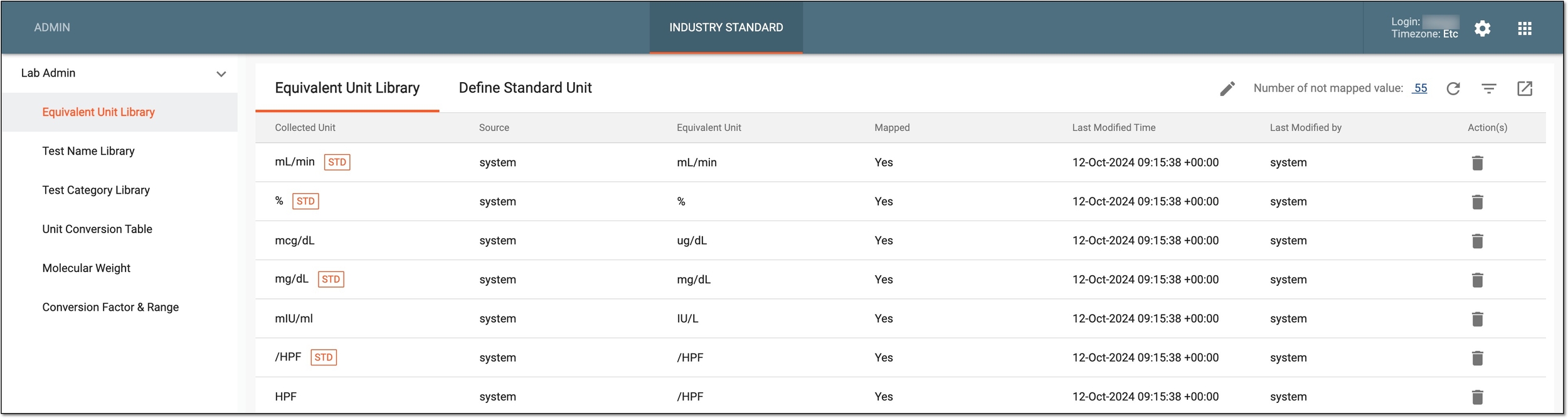
A module of the eClinical administrative system that enables users to configure and maintain laboratory test assessment and unit conversion rules for the EDC application to follow.
A person responsible for managing and ensuring the integrity, accuracy, and confidentiality of data collected during clinical trials. The DM’s scope of work might include maintaining the quality of data, complying with regulatory requirements, and supporting the overall success of clinical research.
In the eClinical system, the Data Manager (DM) user role is granted to a person who is mainly responsible for cleaning the data, making sure the data is entered correctly according to all requirements and industry standards, and creating manual queries for clinical research coordinators on any questionable data pieces. Before the study goes live, works with the sponsor and receives and addresses their feedback to set up the study and CRFs in EDC in a way that the sponsor approves.
A review of data collected via CRFs, especially those related to adverse events and serious adverse events data records. The safety review is intended to identify any risks related to subject safety. This review can be done by physicians, pharmacovigilance teams, or other dedicated personnel as per study protocol.