Edit site shipping address
A site is a facility that among other activities covers drug (item) dispensation to participants. To satisfy the dispensation process with sufficient item inventory, the items must be shipped to the site from suppliers—depots or other sites. For involved parties, a centralized location for tracking logistical information is convenient and facilitates better coordination of the item distribution process between depots and sites.
Unlike other site information populated from CTMS where the sites are originally configured for the study, the shipping address can be viewed on a separate page in IWRS and updated if needed.
The updates may be required to accommodate new logistical requirements or ensure alignment with new operational strategies. This capability for modification in IWRS ensures that shipping information is always current and corresponds to site needs, without requiring edits to CTMS configurations.
Important
Note that updating the site shipping address in IWRS is not reflected in the site's details on the CTMS side.
However, any updates introduced to the site shipping address in IWRS affect the delivery procedures because the shipping address is utilized to coordinate site shipments sent from depots or other sites.
-
In the IWRS application header, select the SITE tab.
-
On the Site List page that opens, in the table, select the site code of your interest.
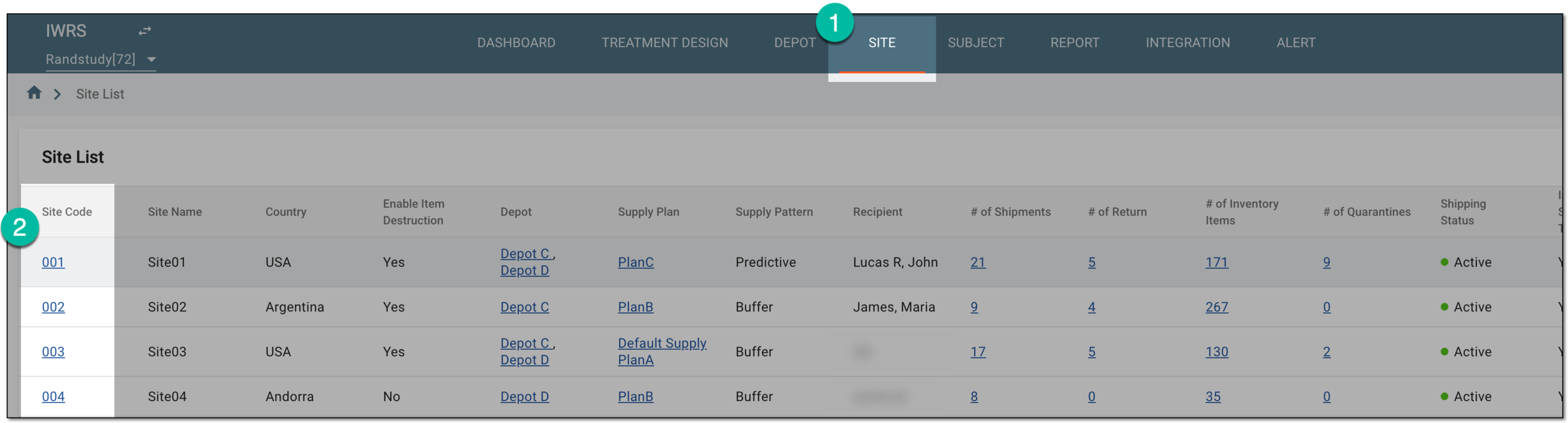 Figure 1. Selecting site to open its details
-
Under the Site Information subtab that opens, in the contents panel, select the Shipping Address tab.
-
In the table that appears, select Edit
 next to the site shipping address.
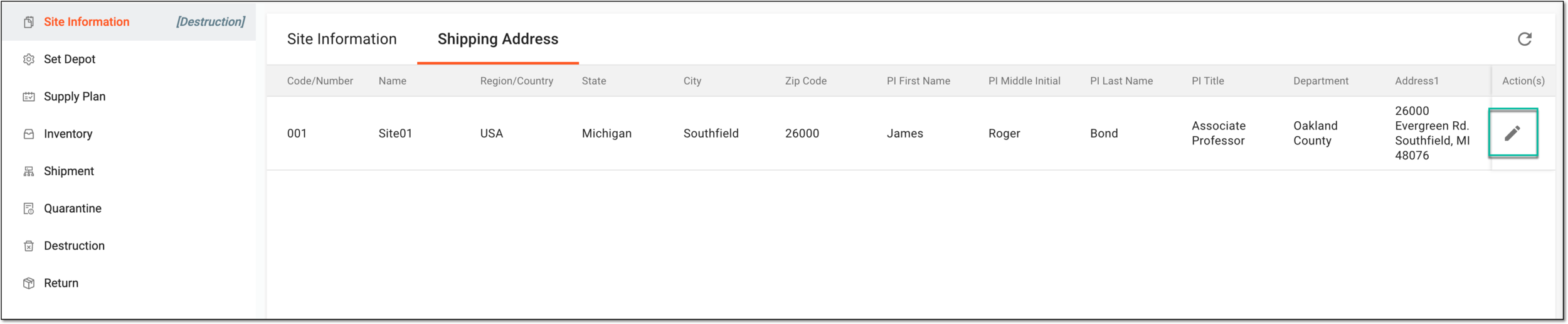 Figure 2. Selecting to edit site shipment address
-
On the page that opens, update the site shipping address as explained in the following table.
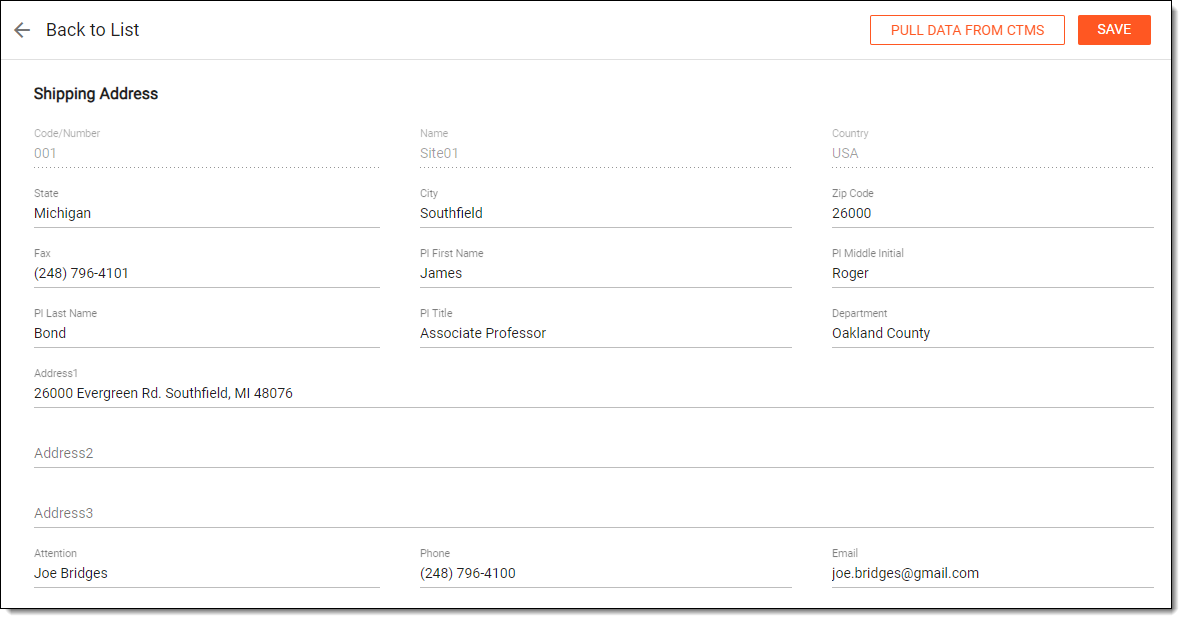 Figure 3. Updating site shipping address
Important
None of the fields are mandatory because the initial shipping address information is populated from CTMS. However, in the environments of specific EDETEK clients who request it, certain fields can be configured as required.
For the sites that have shipping relations with depots integrated with the vendors' external systems, field validation—input length, restricted characters, and so on—occurs according to the external systems' requirements. This is needed to support inerrable data flow between IWRS and the vendor's system.
Element
Details
Code/Number
Represents the code number of the selected site. This value is read-only and cannot be changed.
Name
Represents the name of the selected site. This value is read-only and cannot be changed.
Country
Represents the country where the selected site is located. This value is read-only and cannot be changed.
State
Enter the name of the country state that is to become a part of the new site shipping address.
If the site country is the USA, you can select the needed state from the predefined list of US states.City
Enter the name of the city that is to become a part of the new site shipping address.
Zip Code
Enter the zip code that is to become a part of the new site shipping address.
Fax
Enter the fax number that is to become a part of the new site shipping address.
PI First Name
Enter the name of the principal investigator associated with the site.
PI Middle Initial
Enter the middle name of the principal investigator associated with the site.
PI Last Name
Enter the last name of the principal investigator associated with the site.
PI Title
Enter the job title of the principal investigator at the site.
Department
Enter the state department name that is to become a part of the new site shipping address.
Address1
Enter the primary address that is to become a part of the new site shipping address.
Address2
Enter the secondary address that is to become a part of the new site shipping address.
Address3
Enter the secondary address that is to become a part of the new site shipping address.
Attention
Enter the name of the person who is going to be the recipient or sender at the updated shipping address.
Phone
Enter the phone number of the person who is going to be the recipient or sender at the updated shipping address.
Email
Enter the email address of the person who is going to be the recipient or sender at the updated shipping address.
PULL DATA FROM CTMS
Select
 to update shipping address details to their initial values as indicated in CTMS.
In the confirmation dialog, you need to confirm your action because it is intended to erase the entered data.
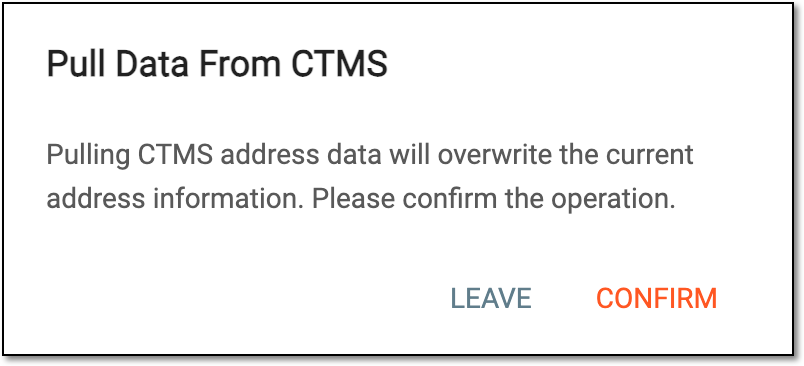 Figure 4. Pulling shipping address from CTMS
SAVE
Select
 to apply the changes introduced to the site shipping address.
Once saved, the site shipping address is updated in IWRS but it remains without changes in CTMS.