View site shipping address
In a clinical trial, a site is a facility that among other activities covers drug (item) dispensation to participants. Thus, to have enough items in their inventories, some logistics must be handled and the items shipped to the site from suppliers—depots or other sites. For involved parties, a centralized location for tracking logistical information is convenient and facilitates better coordination of the item distribution process between depots and sites.
The sites are created and added to your study via the CTMS application, from where IWRS pulls all the basic details, including the shipping address of any site. Unlike other site information, the shipping address can be viewed on a separate page and updated if needed.
-
In the IWRS application header, select the SITE tab.
-
On the Site List page that opens, in the table, select the site code of your interest.
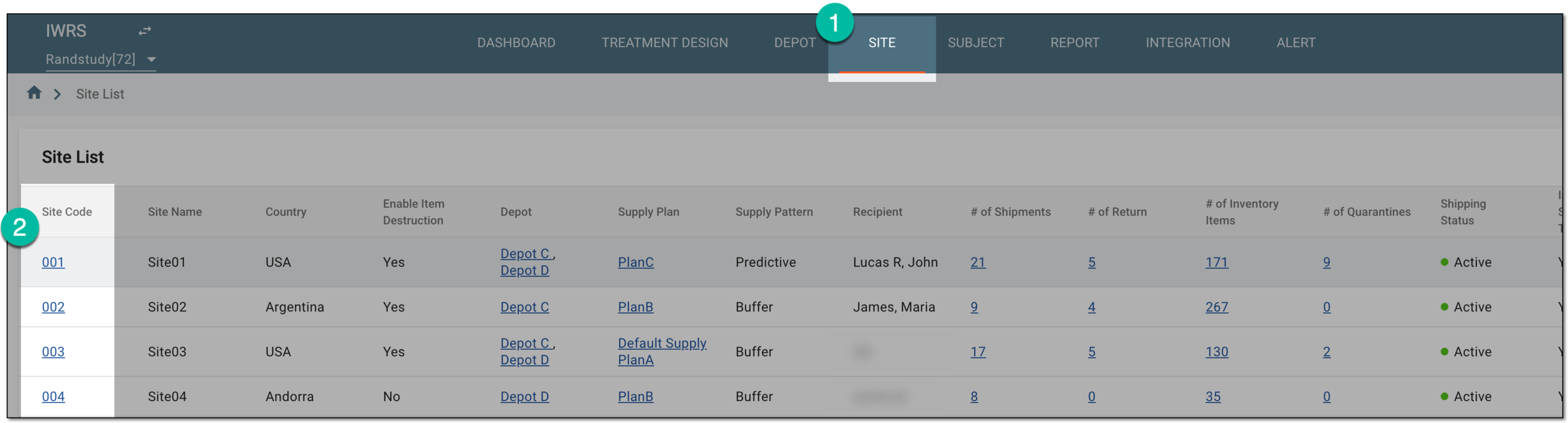 Figure 1. Selecting site to open its details
-
Under the Site Information subtab that opens, in the contents panel, select the Shipping Address tab.
-
In the table that appears, view the shipment address details of the selected site.
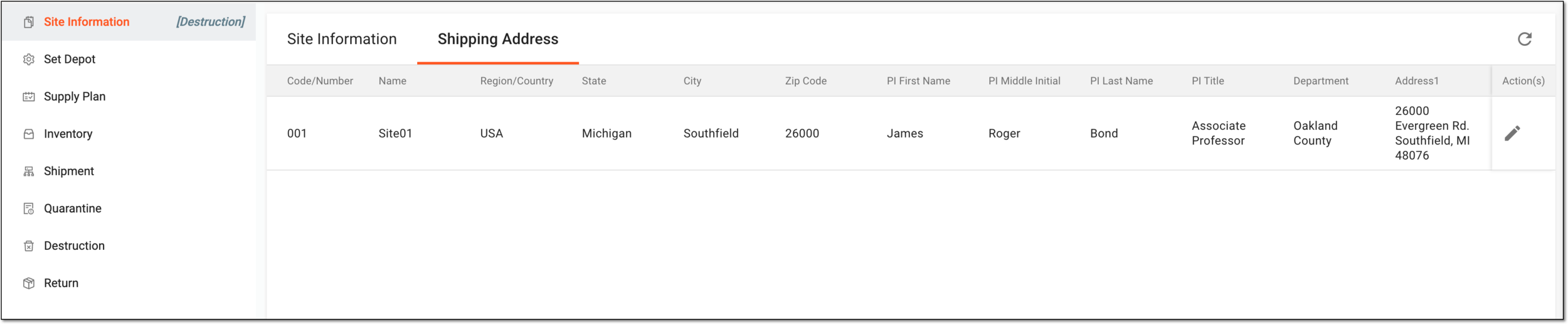 Figure 2. Viewing site shipment address
Once viewed, you can continue working with the site.