Coding review
During clinical trials, when reporting clinical information such as adverse events or serious adverse events, the reporter may use their own words and terms, known as verbatim terms, to describe the patient's condition, symptoms, and other relevant details. However, when creating an ICSR (Individual Case Safety Report), it is essential to convert these verbatim terms into standardized universal medical terms. This coding process ensures that the ICSR can undergo proper review and approval by regulatory bodies.
In PV, you can view and code all verbatim terms that have been entered in the ICSR (events, lab tests, medical histories, procedures, and so on) within a single page. This process is called the coding review. During the coding review, skilled professionals, such as medical coders or safety data specialists, meticulously analyze the reported information and apply appropriate medical codes based on international coding dictionaries such as MedDRA and WHODrug.
In PV, you can view and code all verbatim terms entered in the ICSR (events, lab tests, medical histories, procedures, and so on) within a single page. This process is called the coding review. During the coding review, skilled professionals, such as medical coders or safety data specialists, meticulously analyze the reported information and apply appropriate medical codes based on international coding dictionaries, such as MedDRA and WHODrug.
-
In the PV application header, select the ICSR tab.
-
On the ICSR List page that opens, in the table, locate the ICSR record for which you want to perform a coding review. Then select its case number to open the details page in the new browser tab.
Alternatively, from the Actions column next to your ICSR, select Edit
 to open
the ICSR details in the same browser tab.
to open
the ICSR details in the same browser tab. Figure 1. Selecting to edit ICSR
-
On the ICSR form page that opens, from the toolbar, select Coding Review
 .
. Figure 2. Accessing option for coding review
-
On the Coding Review page that opens, depending on which dictionary review you need to perform, select the MedDRA or WHODrug tab and perform the coding review as follows.
Under the MedDRA tab, perform the coding review as explained in the following table.
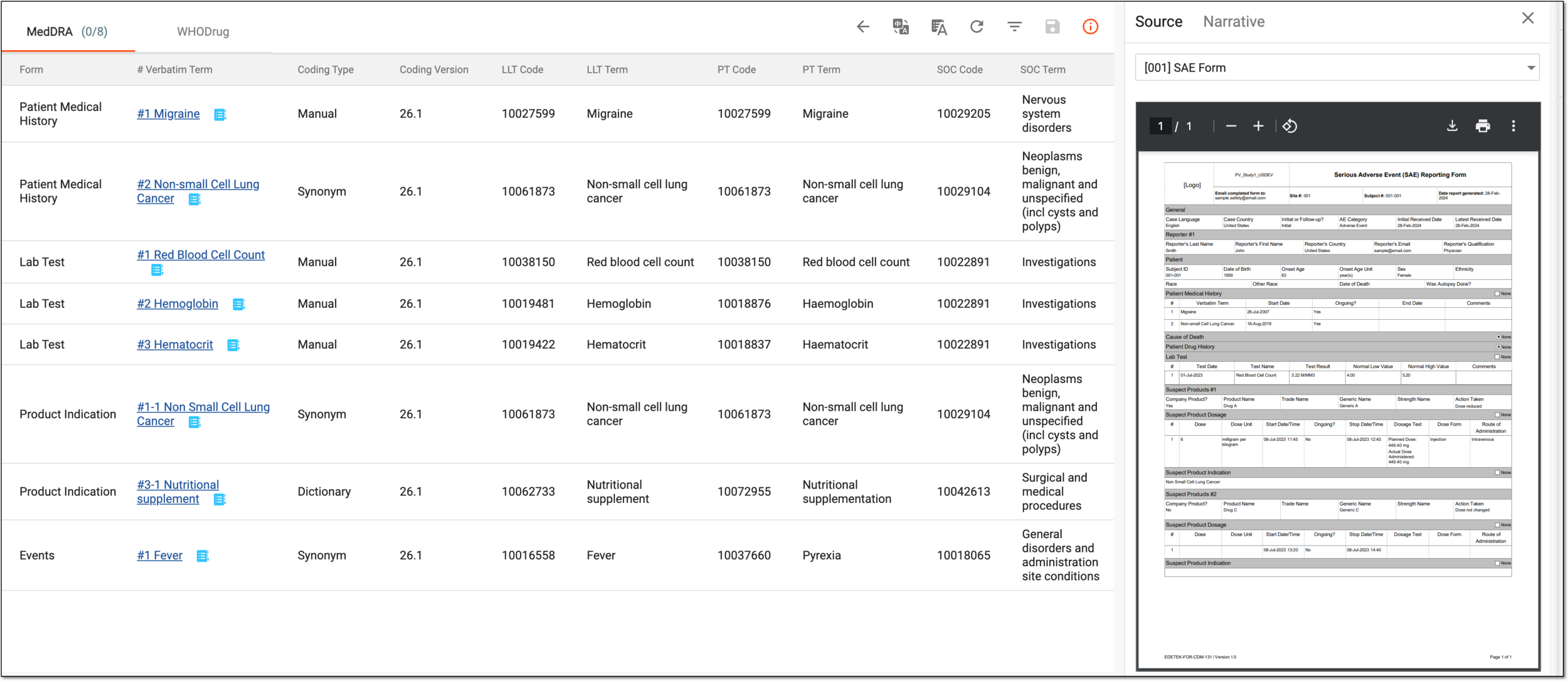 Figure 3. Performing MedDRA coding review
Element
Details
Auto Coding
From the workspace toolbar, select
 to automatically code all verbatim terms on the list with MedDRA codes. For more details on
this type of coding, refer to the Autocoding in ICSR forms section.
to automatically code all verbatim terms on the list with MedDRA codes. For more details on
this type of coding, refer to the Autocoding in ICSR forms section.The autocoding is unavailable if the translation view is enabled. Use MedDRA Search to code each verbatim
manually.
to code each verbatim
manually.Translation View
From the workspace toolbar, select
 to review the translated version of the coding data. From the field that appears, select
the target translation language.
to review the translated version of the coding data. From the field that appears, select
the target translation language.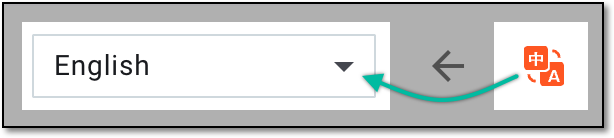 Figure 4. Selecting language of translation view
Currently, only English and Chinese translation languages are supported in PV.You can go back to the original language view by selecting Translation View .
.Form
Represents the name of the ICSR form where the verbatim term is located.
# Verbatim Term
Represents the sequential number of the record in the respective ICSR form where the verbatim term resides and the verbatim term itself—the original data entry that must be coded according to the MedDRA dictionary. It is also an active link selecting which leads you to the exact form and record where the verbatim term resides.
MedDRA Search
In the # Verbatim Term column, locate the needed verbatim term. Then next to it, select
to apply the
manual coding. For more details on this type of coding, refer to the Code MedDRA terms manually
section.Coding Type
Represents how the verbatim is coded in PV and can be one of the following:
-
Manual: the verbatim term is coded manually by mapping it to the selected term from the MedDRA dictionary.
-
Dictionary: the verbatim term is coded automatically by the system by finding a matching MedDRA term.
-
Synonym: the verbatim term is coded automatically based on the synonym list that contains the previous manual coding applied to the same verbatim term.
This value is autopopulated once the term coding is completed.Coding Version
Represents the MedDRA version that is used for the term coding.
This value is autopopulated once the term coding is completed.LLT Code
Represents a unique numeric identifier assigned to the Lowest Level Term in the MedDRA dictionary to which the verbatim term is coded.
This value is autopopulated once the term coding is completed.LLT Term
Represents the Lowest Level Term—the most specific level in the MedDRA hierarchy, representing individual terms used to describe medical conditions, symptoms, or adverse events—to which the verbatim term is coded.
This value is autopopulated once the term coding is completed.PT Code
Represents a unique numeric identifier assigned to the Preferred Term in the MedDRA dictionary to which the verbatim term is coded.
This value is autopopulated once the term coding is completed.PT Term
Represents the Preferred Term—a medical term in MedDRA that represents a specific medical condition, symptom, or adverse event—to which the verbatim term is coded.
This value is autopopulated once the term coding is completed.SOC Code
Represents a unique numeric identifier assigned to the System Organ Class in the MedDRA dictionary to which the verbatim term is coded.
This value is autopopulated once the term coding is completed.SOC Term
Represents the System Organ Class—the highest level in the MedDRA hierarchy, grouping related medical conditions, symptoms, and adverse events by organ system or therapeutic area—to which the verbatim term is coded.
This value is autopopulated once the term coding is completed.Source And Narrative
From the workspace toolbar, select
 to open the side panel with the following tabs:
-
Source: contains the source document uploaded to your ICSR via the Source form. Here, the preview is available for PDF files only.
-
Narrative: contains detailed information about an adverse event or suspected adverse reaction that has occurred in a patient added to your ICSR via the Narrative form.
If there are multiple source documents added to different case versions, you can review all of them from one page. Select the needed version from the dropdown menu and preview the respective source document or narrative.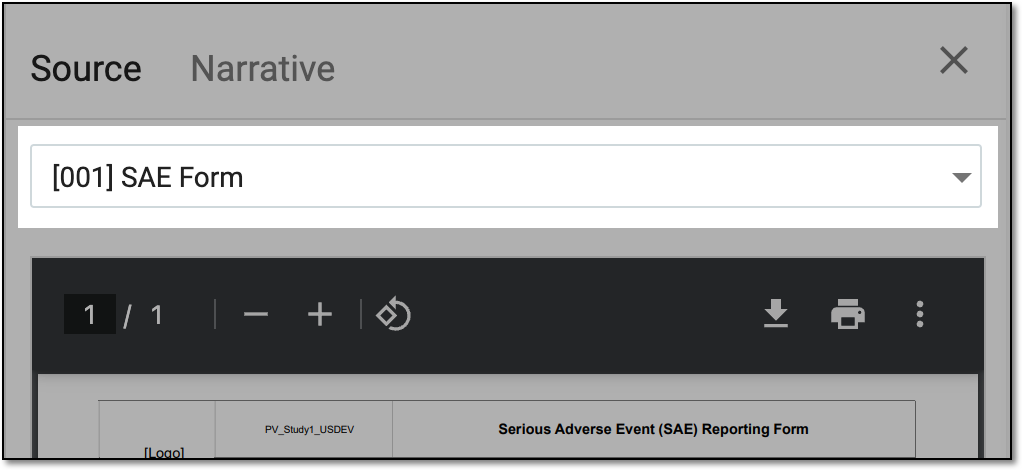 Figure 5. Source and narrative case version menu
SAVE
From the workspace toolbar, select
 to save the coding applied to verbatim terms.
Under the WHODrug tab, perform the coding review as explained in the following table.
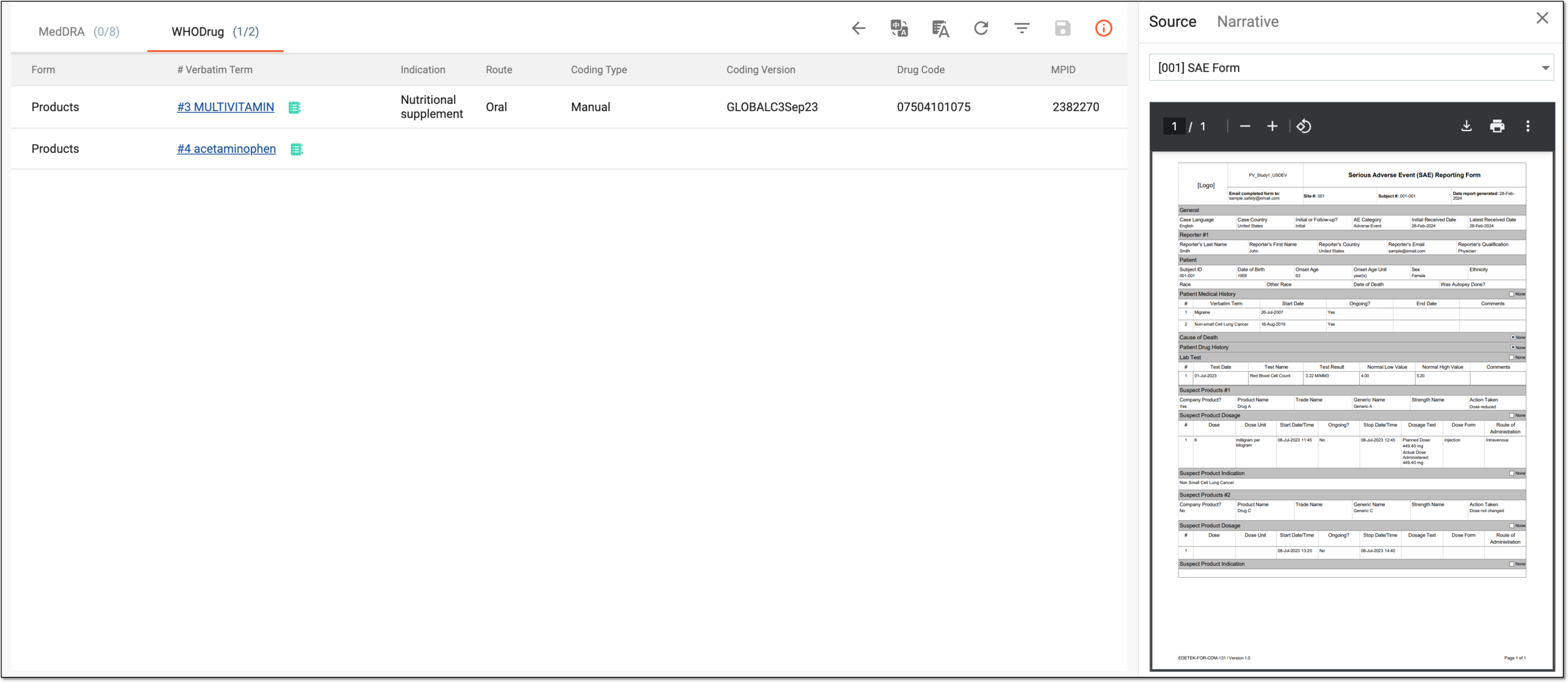 Figure 6. Performing WHODrug coding review
Element
Details
Auto Coding
From the workspace toolbar, select
to automatically code all verbatim terms on the list with the WHODrug synonym list associated with your study.To autocode your verbatim term to a synonym, the WHODrug version in the General form of your ICSR and the WHODrug version of the synonym list associated with your study should match.The autocoding is unavailable if the translation view is enabled. Use WHODrug Search to code each verbatim
manually.Translation View
From the workspace toolbar, select
to review the translated version of the coding data. From the field that appears, select
the target translation language.Figure 7. Selecting language of translation view
Currently, only English and Chinese translation languages are supported in PV.You can go back to the original language view by selecting Translation View.Form
Represents the name of the ICSR form where the verbatim term is located.
# Verbatim Term
Represents the sequential number of the record in the respective ICSR form where the verbatim term resides and the verbatim term itself—the original data entry that must be coded according to the MedDRA dictionary. It is also an active link selecting which leads you to the exact form and record where the verbatim term resides.
WHODrug Search
In the # Verbatim Term column, locate the needed verbatim name of the drug. Then next to it, select
to
apply the manual coding. For more details on this type of coding, refer to the Code WHODrug terms
manually section.Indication
Represents the condition or disease for which a medicinal product is prescribed or intended. It is the therapeutic purpose or reason for using the drug.
This value is autopopulated once the term coding is completed.Route
Represents the method or pathway by which a medicinal product is administered to the patient and how the drug enters the body and reaches its site of action.
This value is autopopulated once the term coding is completed.Coding Type
Represents how the verbatim is coded in PV and can be one of the following:
-
Manual: the verbatim term is coded manually by mapping the product name to the selected term from the WHODrug dictionary.
-
Synonym: the verbatim term is coded automatically by the system by finding matching term in the synonym list preconfigured in the CODING application and associated with your study in PV.
-
Similarity Match: the verbatim term is coded automatically by the system by finding the matching WHODrug dictionary term.
For autocoding, the system follows the established priority: first, the synonym list check, then the exact WHODrug dictionary term check, and then the WHODrug dictionary similar term check.
This value is autopopulated once the term coding is completed.Coding Version
Represents the WHODrug dictionary version that is used for the term coding.
This value is autopopulated once the term coding is completed.Drug Code
Represents a unique identifier assigned to the medicinal product in the WHODrug dictionary. The drug code represents the active pharmaceutical ingredient (API) or substance used in the drug, and it is assigned to the chemical substance or drug entity itself, regardless of the brand or formulation.
This value is autopopulated once the term coding is completed.MPID
Represents a unique code (Medicinal Product Identifier) used to determine a specific medicinal product in the WHODrug dictionary. The MPID represents a specific medicinal product or formulation that may contain one or more active ingredients, and it is used to identify commercial products—including brand names and generic formulations—that are available in the market.
This value is autopopulated once the term coding is completed.Source And Narrative
From the workspace toolbar, select
to open the side panel with the following tabs:-
Source: contains the source document uploaded to your ICSR via the Source form. Here, the preview is available for PDF files only.
-
Narrative: contains detailed information about an adverse event or suspected adverse reaction that has occurred in a patient added to your ICSR via the Narrative form.
If multiple source documents are added to different case versions, you can review all of them on one page. Select the needed version from the dropdown menu and preview the respective source document or narrative.Figure 8. Source and narrative case version menu
SAVE
From the workspace toolbar, select
to save the coding applied to verbatim terms.Tip
Select any of the WHODrug table rows and in the panel that appears, review more details on the coded drug.
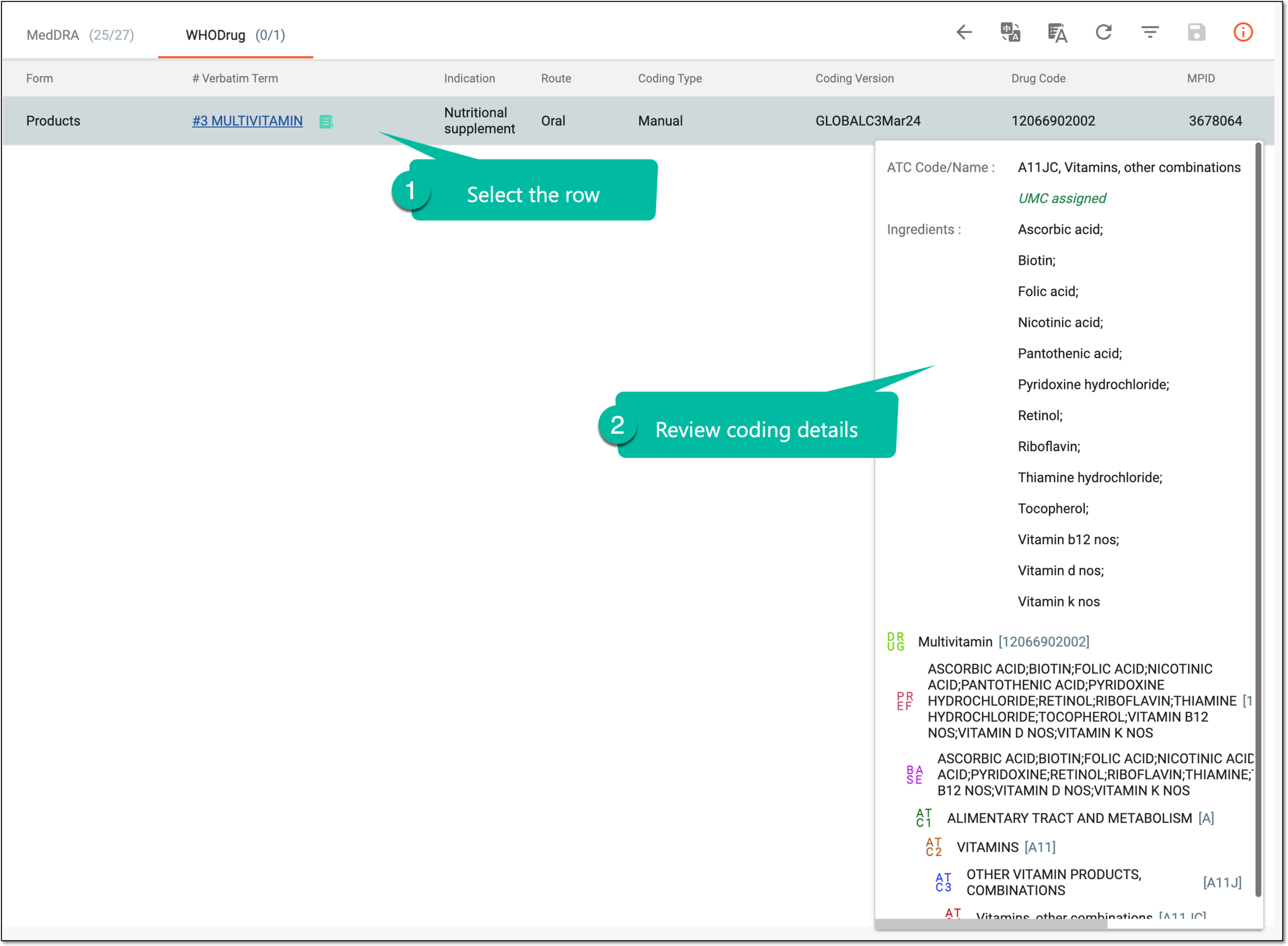 Figure 9. Reviewing coding details
-