View contact log, action items, and documents in medical review
The Contact Log/Action Items/Documents tab is designed for users to review the communication history for ICSR, add their comments or request actions from another user, and easily access the attached files during the medical review.
The data and files under this tab are pulled from various forms of ICSR to make it easier to review and manage them from one place. Moreover, if there are multiple case versions, from the medical review page, you can analyze the data and files added to all of them.
-
In the PV application header, select the ICSR tab.
-
On the ICSR List page that opens, in the table, locate the ICSR record for which you want to review medical data. Then select its case number to open the details page in the new browser tab.
Alternatively, from the Actions column next to your ICSR, select Edit
 to open the
ICSR details in the same browser tab.
to open the
ICSR details in the same browser tab. Figure 1. Selecting to edit ICSR
-
On the ICSR form page that opens, from the workspace toolbar, select Medical Review
 .
. Figure 2. Accessing medical review option
-
On the page that opens, select the Contact Log/Action Items/Documents tab, and on the page that opens, switch between subtabs to view and manage the data as explained in the following table.
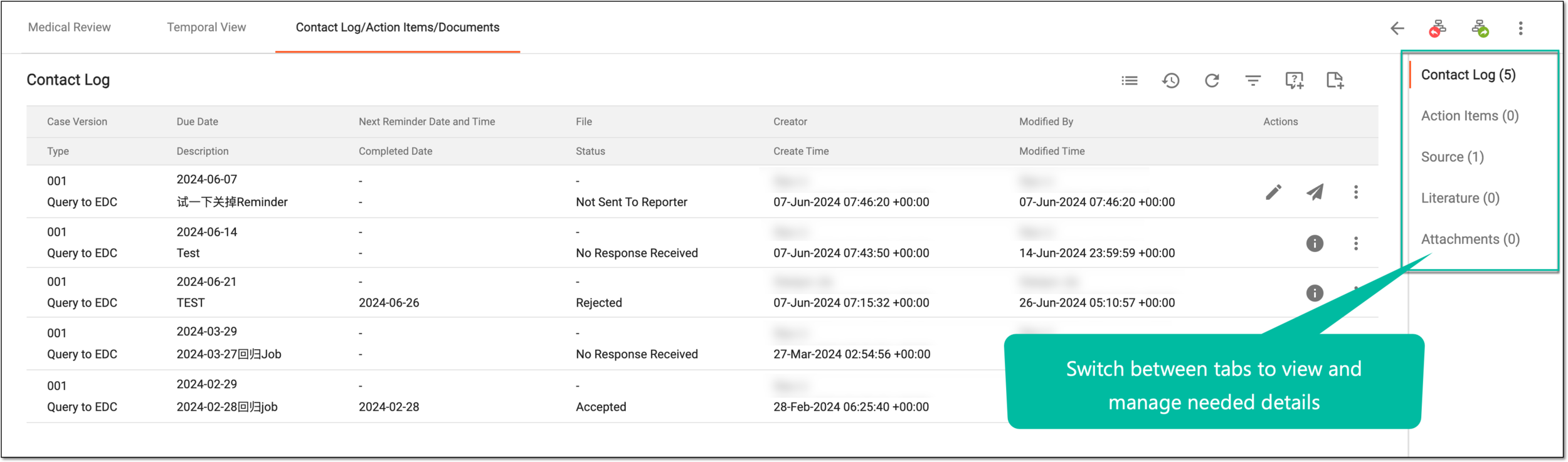 Figure 3. Reviewing contact log, action items, and documents
Subtab
Details
Contact Log
Represents the ICSR contact log list, details, and options to create case notes and queries, same as explained in the Contact log section.
Action Items
Represents the ICSR action items list, details, and options to create new action items, same as explained in the Action items section.
Source
Represents the source documents attached to your case via the Source form. You can also manage the source documents from here, that is edit, delete, view the audit trail and history, or add new files.
Literature
Represents the reference literature files attached to your case via the Literature form. You can also manage the literature document from here, that is edit, delete, view the audit trail and history, or add new files.
Attachments
Represents the clinical documents, such autopsy reports, ECG strips, chest X-rays, or else, attached to your case via the Attachments form. You can also manage the documents from here, that is edit, delete, view the audit trail and history, or add new files.
You have reviewed the contact log, action items, and documents for the case.