Create monitoring configuration
Monitoring configuration incorporates settings intended to facilitate the preparation and management of monitoring visits. You can create new monitoring configuration entities to reduce the workload spent on the maintenance of individual monitoring visits.
Important
You can have only one monitoring configuration entity enabled per site and monitoring visit type because the system uses this configuration when adding monitoring visits to CTMS. Before creating a new monitoring configuration entity for the same site, make sure to deactivate the currently active configuration, otherwise, the system does not allow you to create a new entity.
-
Access the study management page in one of the following ways:
-
In the CTMS application header, select the DASHBOARD tab and then select the study dashboard of your interest.
 Figure 1. Accessing study management from dashboard
-
In the CTMS application header, select the STUDY MANAGEMENT tab. Then from the Study Data List table, select the study name of your interest.
 Figure 2. Accessing study management from study data list
-
-
On the study page that opens, in the left pane, expand Monitoring and select Monitoring Config.
-
From the workspace toolbar of the Monitoring Configuration table that appears, select New Item
 .
.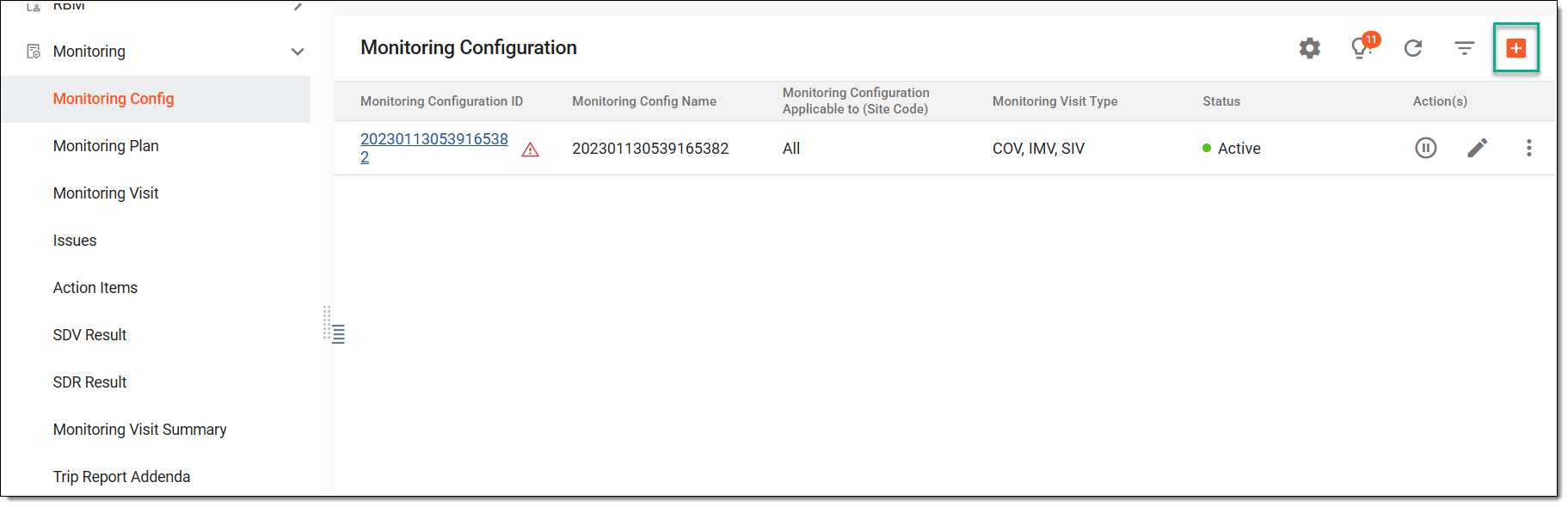 Figure 3. Adding new monitoring configuration
-
On the page that appears, fill out the monitoring configuration form, which is organized into the following stages.
Specify the basic monitoring configurations as explained in the following table.
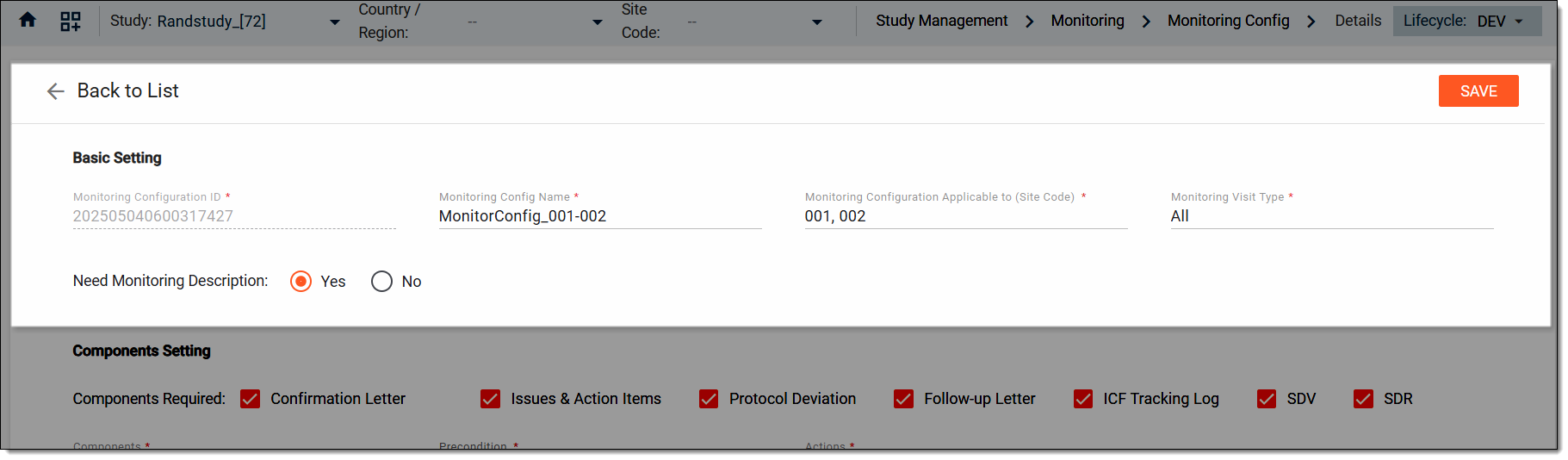 Figure 4. Defining basic settings. Monitoring configurations
Tip
In the following table, mandatory elements are marked with an asterisk (*).
Element
Details
Monitoring Configuration ID*
Represents an ID automatically generated by the system when creating a new monitoring configuration entity. This is an uneditable value.
Monitoring Config Name*
Enter a descriptive name of the monitoring configuration that helps identify this entity when working with it in the system.
Monitoring Configuration Applicable to (Site Code)*
Select sites to which the created monitoring configuration is to be applied. You can also apply this configuration to all sites at once.
Monitoring Visit Type*
Select monitoring types to which the created monitoring configuration is to be applied. The monitoring visits define the type of monitoring that needs to be conducted at sites, outlining the trial goals. The monitoring type can be one of the following: PSSV (Pre-Study Site Visit), SIV (Site Initiation Visit), IMV (Interim Monitoring Visit), or COV (Close Out Visit).
Need Monitoring Description
Select Yes to enable the Description field for users when linking this monitoring configuration to a monitoring visit, allowing them to document study-specific risks, objectives, or key focus areas.
Otherwise, select No if the configuration proceeds without needing that additional explanation, suitable for straightforward or standard visit plans.
SAVE
Select
 to create the monitoring configuration entity with the Active status.
You can proceed with updating the configurations by proceeding to the following form stages. Otherwise, upon selecting SAVE, the system adds the monitoring configuration entity with the default configurations and you can always change them later by updating the monitoring configuration entity.Specify and add various components to your monitoring configurations as explained in the following table.
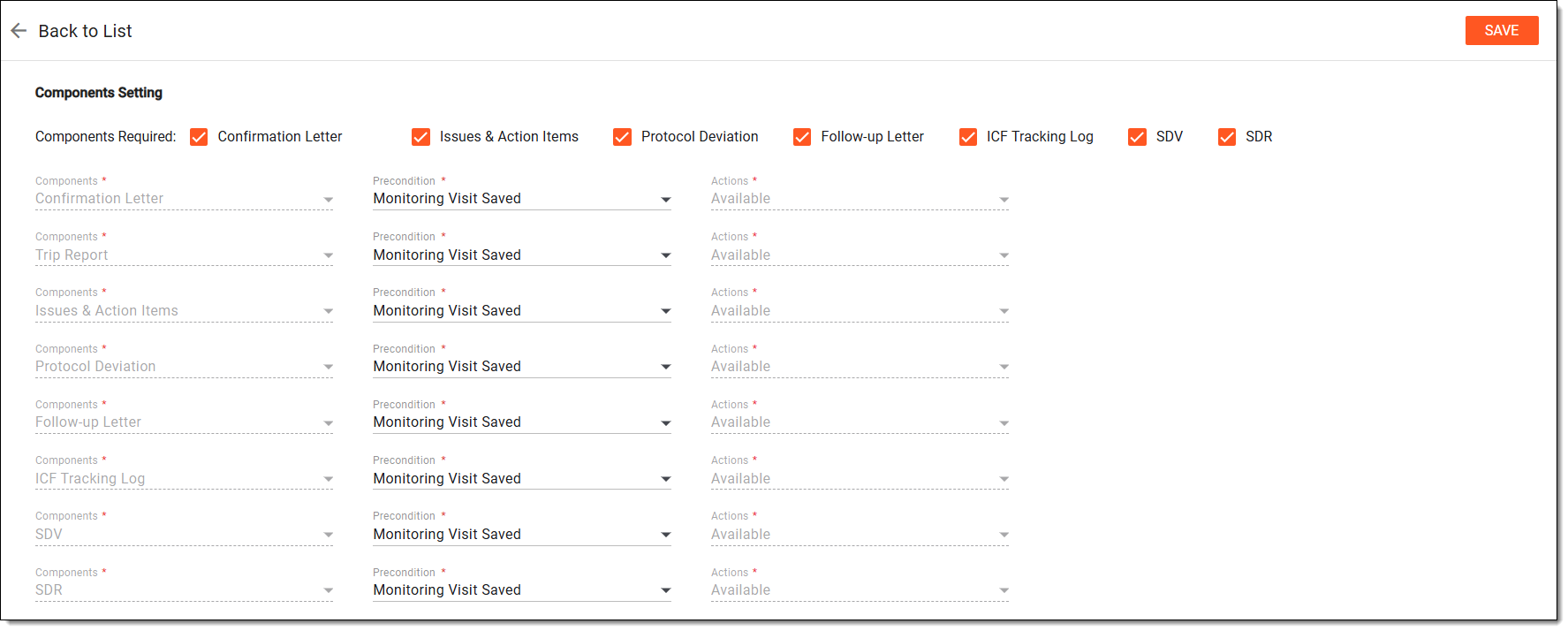 Figure 5. Defining components settings. Monitoring configurations
Tip
In the following table, mandatory elements are marked with an asterisk (*).
Element
Details
Components Required
Select components that need to be mandatory for every created monitoring visit, including Confirmation Letter, Issues & Action Items, Protocol Deviation, Follow-up Letter, ICF Tracking Log, SDV, and SDR.
The Trip Report component is mandatory in the configuration since it is always required in monitoring visits.Components*
Represents the name of the component and cannot be edited. The number of such fields depends on the number of components selected previously.
Precondition*
Select the action that must be taken for the corresponding component to become available in monitoring visits:
-
Monitoring Visit Saved: the monitoring visit must be saved to trigger the component availability.
-
Trip Report Approval Completed: the trip report must be approved before the follow-up letter step to trigger the component availability.
-
Null: no action is required, the component is available by default.
Actions*
Represents the default non-editable value that is Appear. This means that the component becomes available in monitoring visits only after the previously specified precondition is met.
In the Monitoring Visit Work Steps Setting block, describe the monitoring visit approval process settings as explained in the following table.
 Figure 6. Defining monitoring visit work steps. Monitoring configurations
Tip
In the following table, mandatory elements are marked with an asterisk (*).
Element
Details
Monitoring Visit Needs to be Approved
Switch this toggle on if you want the assigned CTMS users to approve monitoring visits before implementing them. The system preserves this configuration every time a new monitoring visit is added.
Monitoring Visit Approved by*
This field is available only if the Monitoring Visit Needs to be Approved toggle is switched on in the previous field. Select either of the following options—Role Category (if you want users with a specific role to approve monitoring visits) or the Assignee (if you want specific users to approve monitoring visits).
Role Category*/Assignee*
This field is available only if the Monitoring Visit Needs to be Approved toggle is switched on. If Role Category has been selected in the previous field, then select a role or roles to authorize them for monitoring visit approval. If Assignee has been selected in the previous field, then select a user or users to authorize them for monitoring visit approval.
Expected Days
This field is available only if the Monitoring Visit Needs to be Approved toggle is switched on. Enter the expected number of days for the assignees to complete the approval task.
Type*
This field is available only if the number of expected days is entered. Select whether the working or calendar days need to be considered when calculating expected days.
Monitoring Visit Approval Due Date
This field is available only if the number of expected days is entered. Select the date condition that the system must follow to calculate the due date for monitoring visit approval, considering the number of expected days.
In the Trip Report Template block, select the templates to associate with your visit types as explained in the following table.
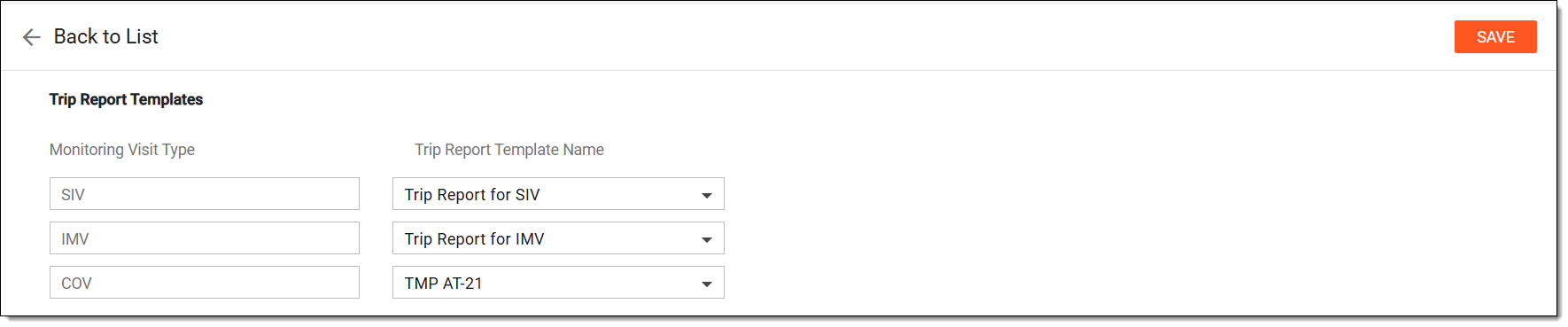 Figure 7. Selecting trip report templates. Monitoring configurations
Element
Details
Monitoring Visit Type
Select the monitoring visit type: PSSV (Pre-Study Site Visit), SIV (Site Initiation Visit), IMV (Interim Monitoring Visit), or COV (Close Out Visit).
Trip Report Template Name
Select the monitor template according to which a trip report for the created visit is to be generated.
In the Trip Report Work Steps Setting block, describe the trip report's approval process settings as explained in the following table.
 Figure 8. Defining trip report work steps. Monitoring configurations
Tip
In the following table, mandatory elements are marked with an asterisk (*).
Element
Details
Trip Report Needs to be Approved
Switch this toggle on if you want a trip report to be approved according to the specific workflow before finalizing a monitoring visit. If the toggle is switched off, you can specify only the expected days for trip report completion.
The system preserves this configuration every time a new monitoring visit is added.
Expected Days of Trip Report Completion
Enter the expected number of days for the user in charge to complete a trip report for monitoring visits.
Type*
Based on the previously entered number of expected days, select whether the working or calendar days need to be considered when calculating expected days.
Trip Report Completion Due Date
This field is available only if you have previously entered the number of expected days. Select the date condition that the system must follow to calculate the due date for completing a monitoring visit trip report, considering the number of expected days.
Workflow Name
Select Associate Workflow
 to define a workflow for the trip report approval process. You can also indicate
due dates for specific workflow steps if needed.
to define a workflow for the trip report approval process. You can also indicate
due dates for specific workflow steps if needed.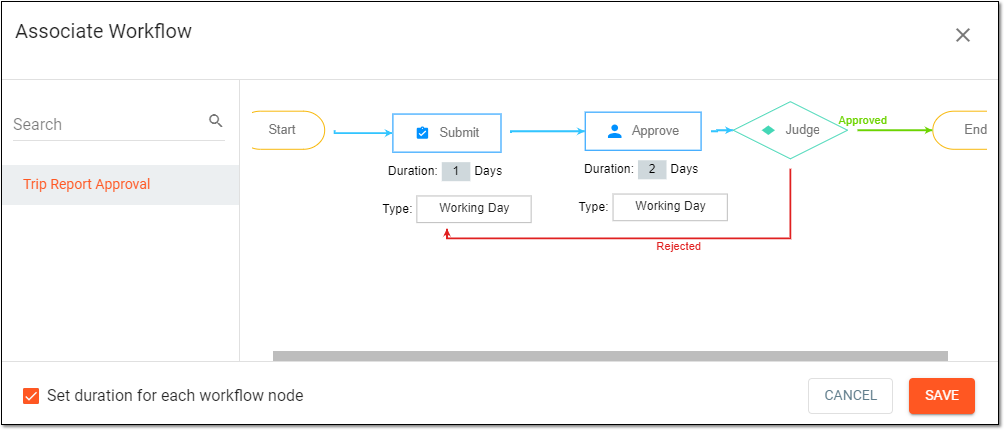 Figure 9. Associating workflow with trip report approval
The workflow can only be selected if the Trip Report Needs to be Approved toggle has been switched on. Also,
                                        ensure to configure the necessary workflow for trip report approval beforehand in CTMS.
Whole Trip Report Finalized Due Date
Set the deadline for finalizing the entire trip report, calculated as a number of days after the selected base date.
This field is only available if the Trip Report Needs to be Approved toggle is switched
                                        on.
Query Expected Days
Enter the time (in days) allowed to resolve any queries related to the trip report.
Configure the settings for generating and sending the automated cancellation letter during monitoring visits as explained in the following table.
 Figure 10. Defining cancellation letter settings. Monitoring configurations
Tip
In the following table, mandatory elements are marked with an asterisk (*).
Element
Details
Cancellation Letter Template
Select a predefined email template that is to be used when sending a cancellation letter during monitoring visits.
The visit owner should be the email recipient as the default
Select Yes if you want the creator of monitoring visits to be the recipient of the cancellation letter by default.
Signature Required When Sending Letters*
-
Select Yes if you want the default value for the electronic signature requirement for cancellation letters sent for monitoring visits to be set to Yes.
-
Select No if you want the default value for the electronic signature requirement for cancellation letters sent for monitoring visits to be set to No.
Send to
Select the category of the email recipients, such as a staff member or a role.
Role Category/Staff Name
Based on your selection in the previous field, select the particular role or users to whom you want to set as the email recipients.
Cc
Select the category of the carbon copy (CC) email recipients, such as a staff member or a role.
Role Category/Staff Name
Based on your selection in the previous field, select the particular role or users to whom you want to set as the CC email recipients.
Configure the settings for generating and sending the automated confirmation letter during monitoring visits as explained in the following table.
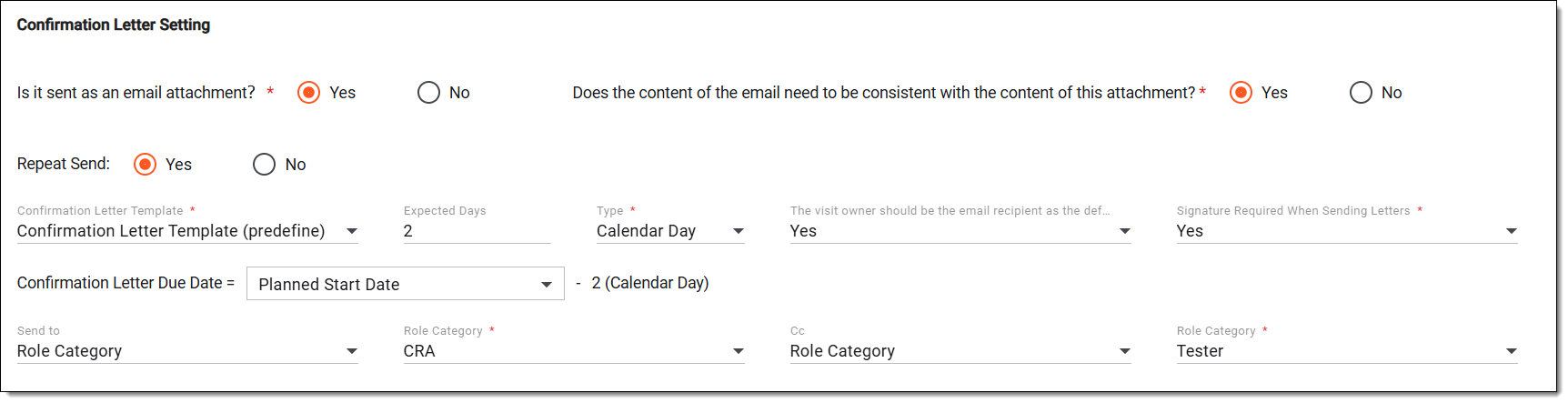 Figure 11. Defining confirmation letter settings. Monitoring configurations
Tip
In the following table, mandatory elements are marked with an asterisk (*).
Element
Details
Is it sent as an email attachment?*
-
Select Yes to indicate that the confirmation letter is sent as an attachment with the email.
-
Select No to include the confirmation letter content in the email body.
Does the content of the email need to be consistent with the content of this attachment?
-
Select Yes to ensure that the email message aligns with the attached letter content.
-
Select No to keep the email content independent of the attached letter.
This field is available only if Yes is selected in the Is it sent as an
                                        email attachment? field.
Repeat Send
Indicate if you want the users to be able to resend the confirmation letter (Yes) or not (No).
Confirmation Letter Template*
Select a predefined email template that is to be used when writing a confirmation letter for any of the created monitoring visits.
Expected Days
Enter the time allowed (in days) to send the letter before the due date.
Type*
Based on the previously entered the number of expected days, select whether the working or calendar days need to be considered when calculating expected days.
Confirmation Letter Due Date
Based on the selected type, set the due date by calculating it relative to a reference date (such as, Planned Start Date).
The visit owner should be the email recipient as the default
Select Yes if you want the creator of monitoring visits to be the recipient of the confirmation letter by default.
Signature Required When Sending Letters*
-
Select Yes if you want the default value for the electronic signature requirement for confirmation letters sent for monitoring visits to be set to Yes.
-
Select No if you want the default value for the electronic signature requirement for confirmation letters sent for monitoring visits to be set to No.
Send to
Select the category of the email recipients, such as a staff member or a role.
Role Category/Staff Name
Based on your selection in the previous field, select the particular role or users whom you want to set as the email recipients.
Cc
Select the category of the carbon copy (CC) email recipients, such as a staff member or a role.
Role Category/Staff Name
Based on your selection in the previous field, select the particular role or users whom you want to set as the CC email recipients.
Configure the settings for generating and sending the automated follow-up letter during monitoring visits as explained in the following table.
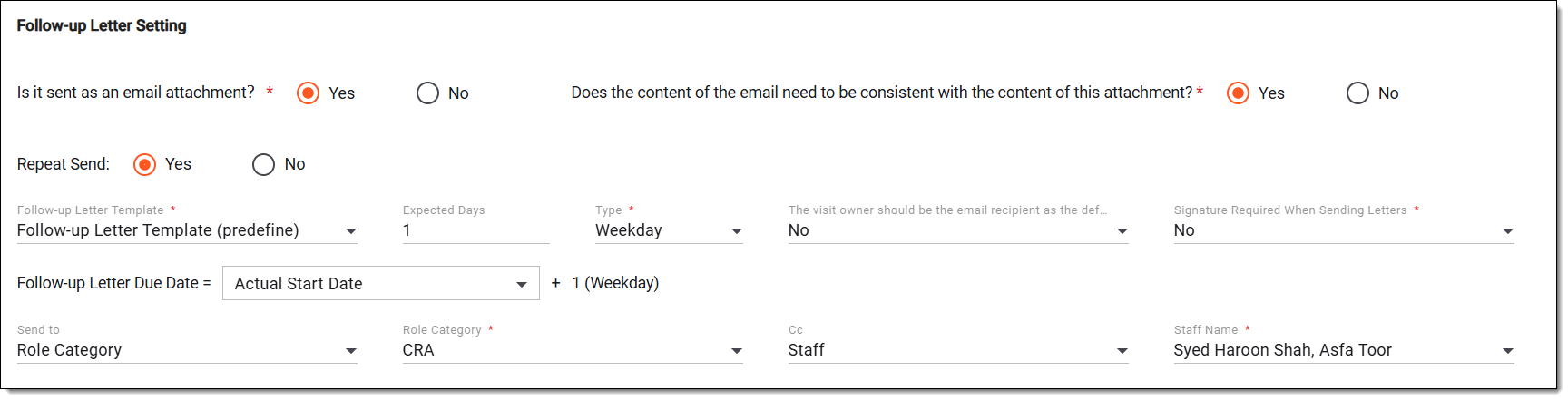 Figure 12. Defining follow-up letter settings. Monitoring configurations
Element
Details
Is it sent as an email attachment?*
-
Select Yes to indicate that the follow-up letter is sent as an attachment with the email.
-
Select No to include the follow-up letter content in the email body.
Does the content of the email need to be consistent with the content of this attachment?
-
Select Yes to ensure that the email message aligns with the attached letter content.
-
Select No to keep the email content independent of the attached letter.
This field is available only if Yes is selected in the Is it sent as an
                                        email attachment? field.
Repeat Send
Indicate if you want the users to be able to resend the follow-up letter (Yes) or not (No).
Follow-up Letter Template*
Select a predefined email template that is to be used when writing a follow-up letter for any of the created monitoring visits.
Expected Days
Enter the time (in days) allowed to send the letter before the due date.
Type*
Based on the previously entered number of expected days, select whether the working or calendar days need to be considered when calculating expected days.
Follow-up Letter Due Date
Based on the selected type, set the due date by calculating it relative to a reference date (such as, Planned Start Date).
The visit owner should be the email recipient as the default
Select Yes if you want the creator of monitoring visits to be the recipient of the follow-up letter by default.
Signature Required When Sending Letters*
-
Select Yes if you want the default value for the electronic signature requirement for follow-up letters sent for monitoring visits to be set to Yes.
-
Select No if you want the default value for the electronic signature requirement for follow-up letters sent for monitoring visits to be set to No.
Send to
Select the category of the email recipients, such as a staff member or a role.
Role Category/Staff Name
Based on your selection in the previous field, select the particular role or users whom you want to set as the email recipients.
Cc
Select the category of the carbon copy (CC) email recipients, such as a staff member or a role.
Role Category/Staff Name
Based on your selection in the previous field, select the particular role or users whom you want to set as the CC email recipients.
Set the naming convention for monitoring visits by combining specific elements as explained in the following table.
 Figure 13. Setting monitoring naming convention. Monitoring configurations
Element
Details
Monitoring Visit Naming Elements
Construct a naming convention for future created monitoring visits using the following elements: dash, creation date "ddMMMyyyy," site code, monitoring type, monitoring method, responsible name, ascending number of the monitoring visit, or a custom label.
Monitoring Visit Name is Editable
Select Yes if you want to enable the editing of names of manually created monitoring visits.
If No is selected, the names of monitoring visits created from this monitoring configuration are generated according to the predefined naming convention in the previous field and are read-only.
Configure automatic finalization of a monitoring visit, based on the completion of specific predefined criteria as explained in the following table.
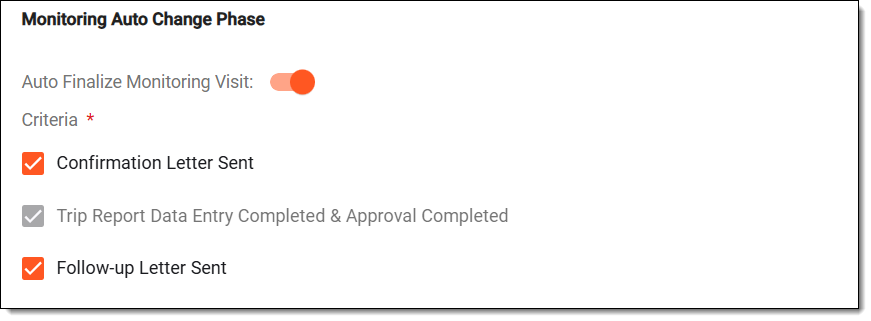 Figure 14. Setting autochange phase criteria. Monitoring configurations
Tip
In the following table, mandatory elements are marked with an asterisk (*).
Element
Details
Auto Finalize Monitoring Visit
Enable or disable the system’s ability to automatically finalize a monitoring visit when all selected criteria are fulfilled.
Criteria*
Select actions that must be completed or the letters that must be sent for auto-finalization to occur.
Configure whether appendices are required when exporting trip reports and define which appendix items should be included for each specified monitoring visit type, as explained in the following table.
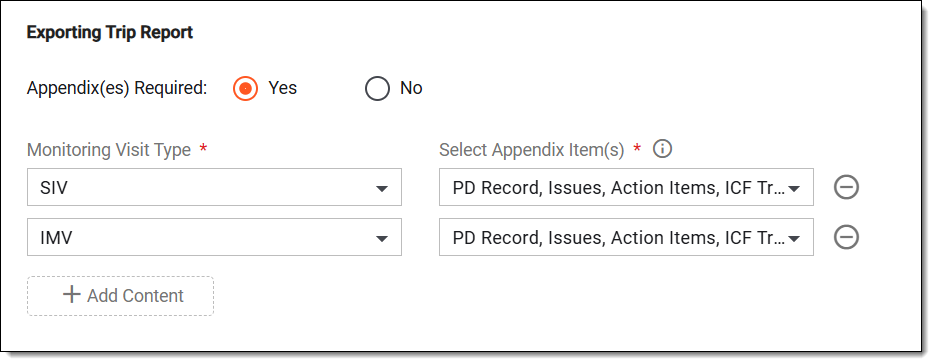 Figure 15. Defining trip report exporting settings. Monitoring configurations
Tip
In the following table, mandatory elements are marked with an asterisk (*).
Element
Details
Appendix(es) Required
Select Yes if the PDF file is required to be exported for the trip report.
Monitoring Visit Type*
Select the specific monitoring type for which the trip report is required to be exported.
Select Appendix Item(s)*
Select the specific appendix items, such as protocol deviation records, action items, issues, or ICF tracking logs that must be required for the selected monitoring type.
Add Content
Select
 to add another monitoring type to the list of required appendices.
Remove
Select
 to remove the monitoring type from the list of required appendices.
 -
Once the configurations are defined, select SAVE to implement your changes. All monitoring visits added either by the system or manually now inherit this configuration.