Alerts management
Alerts is a feature of EDC that helps you keep the users informed of the predefined events occurring within the application. The alert setup procedure requires specific knowledge of the functionality, especially the trigger conditions—the set of events, such as form completion, subject phase change, or else, depending on the alert. Once these conditions occur, they initiate the email notification to respective users. Thus, the alert configuration in EDC is usually done by the study design specialists.
For example, you want to notify a specific group of users when an adverse event occurs. Thus, you create the AE alert and add those users as recipients. As soon as the adverse event is documented in a respective form of the DATA ENTRY tab, the alert is triggered, and an email is sent to the recipients specified in the alert.
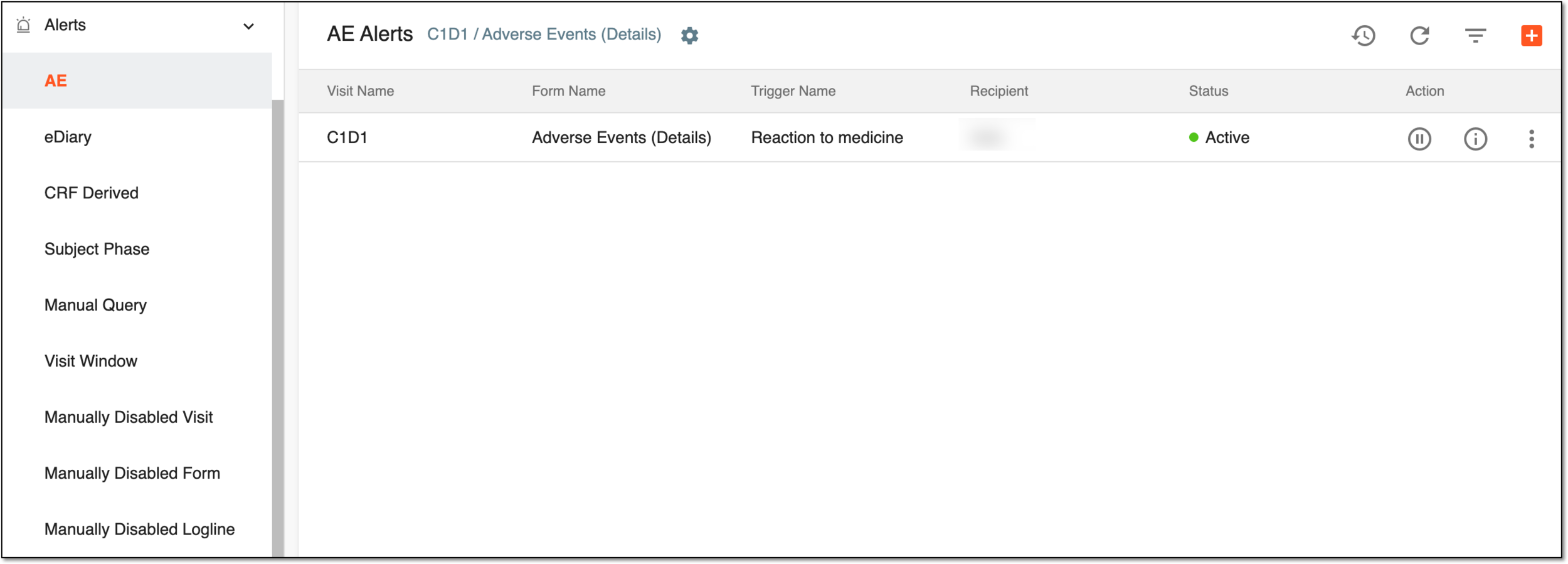
In EDC, you can configure various types of alerts under their respective subtabs as explained in the following table.
|
Subtab |
Details |
|---|---|
|
AE |
To configure and manage alerts related to adverse events occurrence. |
|
eDiary Form |
To configure and manage alerts related to the eDiary filling by the subjects. |
|
eDiary Incomplete |
To configure and manage alerts related to the eDiary form untimely completion by the subjects. |
|
CRF Derived |
To configure and manage alerts related to data changes in the specific case report forms (CRFs). |
|
Subject Phase |
To configure and manage alerts related to the change of phase of the specific subjects. |
|
Manual Query |
To configure and manage alerts related to manually created queries at visit, form, record, or item level. |
|
Visit Window |
To configure and manage alerts related to the visit window period breaches and other discrepancies. |
|
Phase Capping |
To track the current status of subject registration to the study or enrollment to a certain phase. |
|
Manually Disabled Visit |
To configure and manage alerts related to the manual disabling of visits. |
|
Manually Disabled Form |
To configure and manage alerts related to the manual disabling of CRFs. |
|
Manually Disabled Logline |
To configure and manage alerts related to the manual disabling of CRF loglines. |
|
Randomization Approved |
To configure and manage alerts related to the approval or rejection of subject randomization in EDC. |
|
Site Treatment Completed |
To configure and manage alerts related to the last subject's treatment finalization at a specific site. |
|
Local Lab Sync |
To configure and manage alerts related to the unsynced lab normal range versions to theirs associated CRFs. |
With Alerts, you can perform the following actions:
-
Add an alert that is triggered upon the event of your interest.
-
Activate/Inactivate an alert to send it out/prevent it from being sent on a scheduled basis.
-
View alert information for more details on each alert.
-
Edit an alert to make amendments to the previously created alerts.
-
Delete an alert that you no longer need.
Any untoward medical occurrence in a clinical investigation subject administered a pharmaceutical product that does not necessarily have a causal relationship with this treatment. An adverse event (AE) can therefore be any unintended sign (including an abnormal laboratory finding), symptom, or disease temporally associated with the use of a medicinal (investigational) product, whether or not related to the medicinal (investigational) product.
An eClinical mobile application used for the collection and management of clinical data of subjects, supporting iOS and Android systems. It is based on the electronic CRF provided by the Study Designer application to support subjects' self-recording of treatment and diagnosis information.
A specialized document in a clinical trial designed to collect the subject data.
See also eCRF.
A specific phase that a subject has to complete in the course of a clinical trial to move further to the next phase. For instance, Screening, Enrolled, Randomized, and others.
 |
In eClinical, subject phases are designed individually for each study via the SD application, although they are referenced in others, like IWRS or EDC.
A time span that defines the allowable range for a subject visit in case it is not possible to conduct that visit on the exact scheduled visit date.
A process during which subjects receive their random numbers and are assigned to different arms based on the randomization scheme.