Cohort list
In a clinical trial, a cohort refers to a group of subjects who share certain characteristics or experiences and receive specific treatment over some time.
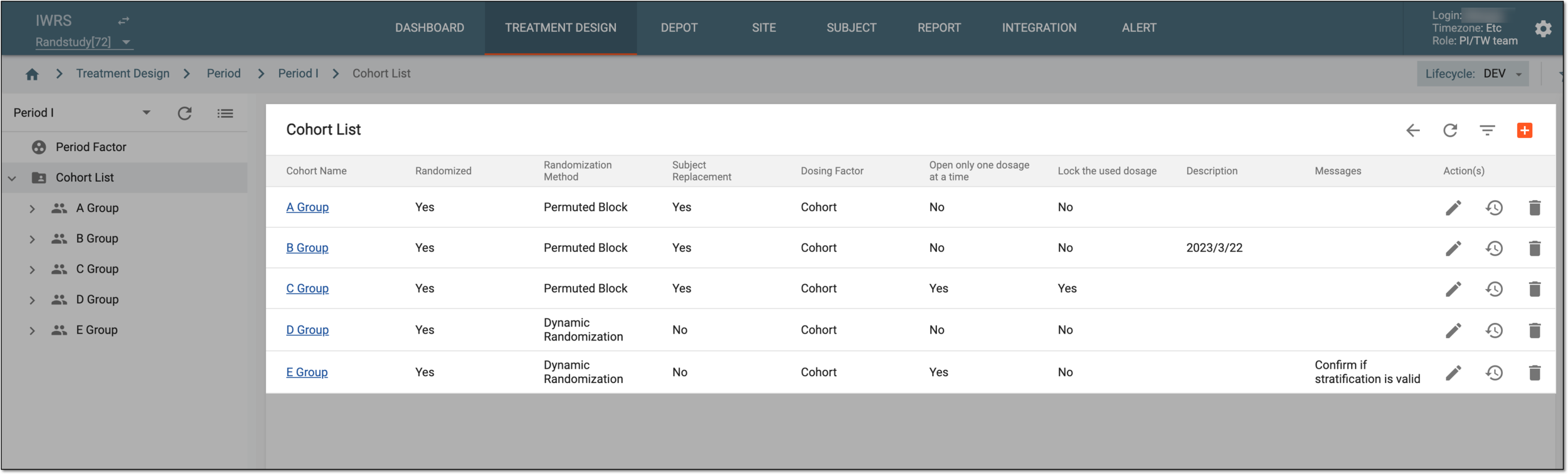
All cohorts previously created in the IWRS application are displayed on the period configuration page, under the Cohort List subtab. The cohorts have the attributes explained in the following table.
|
Column |
Details |
|---|---|
|
Cohort Name |
Represents the cohort name. |
|
Randomized |
Indicates whether the subjects included in the cohort are randomized or not. |
|
Randomization Method |
Represents one of the following randomization methods selected for the cohort upon configuration:
|
|
Subject Replacement |
Represents whether the subjects included in the cohort can be replaced or not. This field remains blank if the subject is not randomized. |
|
Dosing Factor |
Represents the condition under which the dosage is or has been given. |
|
Open only one dosage at a time |
Represents one of the following:
Opening only one dosage option can be convenient for dose escalation cohorts, where you need to go from the lowest dosage of the drug and gradually increase it, so you only want to allow one option for selection to avoid the mistreatment of patients with different dosages simultaneously.
|
|
Lock the used dosage |
Represents one of the following:
Locking the used dosage can be convenient for dose escalation cohorts, where once you have already treated the subjects with a lower dosage of the drug and increased it, you do not want to allow going back and decreasing the dosage.
|
|
Description |
Represents a description of the cohort. |
|
Messages |
Represents the text of the message that appears upon attempting to enroll the subject into the cohort if such confirmation is configured. |
From the Cohort List page, you can perform the following actions: