Configure period
The configuration of a period is a complex process that can be logically divided into the following parts:
-
Period factor: to define the screening conditions (factors) that influence the randomization process.
-
Cohorts: to define the cohorts of subjects that are further assigned to different arms of a clinical trial according to the randomization scheme.
-
Scrambled randomization: to mix up all randomization numbers for all the subjects in all the cohorts within a period to prevent unexpected unbinding.
Important
The scrambled randomization is only available for multiperiod studies.
-
In the IWRS application header, select the TREATMENT DESIGN tab.
-
On the page that opens, in the left pane, select the Period subtab.
-
In the Period List table that appears, locate the period of your interest. Then in the Period Name column, select the value to open the period configurator.
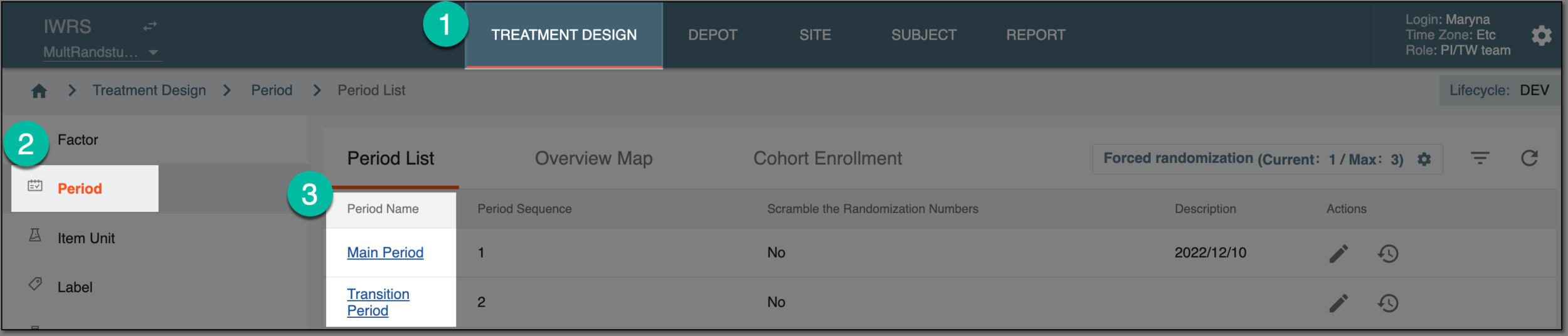 Figure 1. Accessing period configurator
Tip
You can also change the period for configuration from the period configurator directly. For this, expand the dropdown menu on the top left and select the period of your interest.
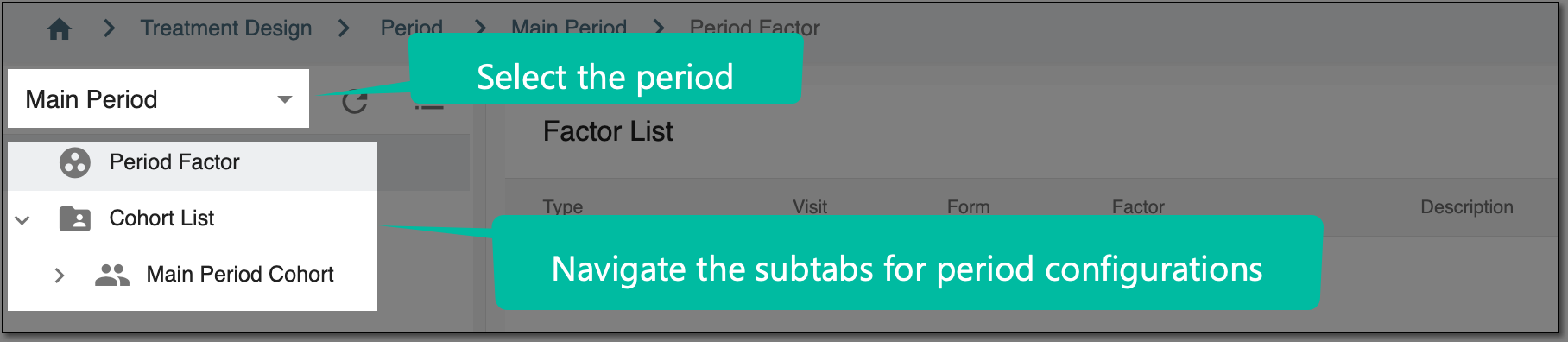 Figure 2. Viewing period configurator
As a result, you can start configuring period scrambled numbers, factors, and cohorts per your needs.