Item disposition list
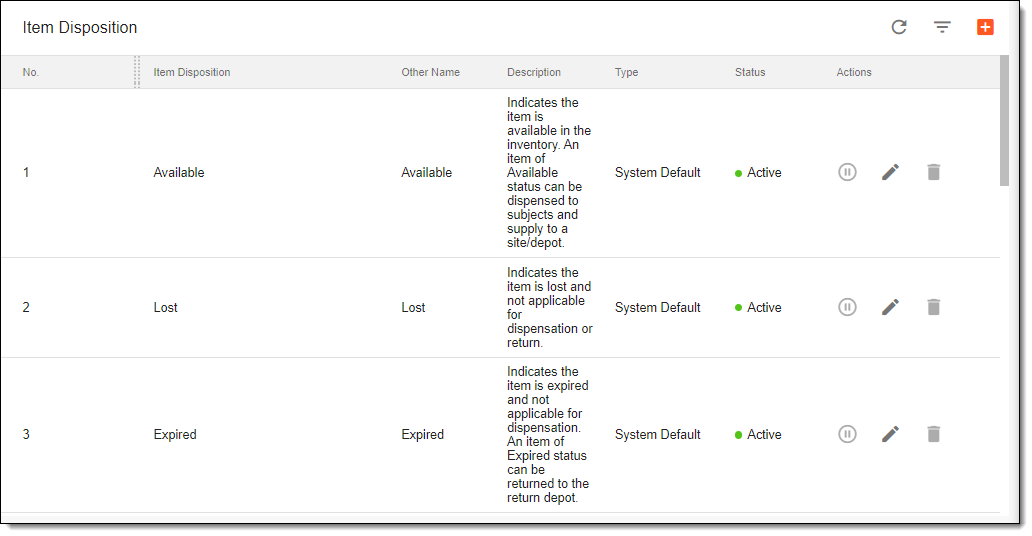
All the item dispositions previously created in the IWRS application, either automatically by the system or manually by users, are displayed under the TREATMENT DESIGN tab > Item Disposition subtab.
The item dispositions have the attributes explained in the following table.
|
Column |
Details |
|---|---|
|
No. |
Represents the system-generated number of the item disposition. |
|
Item Disposition |
Represents the system default or user-defined name of the item disposition. |
|
Other Name |
Represents the item disposition status and helps further qualify the nature of the item disposition. For example, if the Item Disposition is set to Quarantined and the Other Name field is set to Temperature Excursion, this means that the disposition item has been quarantined due to temperature excursion which is the deviation from the labeled storage condition of a product. Each item disposition can have one or more Other Name options which can be added or removed while editing an item disposition. These options are available for selection under the SITE > Shipment subtab when the shipment status is set to Received or Partially Received. |
|
Description |
Represents a meaningful description of the item disposition. |
|
Type |
Represents the type of the item disposition:
|
|
Status |
Represents the status of the item disposition:
|
The following actions can be applied to item dispositions you see in the list:
-
Edit an item disposition: to make updates and edits to your item dispositions.
-
Activate/Inactivate an item disposition (only for the user-created dispositions): to make the disposition active/inactive so that it can further be used/cannot be used in the system.
-
Delete an item disposition (only for the user-created dispositions): to delete item dispositions that are no longer needed.