Edit item disposition
The Item Disposition subtab is designed for viewing and defining item dispositions that represent the status of the item. Further on, these dispositions help you identify the items that are available for distribution or shipping.
At any time, you can edit the name or description of the item dispositions. Furthermore, you can also add or remove the Other Field items which help further qualify the nature of the item disposition. For example, if an item disposition is set to Quarantined, you can further qualify this disposition by selecting Temperature Excursion from the Other Name field.
-
In the IWRS application header, select the TREATMENT DESIGN tab.
-
In the left pane, select the Item Disposition subtab.
-
In the Item Disposition table that appears, go to the item disposition that you want to update and select Edit
 next to it.
 -
In the Edit dialog that appears, update the item disposition details as explained in the following table.
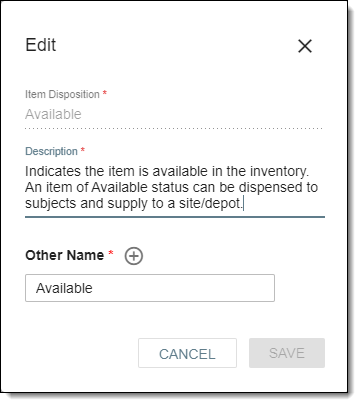 Figure 1. Editing item disposition
Tip
In the following table, mandatory elements are marked with an asterisk (*).
Element
Details
Item Disposition*
Displays the unique name of the item disposition being edited. The names of the default item dispositions cannot be changed (that is why the Item Disposition field is disabled for such item dispositions). The only field you can change is the description.
Description*
Edit the meaningful description for the item disposition.
Other Name*
Provide a name that further qualifies the item disposition being edited.
Select
 to add another option to the Other Name field or select
  remove an existing option from the Other Name field.
SAVE
Select
 to save the implemented changes.
CANCEL
Select
 to discard the edits and close the dialog.
Upon saving, your item disposition has now been updated. You can also activate or inactivate item dispositions.