SDR result
Source Data Review (SDR) refers to a comprehensive review of the collected data to evaluate its quality, consistency, and compliance with the study protocol, standard operating procedure, and regulatory requirements. During SDR, the CRA or data management team examines the data for completeness, accuracy, and compliance with the study protocol and regulatory requirements.
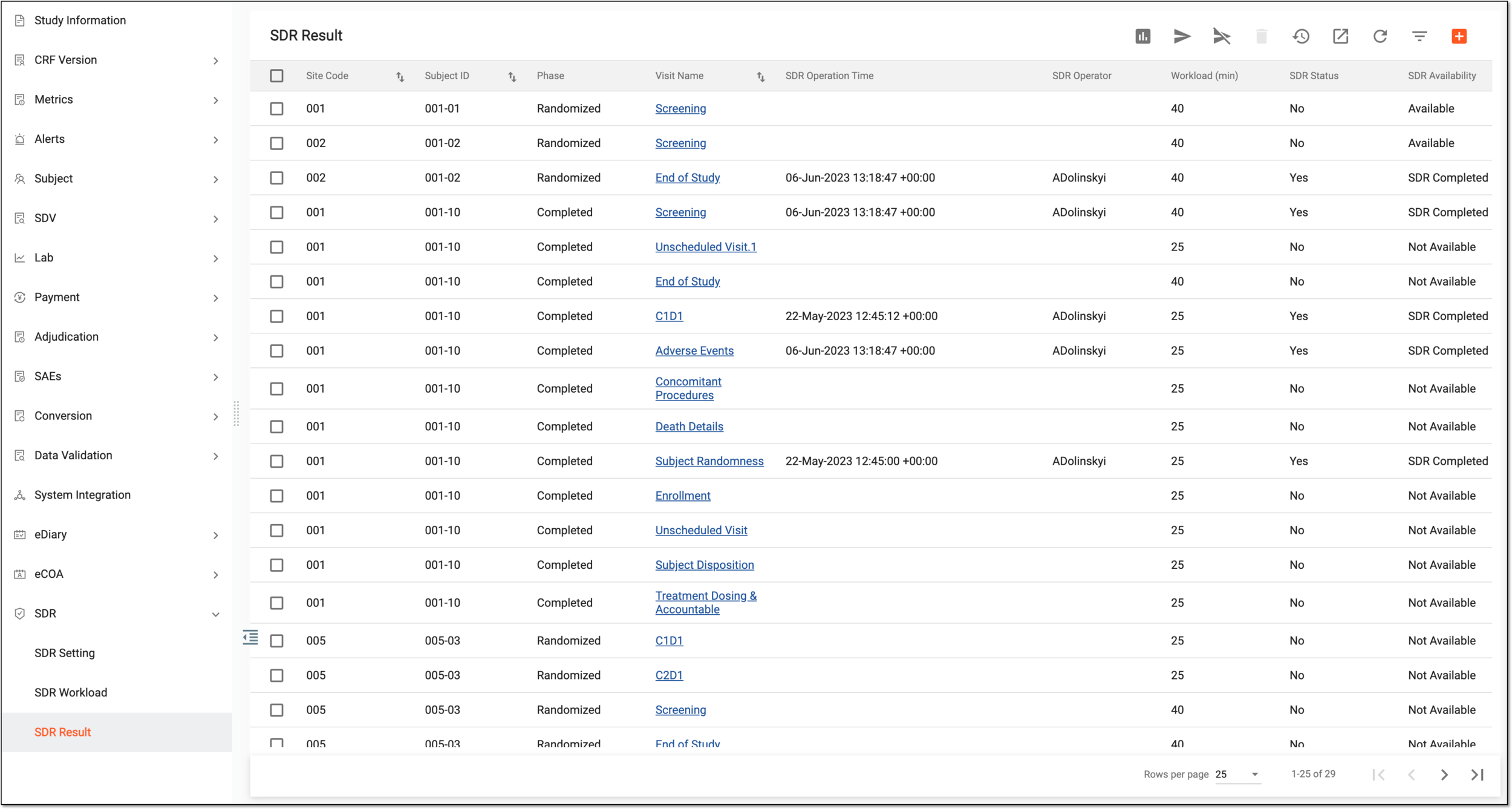
After the needed SDR setting records have been added and the SDR workload has been defined for all visits, you can start to review source documents. Under the SDR Result tab, you can track the SDR status on the reviewed source documentation. If there are some documents pertaining to some subjects or visits that need to undergo SDR and they are not on the list, you can add them additionally.
Tip
In the SDR Availability column of the SDR Result grid, you can filter out all visits available for SDR. Once filtered, select the hyperlink in the Visit Name column to go to the folder with the source documentation for a corresponding visit where you can conduct SDR. The visit is not available for the SDR process if the visit itself or its subject is softlocked, disabled, or has the Initial status.
Moreover, from the workspace toolbar, you can select Go to Chart  to go to the SDV & SDR workload report where you learn about the overall time spent on the SDR completion and time required for the SDR completion for visits that have not yet undergone SDR.
Under the SDR Result tab, you can perform the following actions: