View user 2FA status
The two-factor authentication is defined as a security configuration where a user has to complete two authentication processes to successfully access the application. You can analyze the details of all the users' statuses who have enabled or have not enabled the 2FA authentication method.
-
In the ADMIN application header, select the CONFIGURATION tab.
-
On the page that appears, from the left pane, select 2-Factor Authentication > User 2FA Status.
-
In the User 2FA Status table that appears, view the details of the users as explained in the following table.
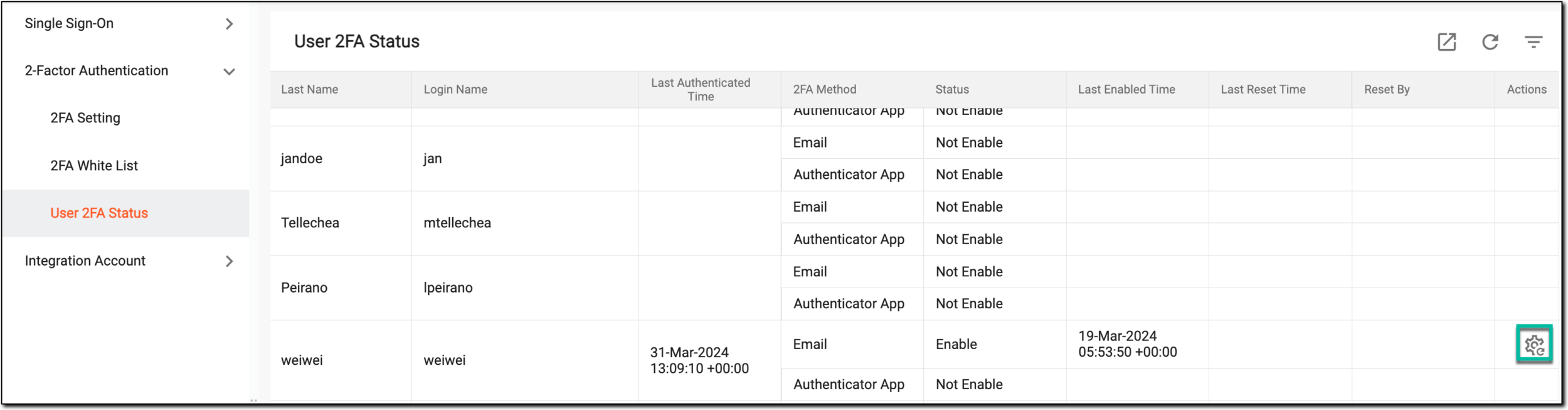 Figure 1. Viewing User 2FA status
Element
Details
First Name
Represents the first name of the user.
Last Name
Represents the last name of the user.
Login Name
Represents the name with which the user can log in to the system.
Last Authenticated Time
Represents the time when the user is last authenticated.
2FA Method
Represents the method through which the user is authenticated via 2FA.
Status
Represents whether the 2FA is enabled for the user or not.
Last Enabled Time
Represents the time when the 2FA method is last enabled for the user.
Last Reset Time
Represents the time when the 2FA is last reset for the user.
Reset By
Represents the name of the user who has reset the 2FA for the user.
You have viewed the user's 2FA status. You can also reset the 2FA method for the user.