Tasks dashboard
The My Tasks dashboard is informative and designed to give you a general understanding of your personal workload over all studies to which you have access.
Tip
Upon selecting any tile of your interest, the system always directs you to the My Work dashboard, where you can concentrate on resolving your respective assignments for that particular study.
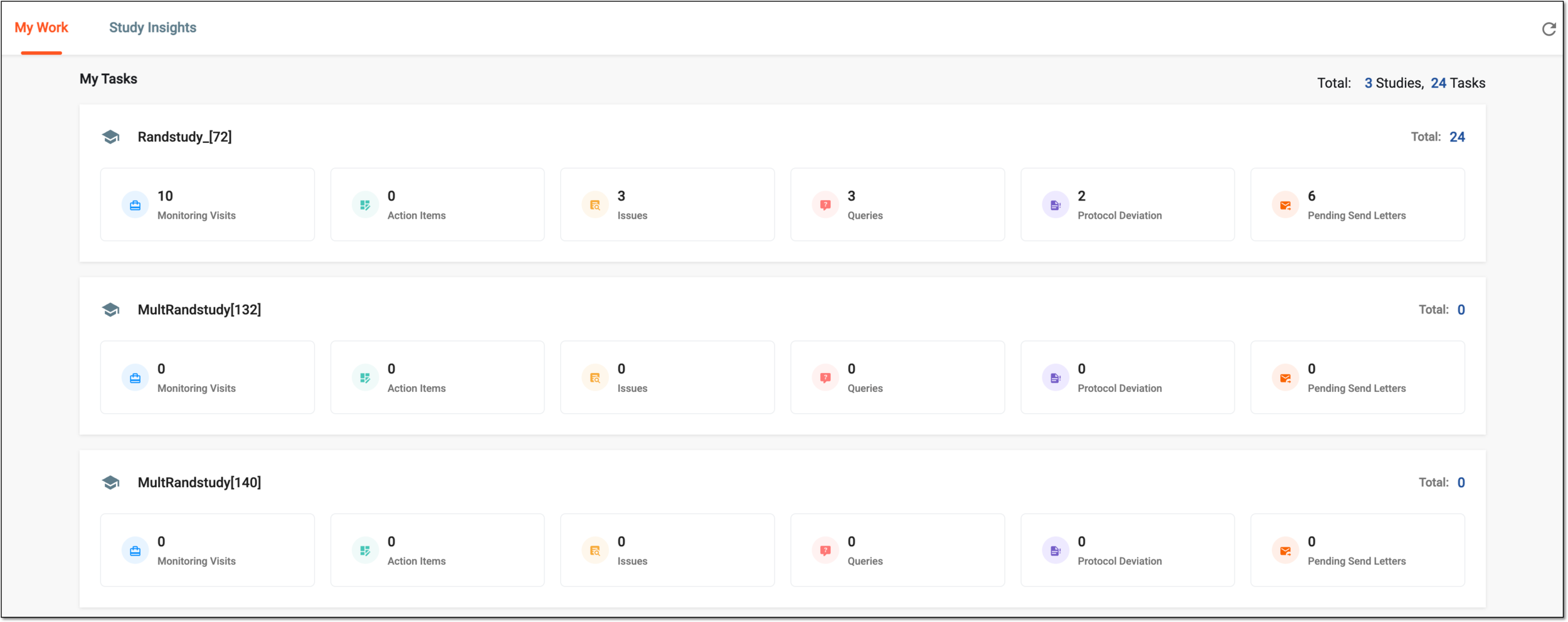
Each study is represented by an individual tile comprising a set of task categories. The task categorization is as follows:
-
Monitoring Visits: this category displays the total count of tasks associated with monitoring visits that are pending your approval, trip report submission, and trip report approval. Upon selection, you can analyze your monitoring visit tasks and resolve them as required.
-
Action Items: this category displays the total count of tasks associated with not started or ongoing monitoring visit action items that require your attention. Upon selection, you can analyze your action items and resolve them as required.
-
Issues: this category displays the total count of tasks associated with existing monitoring visit issues that require your resolution. Upon selection, you can analyze the issues assigned to you and resolve them as required.
-
Queries: this category displays the total count of tasks associated with open monitoring visits and protocol deviation queries that require your resolution. Upon selection, you can analyze the queries assigned to you and resolve them as required.
-
Protocol Deviation: this category displays the total count of tasks associated with protocol deviation records that need to be completed by you. Upon selection, you can visualize your tasks and resolve them as required.
-
Pending Send Letters: this category displays the total count of confirmation and follow-up letters expected to be sent on upcoming or occurred monitoring visits. Upon selection, you can analyze the letters waiting to be sent and proceed to send them as required.
Important
Note that the preceding task categories you see may differ depending on your user role and the set of tasks assigned to you in the system according to your field of responsibilities and company arrangements.