Configure manual query setting
Data validation refers to the process of ensuring the accuracy, reliability, and integrity of CRF data collected during the study. It involves a series of checks and procedures that aim to identify and resolve data inconsistencies. The importance of data validation lies in its role in maintaining the scientific validity and credibility of the study results. By ensuring the quality of the data, researchers can have confidence in the findings and draw accurate conclusions, which ultimately impacts patient safety and the decision-making process for regulatory authorities.
Before you can execute validation rules to start validating entered CRF data, you need to configure the manual query setting in order to define what user roles need to be assigned queries if they are generated upon data validation execution. Moreover, you can define the expected time for the resolution of those queries so if some queries pass the overdue date, they will be marked as overdue.
-
In the EDC application header, select the STUDY INFO tab.
-
In the left pane of the page that opens, expand Data Validation and select the Validation List tab.
-
From the workspace toolbar of the Validation List table that appears, select Manual Query Setting
 .
. Figure 1. Selecting Manual Query Setting option
-
In the Manual Query Setting dialog that appears, configure query settings as explained in the following table.
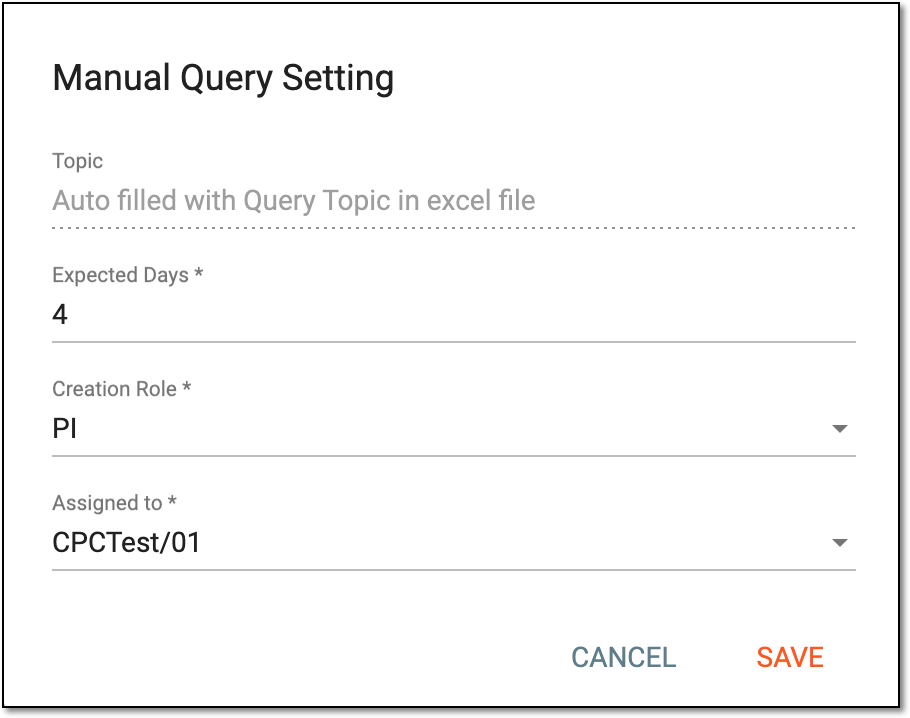 Figure 2. Configuring manual query setting
Tip
In the following table, mandatory elements are marked with an asterisk (*).
Element
Details
Topic
This field is disabled as it indicates that each uploaded validation rules template contains query topics for each issue that may be generated upon data validation execution so the system will assign these topics to each query.
Expected Days*
Represents the number of days expected to be spent on the resolution of each generated query.
Creation Role*
Represents the role of users who can confirm validation result tasks and decide whether to open or cancel queries based on tasks that may be generated upon data validation execution.
Assigned to*
Represents the role of users who are to be assigned to queries after they become opened based on generated validation result tasks.
SAVE
Select
 to save the manual query configuration.
CANCEL
Select
 to discard the changes and close the dialog.
Once saved, the manual query setting is configured. The corresponding users will be assigned tasks upon data validation execution.