Re-randomize scrambled numbers
In IWRS, when using scrambled randomization of subject numbers, you have an option to re-randomize the numbers in case for some reason, you are not satisfied with the previous randomization result.
-
In the IWRS application header, select the TREATMENT DESIGN tab.
-
On the page that opens, in the left pane, select the Period subtab.
-
In the Period List table that appears, locate the period of your interest. Then in the Period Name column, select the value to open the period configurator.
-
In the period configurator, in the Scrambled Randomization List table, go to the scrambled randomization that you want to re-randomize and next to it, select More
 > Re-randomize
  .
.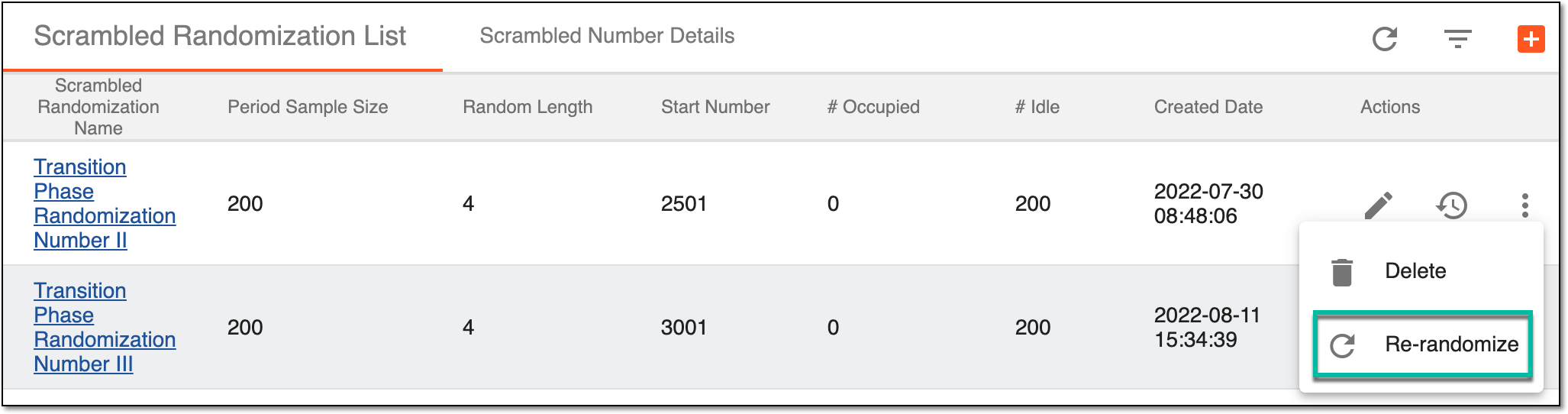 Figure 1. Re-randomizing scrambled numbers
Important
If the scrambled numbers within are not involved in any randomization scheme, Re-randomize
is
disabled.
Upon selecting , the scrambled numbers are randomized again. You can also edit or add new scrambled randomization.