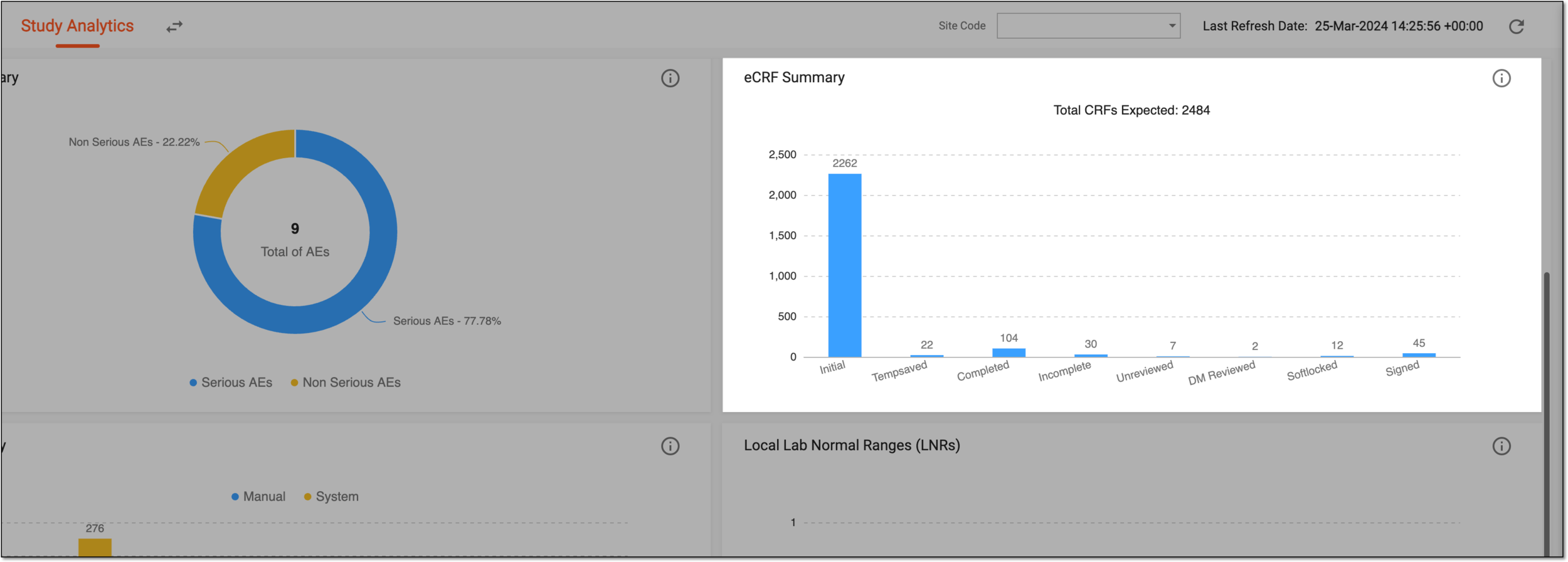
eCRF summary
The EDC dashboard visually summarizes the ongoing processes across the EDC application. On the Study Analytics page, the information is displayed in the form of charts that provide you with a basic and quick analysis of the current state of the key data elements, such as site summary, subject summary, labs, queries, and so on.
The eCRF Summary bar chart is one of such charts provided in the dashboard that displays the total electronic case report forms (eCRFs) created in Study Designer. In EDC, in the DATA ENTRY tab, these eCRFs are expected to be filled (Total CRFs Expected) for the subjects associated with a site and study for acquiring their information, such as their enrollment details, disease history, medical history, and others.
The eCRF Summary bar chart captures and displays information for the forms that are in the following phases: Initial, Tempsaved, Completed, Incomplete, Unreviewed, DM reviewed, Softlocked, and Signed. The data in this chart is updated in real-time, that is as soon as you submit an eCRF of any type, such as simple, log, or grid form, then the count of the Completed bar in the chart is increased.