Activate/Inactivate integration alert
The IWRS application supports the integration with SFTP file servers to enable the automation of data transfer from the file server to IWRS. This automation minimizes manual effort, reduces the risk of human error, and simplifies the overall data management processes within the application.
An integration alert is a customizable notification mechanism that generates an email to inform relevant parties about the file exchange processes between IWRS and the SFTP file server. Currently, IWRS only supports the exchange of shipment data with the SFTP file server. By default, the inventory alerts have an Active status but can be deactivated in case the recipients associated with them need to temporarily stop receiving emails about shipment data exchange processes between IWRS and the SFTP file server.
-
In the IWRS application header, select the INTEGRATION tab.
-
From the left pane, select the Integration Alert subtab
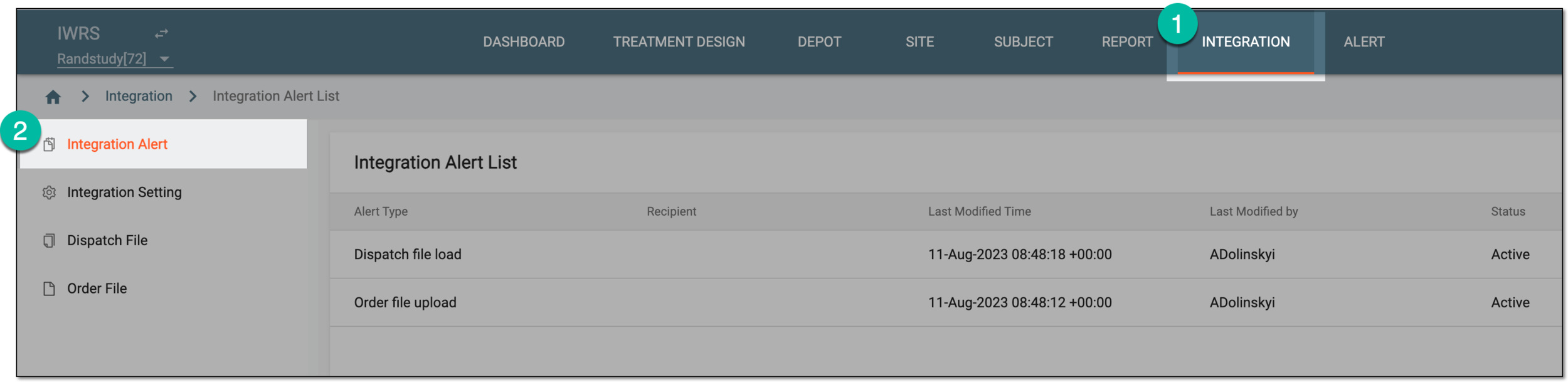 Figure 1. Accessing integration alert list
-
In the Integration Alert List table that opens, select Activate
 next to the
inactive integration alert to activate it, or select Inactivate
next to the
inactive integration alert to activate it, or select Inactivate  next to the active integration alert to deactivate it.
 Figure 2. Activating and inactivating integration alert
Once selected, the integration alert is activated or inactivated. If inactivated, the recipients stop getting alert emails about shipment data exchange processes between IWRS and the SFTP file server until activated again.