View external gateway logs report
An external gateway log is the set of log records generated when an external system interacts with the eClinical system. It supports communication between eClinical systems and other applications, such as EDC.
From the External Gateway Logs report, you can view details of logging activities between the eClinical system and other applications. It assists you in analyzing the integration details between the eClinical system and other applications.
-
In the ADMIN application header, select the REPORT tab.
-
On the page that opens, in the left pane, select External Gateway Logs.
-
In the External Gateway Logs table that opens, view the details of external gateway logs as explained in the following table.
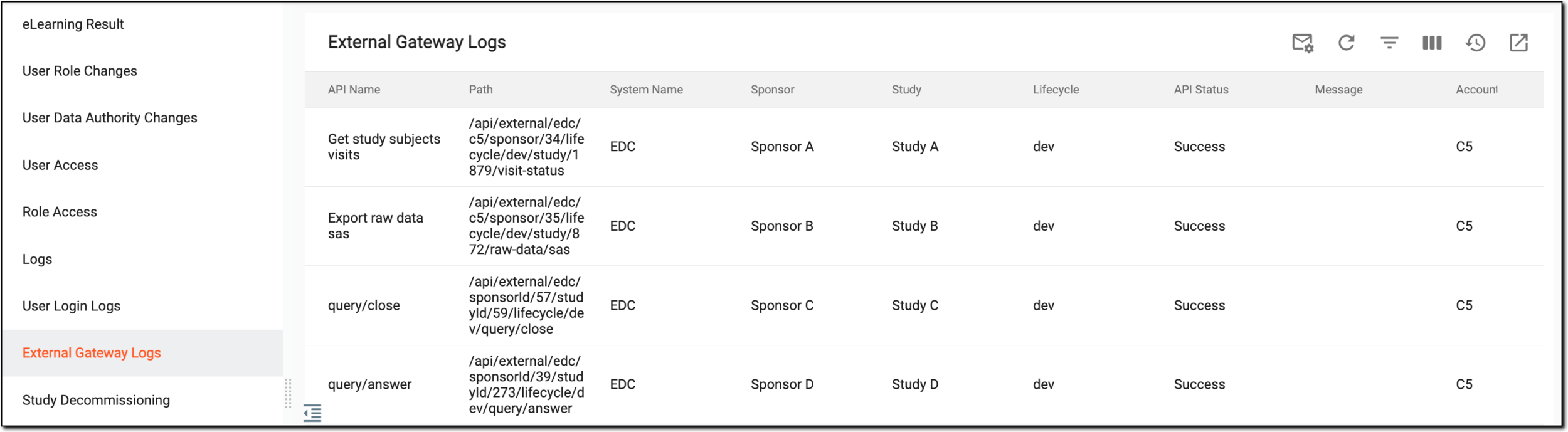 Figure 1. Viewing external gateway logs report
Element
Details
API Name
Represents the unique label of the API from which the external gateway log has been performed.
Path
Represents the path of the API from which the external gateway log has been performed.
System Name
Represents the name of the application that interacted with the ADMIN application, such as EDC.
Sponsor
Represents the name of the sponsor through the external system that interacts with the ADMIN application.
Study
Represents the name of the study through which the external system interacted with the ADMIN application.
Lifecycle
Represents the lifecycle through which the external system log has been performed.
API Status
Represents whether the API used to perform the action was successful or not.
Message
Represents the message sent along with interaction. This field remains blank if no message is sent.
Account Name
Represents the account name through which the external system interacted with the ADMIN application.
Request Time
Represents when the external system requested to interact with the ADMIN application.
Parameter
Represents the information passed when the external system communicates with the ADMIN application.
For instance, if the communication process fails, the parameter passed is a source containing the error message and the code of the failed action. Consequently, it assists in troubleshooting the identified failure.
Response Time
Represents when the response is received after being requested by an external system.
You have viewed the External Gateway Logs report. You can export and download it to work with it offline.