View logs report
The logs are defined as the record of actions, errors, or other events that happen in the ADMIN application. You can view the detailed record of all these actions from the Logs report. This helps you analyze the history of different activities that took place in the administration interface system.
-
In the ADMIN application header, select the REPORT tab.
-
On the page that opens, in the left pane, select Logs.
-
In the Logs table that appears, view the details of logs as explained in the following table.
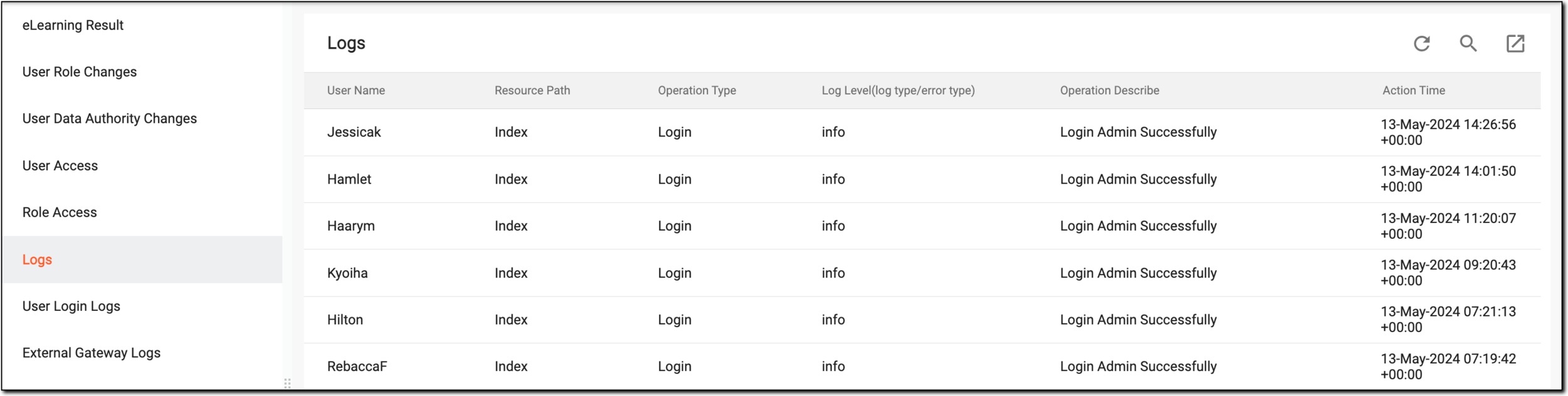 Figure 1. Viewing logs report
Element
Details
User Name
Represents the name of the user who performed an action.
Resource Path
Represents the address where the details of the log action have been saved.
Operation Type
Represents the type of action performed, such as login.
Log Level(log type/error type)
Represents the importance level of the log where the action is performed.
For instance, if the log level is error level, then it specifies that the action performed resulted in failure and requires immediate assistance.
Operation Describe
Represents a brief description of the action performed.
Action Time
Represents the time when the action has been performed.
You have viewed the Logs report. You can export and download it to work with it offline.