View two-factor authentication white list
From the two-factor authentication white list, you can view the details of all those users who are not able to perform their 2FA authentication, despite having it enabled. This list assists the managers in viewing the users who are facing issues and resolving their problems.
Important
The users on the 2FA White List page can access the system but are not authenticated via the two-factor authentication functionality until their issue is resolved.
-
In the ADMIN application header, select the CONFIGURATION tab.
-
On the page that appears, from the left pane, select, 2-Factor Authentication > 2FA White List.
-
In the 2FA White List page that appears, view the details as explained in the following table.
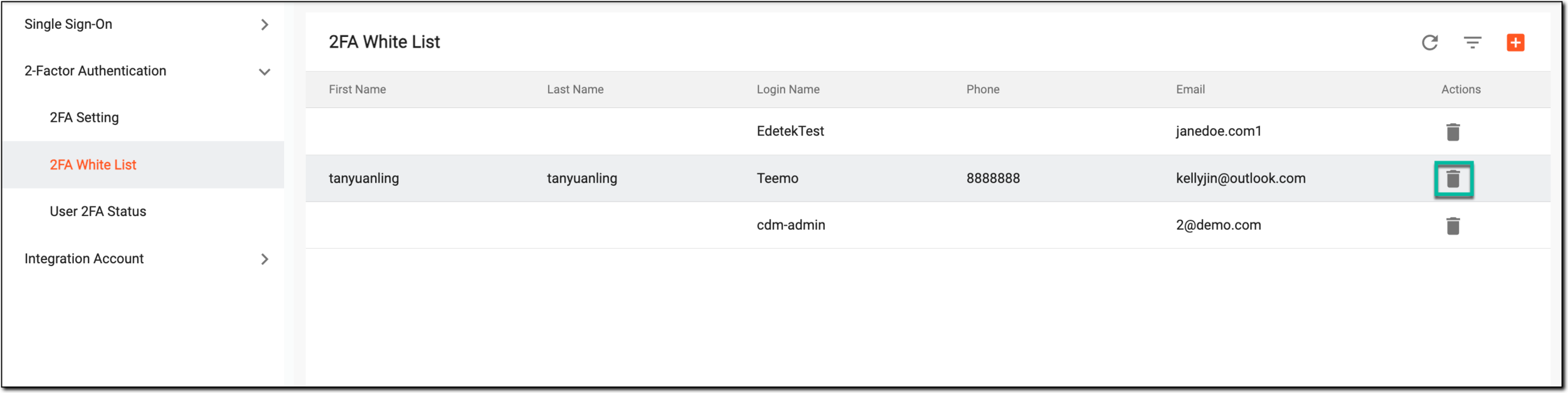 Figure 1. Viewing 2FA white list
Element
Details
First Name
Represents the first name of the user.
Last Name
Represents the last name of the user.
Login Name
Represents the name with which the user logs in to the application.
Phone
Represents the phone number of the user.
Email
Represents the email address of the user.
You have viewed the details of the users in the 2FA white list.