Role management
A role is defined as the set of access permissions and characteristics provided to a certain group of users and based on which they can use the eClinical system.
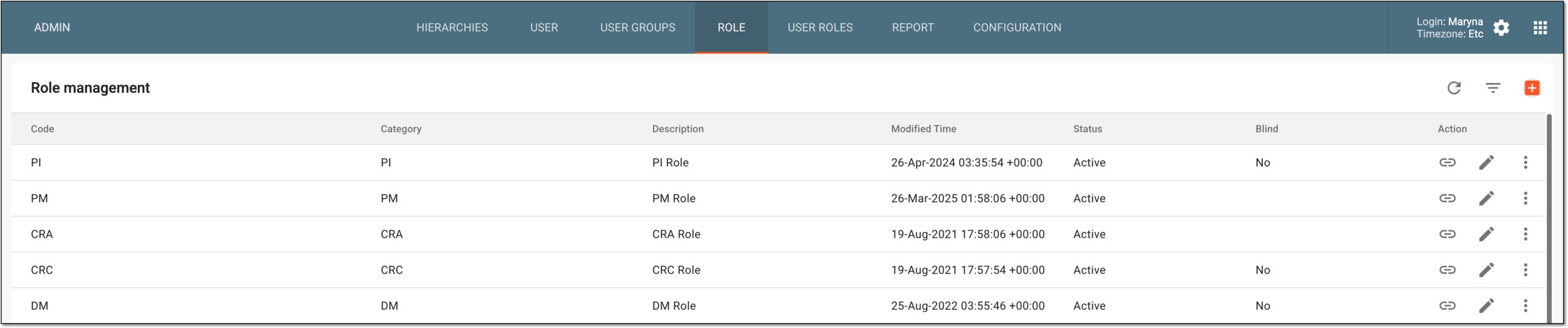
In the ADMIN application, under the ROLE tab, you can find the complete list of all the roles created in the eClinical system, such as DM, CRC, PI, Sponsor, and so on. These roles can be assigned to the eClinical users to grant them certain system permissions and access according to their functional characteristics.
The general details of each role available in the Role management list are explained in the following table.
|
Element |
Details |
|---|---|
|
Code |
Represents the code of the role displayed in the system UI when operated by the respective user. This value is composed upon the role creation out of the role category and subcode values. If there is no subcode, then the code is just the role category. For instance, if the role category is "CRC" and the subcode is "Study_Name_01," the role code is displayed in the system as "CRC/Study_Name_01." This makes it more convenient to trace role activity in system reports and operation history logs. |
|
Category |
Represents the kind of role that the associated users have in the clinical trial or system management based on their functional characteristics, such as DM, CRC, PI, Administrator, Tester, and so on. |
|
Description |
Represents specific descriptive details about the user role. |
|
Modified Time |
Represents the exact date, time, and time zone indicator when the role was last modified. |
|
Status |
Represents whether the user role is active or inactive. |
|
Blind |
Represents whether the user role is blinded or unblinded. |