Process E2B R3 import file
By implementing the E2B R3 standard, the PV system enhances the quality and accuracy of adverse event (AE) data by ensuring consistency, quality, and compliance with regulatory requirements.
In PV, you can create ICSRs using the E2B R3 import by uploading an XML file with your case data or receiving such a file via a gateway. Once the file is imported, its data must be processed for the system to detect the type of XML and extract the information from it.
-
In the PV application header, select the INTAKE tab.
-
On the page that opens, from the left pane, select E2B R3 Import.
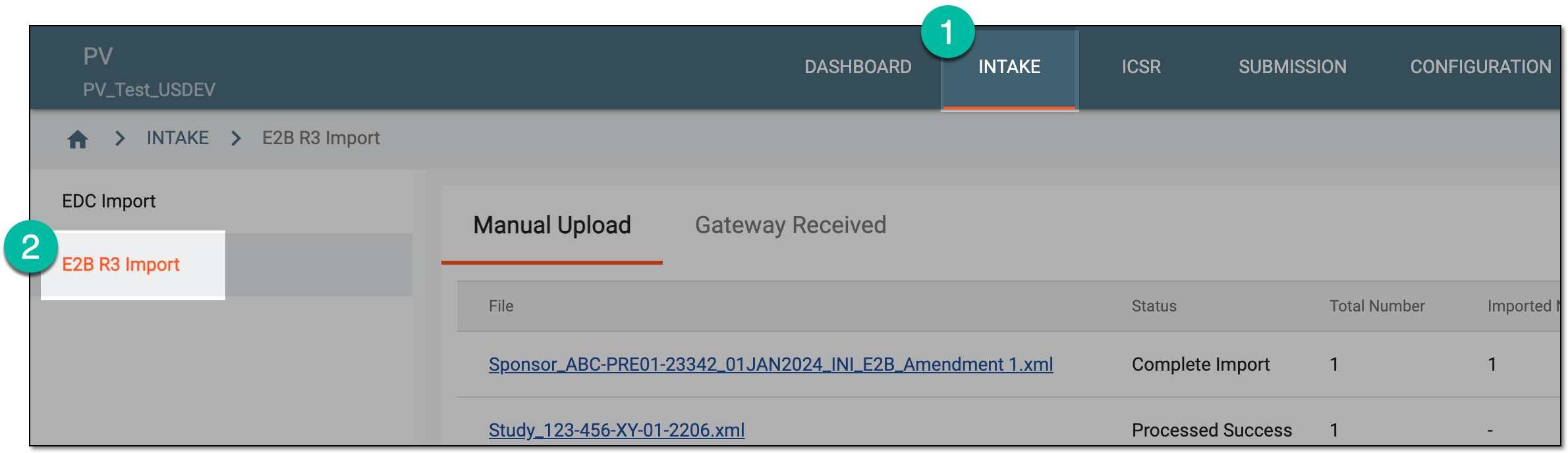 Figure 1. Accessing E2B R3 import
-
Based on where your imported file resides, select the Manual Upload or Gateway Received tab.
-
In the table that appears, locate the unprocessed file and from the Actions column next to it, select Edit
 .
.Tip
You can see the uploaded files with cases based on the study access permission granted via ADMIN.
 Figure 2. Selecting to edit unprocessed import record
-
On the resulting page, from the workspace toolbar, select Process
 .
.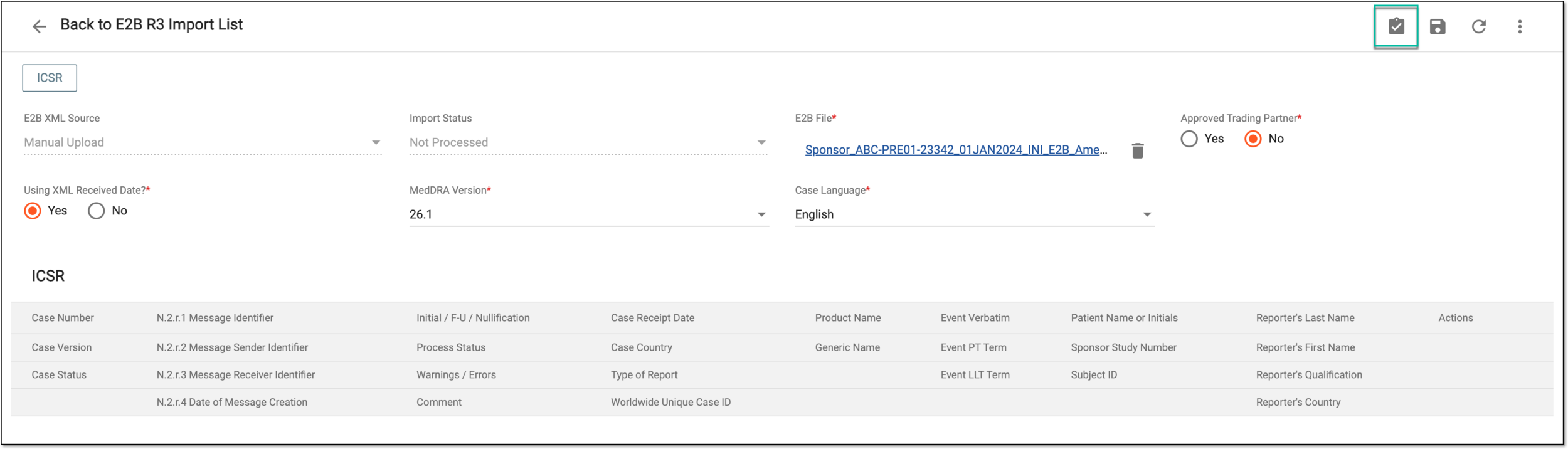 Figure 3. Selecting to process import record
Important
In case the import fails, you receive a respective notification. The possible scenarios for the failure can be:
-
An incorrect form of the XML file: in this case, contact your data provider to obtain a new and corrected file.
-
Inappropriate import format: for instance, E2B R2; the feature only supports XML files in E2B R3 format.
Troubleshoot your file and repeat the E2B R3 upload procedure.
-
-
Upon successful processing, the data from the file is imported and displayed in the newly added form fields and the ICSR table. The details of these data elements are explained in the following table.
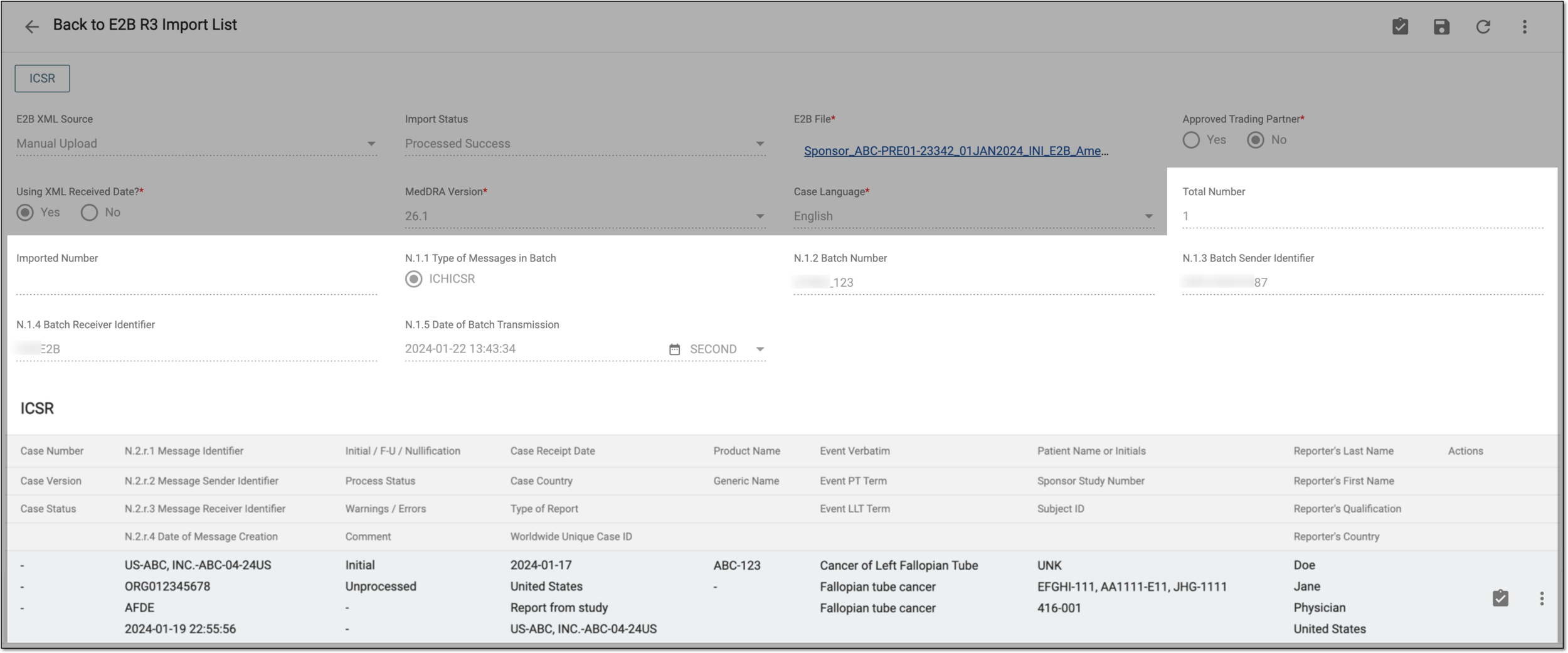 Figure 4. Viewing processed data
Important
All the elements presented in the following table are read-only. The values populate from the processed XML file.
Element
Details
Total Number
Represents the total number of ICSRs in the uploaded XML file.
The system currently supports importing only one ICSR per single XML file.Imported Number
Represents the number of ICSRs whose data is imported into the system upon processing out of the total number of ICSRs in the uploaded XML file.
The system currently supports importing only one ICSR per single XML file.XML ID and Gateway Routing ID are different?
Represents whether the XML ID value of the imported file is different from the Gateway routing ID (Yes) or not (No). The option is autoselected based on the system check upon file processing and cannot be manually changed.
This field is only available for gateway-received files. For manually uploaded files, this value is inapplicable.N.1.1 Type of Messages in Batch
Represents the type of information being transmitted.
N.1.2 Batch Number
Represents a unique tracking number assigned by the sender to each outbound ICH ICSR batch file. The batch number is unique only to the sender.
N.1.3 Batch Sender Identifier
Represents the origin of the ICSR reports (creator of ICH ICSR batch file), for instance, a company name or regulatory authority. The identifier is unique to the receiver.
N.1.4 Batch Receiver Identifier
Represents the intended destination of the ICSR batch file. The identifier is unique to the sender.
N.1.5 Date of Batch Transmission
Represents the date when the ICH ICSR batch file was transmitted.
ICSR
The table represents general data on the reported case.
Case Number
Represents the case number identifier and is only available upon successful import. It is also an active link that opens your case details page in the new browser tab.
Case Version
Represents the case version and is only available upon successful import.
Case Status
Represents the case status and is only available upon successful import.
N.2.r.1 Message Identifier
Represents a unique tracking identifier assigned to a specific ICH ICSR message transmitted by the sender. One ICH ICSR message contains one and only one ICSR.
N.2.r.2 Message Sender Identifier
Represents an identification of the sender of the ICSR reports (creator of ICH ICSR message).
N.2.r.3 Message Receiver Identifier
Represents an identification of the intended recipient of the transmission of the ICSR message.
N.2.r.4 Date of Message Creation
Represents the date when the ICH ICSR message was created in the sender’s database.
Initial / F-U / Nullification
Represents if the report is initial (the case is reported for the first time), follow-up (the data in the report is an additional/updated version of the previously reported case), or nullification (the data in the report nullifies the previously reported case that becomes invalid).
Process Status
Represents the current processing status of the report, such as Unprocessed, Initial Report, Update Report, Follow-up Report, and Reject Import.
Warnings / Errors
Represents any warning or error the system encounters upon processing and validating the report. This is also an active link that you can select to open the dialog with a detailed list of errors encountered by the system.
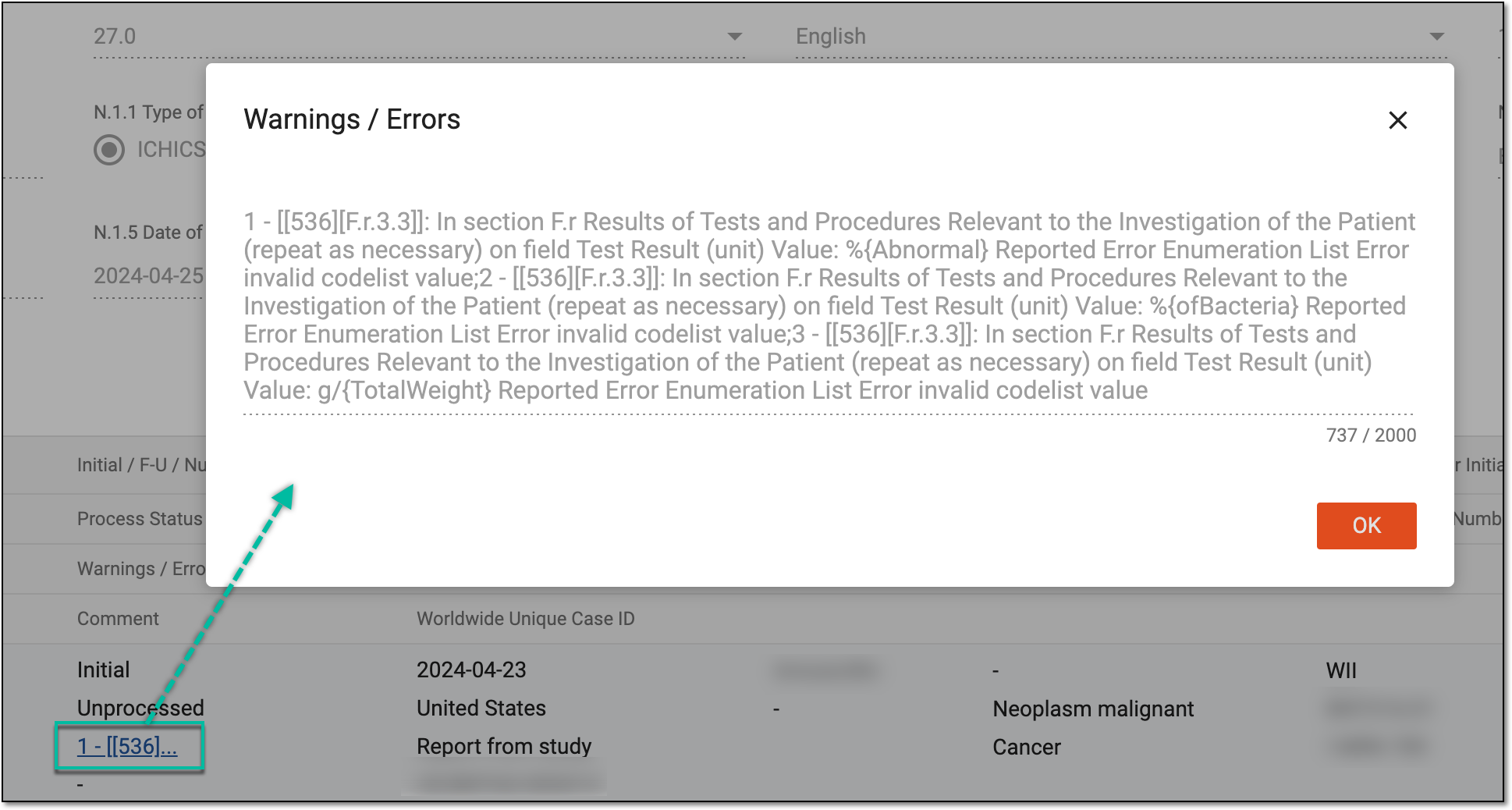 Figure 5. Reviewing processing warning
Comment
Represents any comments added to the report by the user performing the import.
Case Receipt Date
Represents the date when the safety department received the most recent case data.
Case Country
Represents the country in which the first AE occurred at the time of the initial report.
Type of Report
Represents the type of the report: Spontaneous report, Report from study, or Other.
Worldwide Unique Case ID
Represents a unique international identifier assigned to the case.
Product Name
Represents the medicinal name of the first suspect product for the case.
Generic Name
Represents the chemical name of the drug based on the compound's chemical structure.
The field may remain empty since it only applies to the NMPA E2B R3 XML.Event Verbatim
Represents the original reporter's words or short phrases used to describe the first reported event.
Event PT Term
Represents the automatched PT of the first event.
The field remains empty when automatch fails.Event LLT Term
Represents the automatched LLT of the first event.
The field remains empty when automatch fails.Patient Name or Initials
Represents the name or initials of the patient for whom the case is reported.
The field may remain empty since this is an optional element.Sponsor Study Number
Represents the study number assigned by the sponsor.
The field may remain empty since this is an optional element.Subject ID
Represents the unique identifier of a patient (subject) assigned to them by the sponsor in the course of a clinical trial.
The field may remain empty since this is an optional element.Reporter's Last Name
Represents the last name of the primary reporter of the case.
The field may remain empty since this is an optional element.Reporter's First Name
Represents the first name of the primary reporter of the case.
The field may remain empty since this is an optional element.Reporter's Qualification
Represents the qualification of the primary reporter of the case.
Reporter's Country
Represents the two-letter code of the reporter’s country according to ISO 3166-1 (Codes for the representation of names of countries and their subdivisions – Part 1: Country codes).
You have processed the imported E2B R3 file and can now review the resulting ICSR data.