Rename library folder
The Study Designer application has a library of reusable forms that can streamline the process of designing a CRF for different studies. This library accelerates the form creation process and ensures consistency and accuracy across various studies, saving study teams considerable effort. By leveraging the library content, researchers can minimize the time spent on repetitive form design tasks.
To tailor the experience, you have the flexibility to organize the form library into custom folders. It may occur that sometimes the name of any folder needs to be updated due to evolving organizational structures. In such cases, you can easily modify folder names, thus ensuring smooth adaptability and folder organization.
-
In the Study Designer application header, select the CRF DESIGN tab.
-
In the toolbar, select Form library
 to open the library with forms.
 Figure 1. Opening form library
-
On the page that opens, right-click the needed custom folder and select Rename
 .
.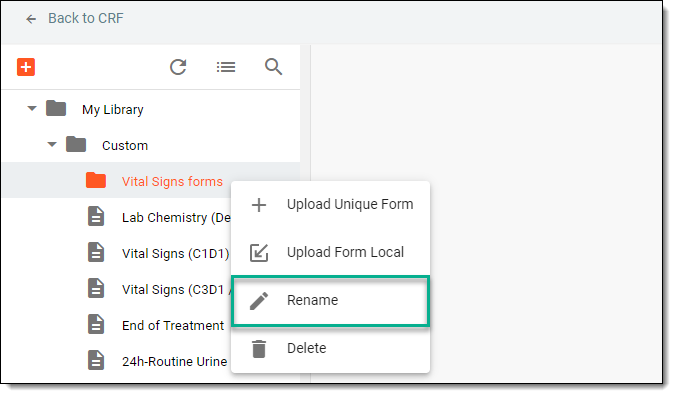 Figure 2. Selecting option to rename folder
Important
You cannot rename the My Library folder because it is the primary tree node in the library hierarchy.
-
In the Rename dialog that appears, update the folder name, and then select
 .
.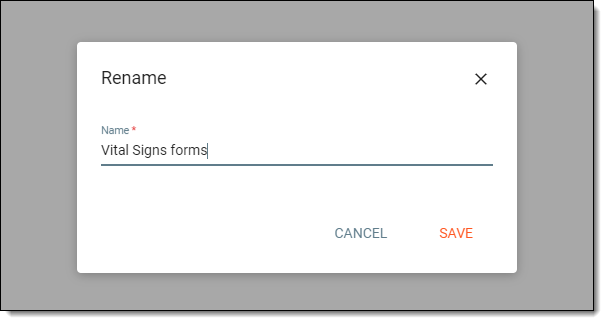 Figure 3. Renaming folder
Once saved, the folder name is updated.