Configure license
In pharmacovigilance, a product license refers to the formal authorization or approval granted by the regulatory authorities of a country or region that allows a pharmaceutical company or marketing authorization holder (MAH) to market and sell a medicinal product within that jurisdiction.
Licenses are issued for pre-market and post-market release of a drug, device, or vaccine. Investigational (pre-market) licenses are issued for studies done at study centers and marketed licenses are issued for the release of products.
In the PV application, once the product configuration is complete, you must create a product license for it.
-
In the PV application header, select the PRODUCT tab.
-
On the page that opens, in the left pane, expand the product family within which resides the product for which you want to add a license.
-
From the list of products, right-click the one of your interest and from the menu that opens, select Add License
 .
.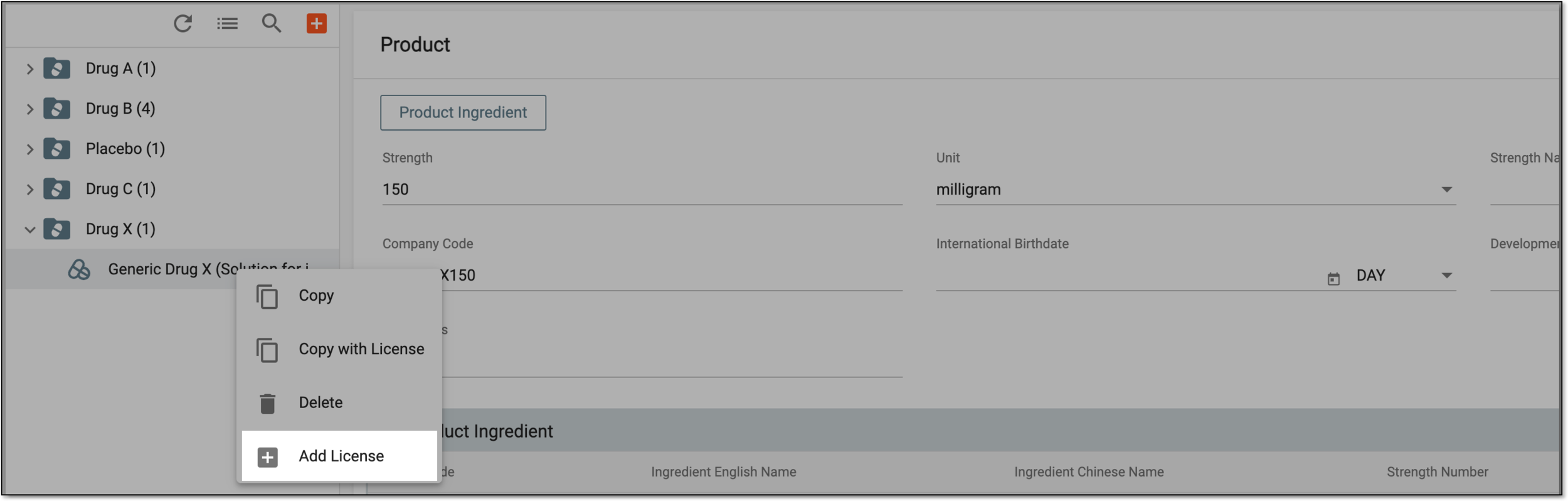 Figure 1. Adding license to product
-
On the Product License form page that opens, complete the required configurations as explained in the following table.
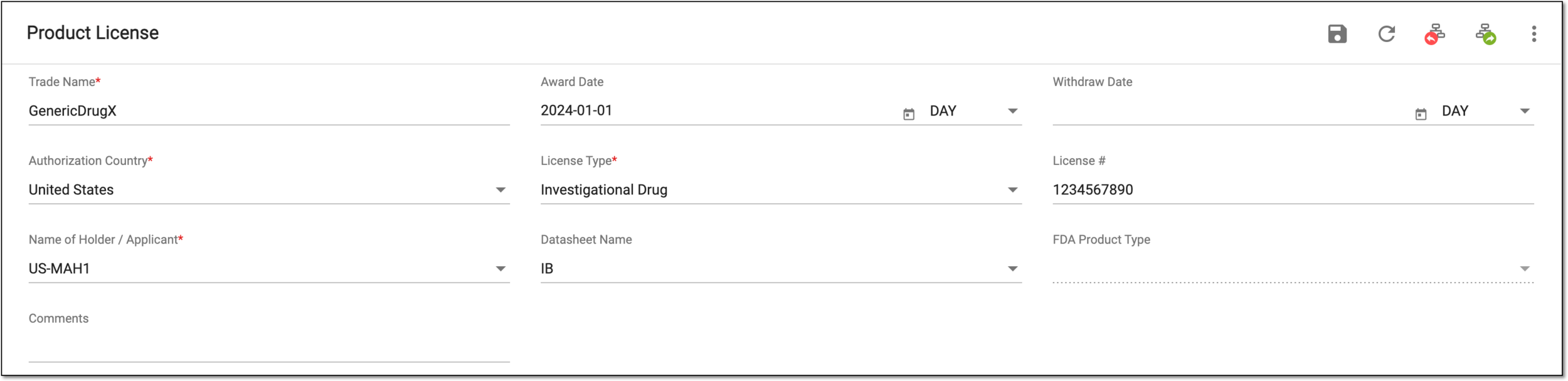 Figure 2. Configuring product license
Tip
In the following table, mandatory elements are marked with an asterisk (*).
Element
Details
Trade Name*
Enter the product trade name, a unique and proprietary name given to the medication by a pharmaceutical company.
Award Date
Select the date when the license has been awarded for your product by the regulatory authority, if indeed.
Withdraw Date
Select the date when the license has been withdrawn from your product by the regulatory authority, if indeed.
Authorization Country*
Select the country where a medicinal product has been granted marketing authorization or approval to be marketed, sold, and used for specific indications.
License Type*
Select the specific classification under which a medicinal product is approved and authorized for marketing and use by the regulatory authorities, such as Investigational Drug, Marketed Drug, and so on.
License #
Enter the identification number of the product license.
Name of Holder / Applicant*
Select the marketing authorization holder (MAH) from the list of available in PV.
If there is no MAH that suits your needs, you need to configure a new MAH.
Datasheet Name
Select the data sheet configured for your product family to associate with the license.
FDA Product Type
Select the product type according to FDA classification.
Comments
Enter a comment to provide additional information pertinent to the license, if any.
SAVE
Select
 to save the implemented changes.
Once saved, the license is added to the product. Now, if needed, you can forward its route to send it for approval.