Edit country configurations for study
If some details of the study country need to be updated, you can use the Edit option to do so. You cannot update the original country name if the updated country is already referenced in some sites or institutions.
Important
Note that you can update countries only if the study or such countries have not been previously closed, terminated, or suspended.
-
Access the study management page in one of the following ways:
-
In the CTMS application header, select the DASHBOARD tab and then select the study dashboard of your interest.
 Figure 1. Accessing study management from dashboard
-
In the CTMS application header, select the STUDY MANAGEMENT tab. Then from the Study Data List table, select the study name of your interest.
 Figure 2. Accessing study management from study data list
-
-
From the left pane of the page that opens, select Study Details > Country/Region List.
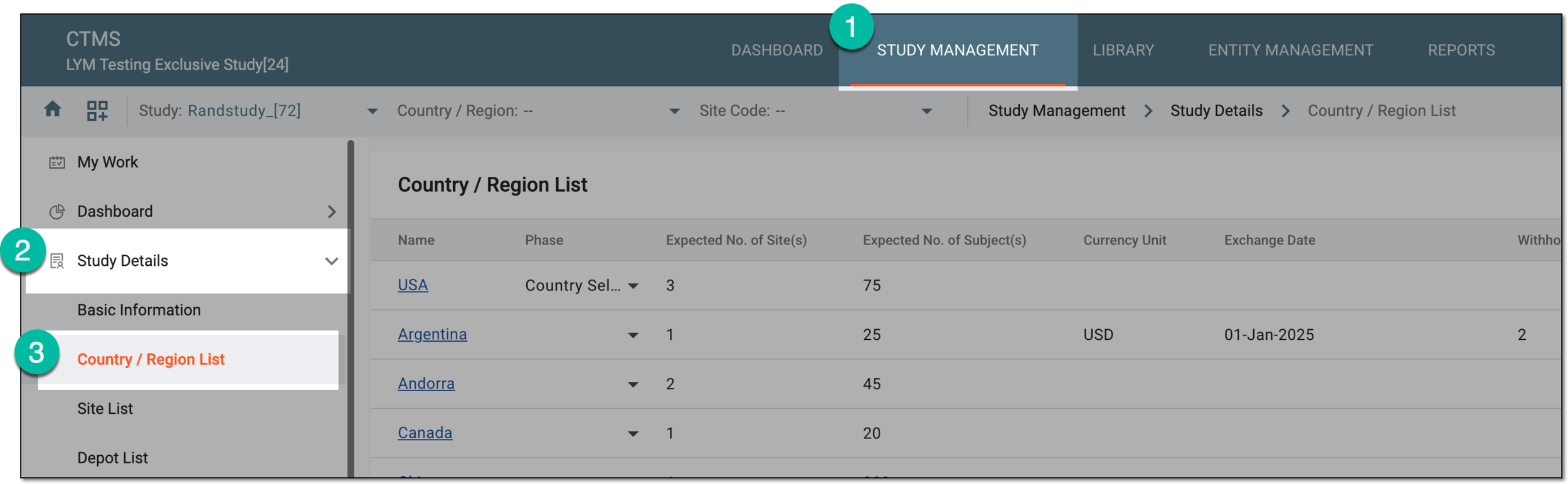 Figure 3. Accessing country and region list for study
-
In the Country/Region List table that appears, in the Name column, select the needed country, or next to it, select Edit
 .
. Figure 4. Accessing option to edit country
-
In the Edit dialog that opens, update country details as explained in the table of the Add country to study section.
Important
When editing country configurations for a master study, they are automatically copied to the substudy.
When editing country configurations for a substudy, only the expected number of subjects can be updated, all the rest of the fields are read-only and the values are inherited from the master study.
You cannot enter the expected number of subjects greater than indicated for the study, otherwise, the notification appears informing you about the maximum number that can be entered for the added country.
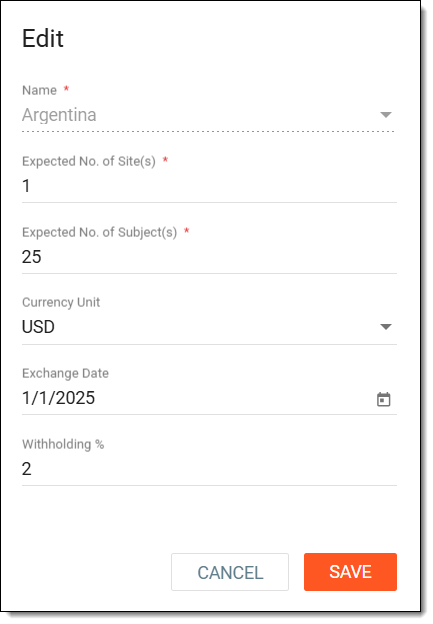 Figure 5. Editing country
-
Select
 to apply the changes.
Important
The SAVE button is not available if the country has been closed, terminated, or suspended. In the corresponding field of the Edit dialog, you can view the date when exactly the specific action has occurred.
Once saved, a country is updated.