Create supply shipment for depot
A supply shipment is a request for items (drugs or investigational products) from a depot to the supply depot. Such a request is created whenever there is a need to replenish the inventory to satisfy further drug logistics in a study.
In IWRS, you can manage your shipments in product units or container units based on your business requirements. To be able to ship products in containers, the respective container units must be configured for your study.
-
In the IWRS application header, select the DEPOT tab.
-
On the Depot List page that opens, select the depot for which you want to create the supply shipment.
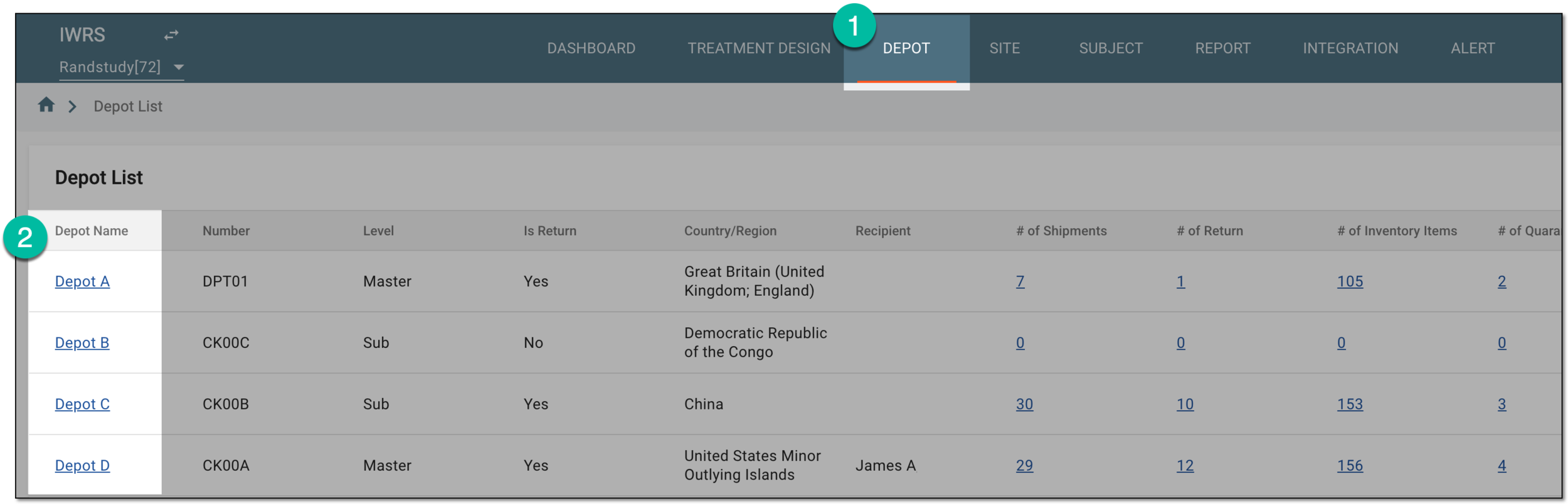 Figure 1. Selecting depot to open its details
-
On the page that opens, in the left pane, select the Shipment subtab.
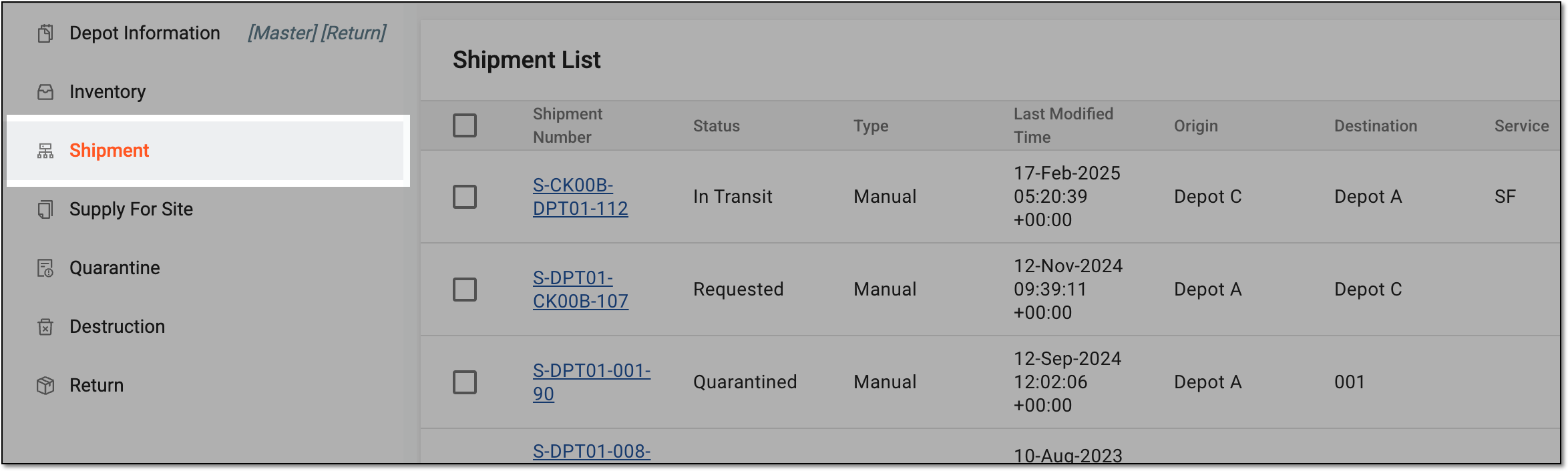 Figure 2. Accessing depot shipment list
-
On the page that opens, above the Shipment List table, select Add
 and then
New Supply Shipment.
and then
New Supply Shipment. Figure 3. Selecting to create new supply shipment for depot
-
On the New Shipment page that opens, complete the first part of the Item Unit stage of the shipment request as explained in the following table.
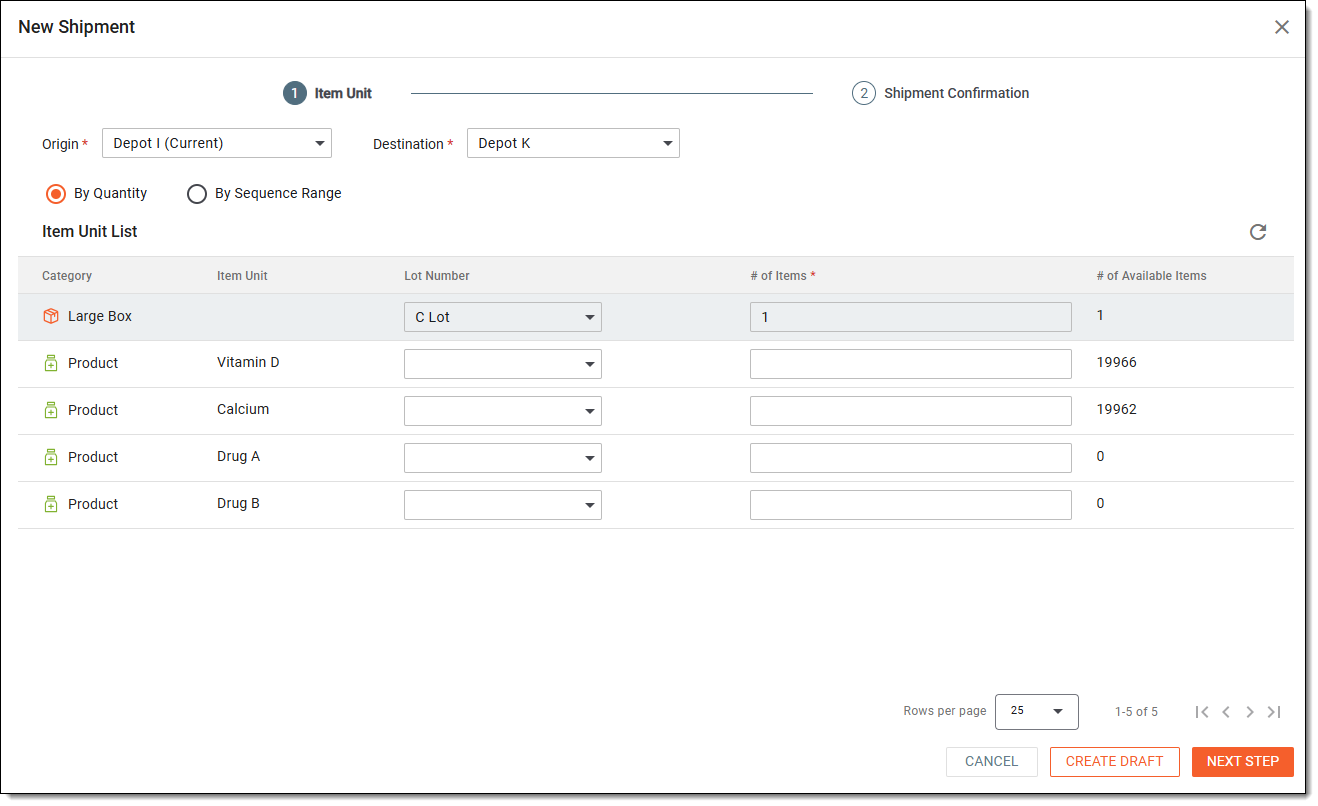 Figure 4. Completing item unit stage of supply shipment request
Tip
In the following table, mandatory elements are marked with an asterisk (*).
Element
Details
Origin*
Select the depot, from which the shipment is to be sent to the recipient.
Destination*
Select the depot or site where you want the requested items to be shipped
By Quantity
Select this option if you want to specify the number of item units you wish to request from the supplier.
For instance, you know the specific lot numbers from which you need a certain quantity of items.
By Sequence Range
Select this option if you want to specify the range of item unit sequential numbers within which you want your requested items to be.
For instance, you know that in the study, all the "Aspirin-100mg" numbers are from 1 to 1000, and the "Aspirin-200mg" numbers are from 1001 to 2000. Thus, you can specify the 1–1000 range to request all the "Aspirin-100mg" items available with the supply depot.
-
Once the needed options are selected—by quantity or sequence range—proceed to complete the shipment request as follows.
Upon selection of the preferred form of item request as By Quantity, in the Item Unit List table that appears, complete the fields as explained in the following table.
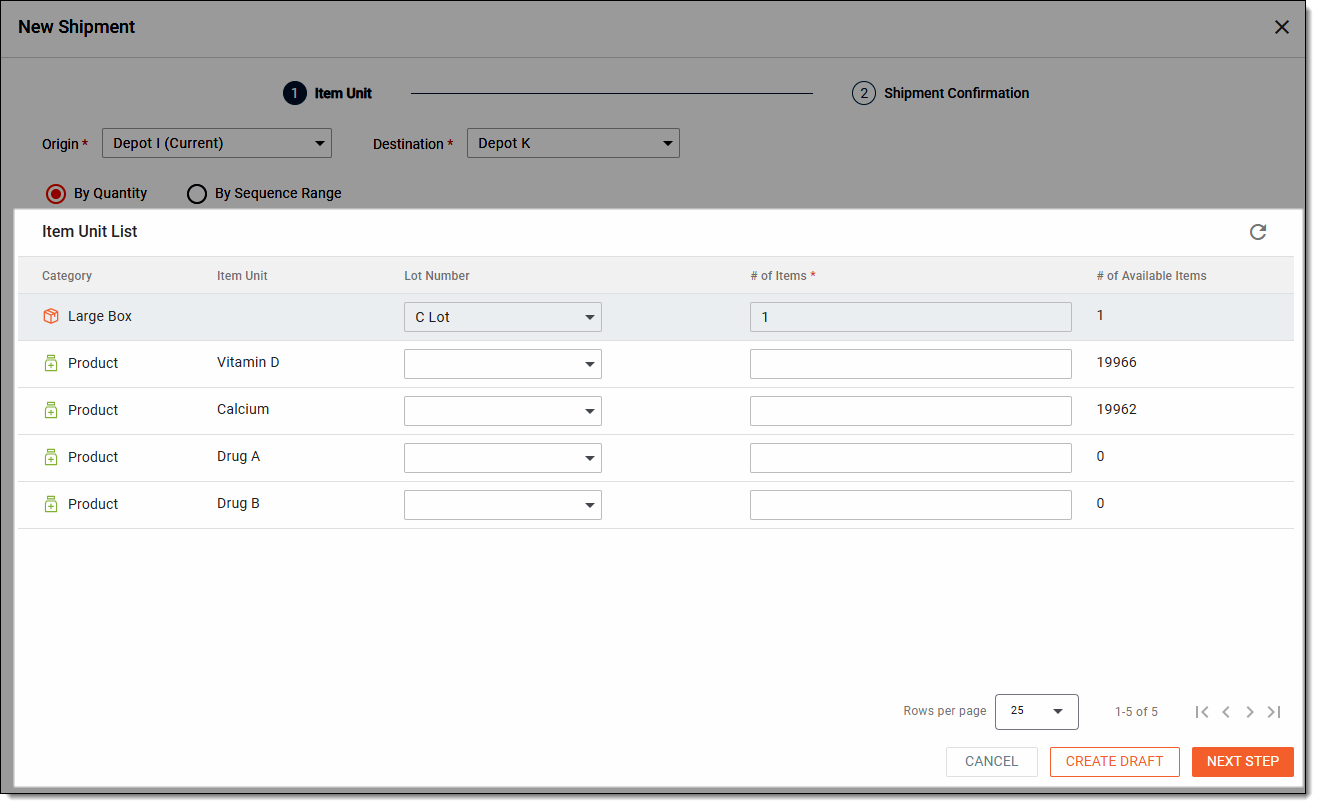 Figure 5. Requesting item supply by quantity
Tip
In the following table, mandatory elements are marked with an asterisk (*).
Element
Details
Category
Represents one of the following:
-
Product: a preconfigured product unit, the name of which you can see in the Item Unit column.
-
[Container category]: a preconfigured container unit. The container category name is configured upon its creation.
Item Unit
Represents the name of the product unit to be added to the shipment request. The values of the column are autopopulated with all the available product units of the selected supply depot.
The item units are not displayed for container units as they are enclosed within the container.Lot Number
Select the lot number from which you need to request items—product or container units.
# of Items*
Enter the number of items—product or container units—that you need to request in a current shipment.
To send out the shipment, the # of Items value must be less than # of Available Items. Otherwise,
                                        you cannot initiate the shipment, but you can save it as a draft.
If there are any other reasons preventing you from adding items to the shipment, you will see the respective prompt below the field.# of Available Items
Is autopopulated with the number of available items for the item unit at the supply depot based on the specified Lot Number value.
NEXT STEP
Select
 to save the applied changes and proceed to the Shipment Confirmation step.
CREATE DRAFT
Select
 to save the shipment as a draft for further use and amendments; no shipment request is sent upon this action.
The saved shipment obtains the Draft status.
to save the shipment as a draft for further use and amendments; no shipment request is sent upon this action.
The saved shipment obtains the Draft status.CANCEL
Select
 to cancel the shipment creation.
Upon selection of the preferred form of item request as By Sequence Range, in the Item Unit List table that appears, complete the fields as explained in the following table.
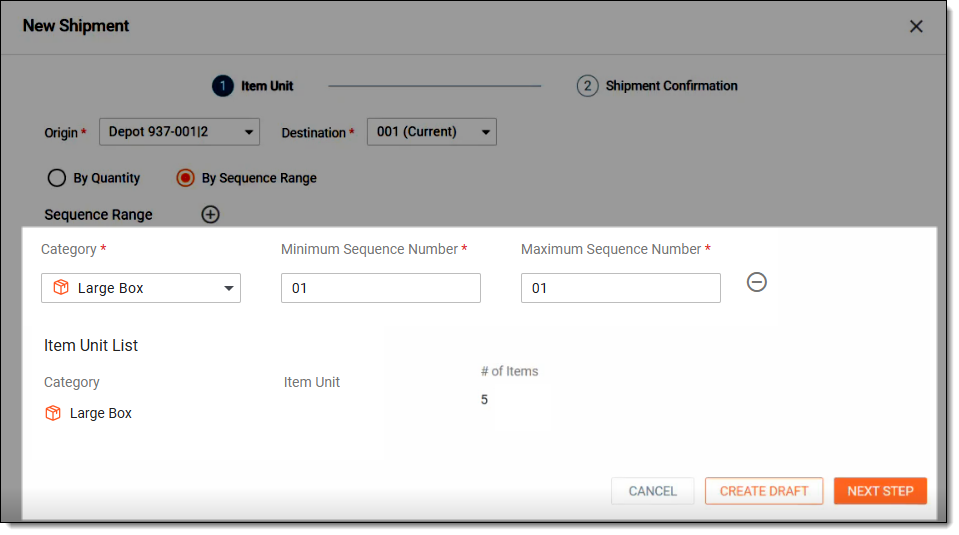 Figure 6. Requesting item supply by sequence range
Tip
In the following table, mandatory elements are marked with an asterisk (*).
Element
Details
Sequence Range

Select the plus symbol to add a new row and set another sequence number range from which you want to request items.
Category*
Select one of the following:
-
Product: a preconfigured product unit, the name of which you can see in the Item Unit column.
-
[Container category]: a preconfigured container unit. The container category name is configured upon its creation.
Minimum Sequence Number*
Enter the lowest sequence number of the range from which you want to request items, for instance, "1". As a result, only the items with the sequence number "1" and above are added to the shipment request.
Maximum Sequence Number*
Enter the highest sequence number of the range from which you want to request items, for instance, "1000". As a result, only the items with the sequence number "1000" and below are added to the shipment request.
Item Unit List
Category
Represents the shipping unit category—product or container—as selected previously.
Item Unit
Is autopulated with all the item units of the selected sequence range available in the selected depot inventory.
# of Items*
Is autopopulated with the number of items for the respective unit available in the selected depot inventory.
If there is any other reason preventing you from adding items to the shipment, you see the respective prompt below the field.NEXT STEP
Select
to save the applied changes and proceed to the Shipment Confirmation step.CREATE DRAFT
Select
to save the shipment as a draft for further use and amendments, no shipment request is sent upon this action.
The saved shipment obtains the Draft status.CANCEL
Select
to cancel the shipment creation. -
-
At the Shipment Confirmation step, review the shipment details you have specified in the previous step.
Tip
Use the Shipping Unit and Product filters to display the shipment details either by both shipping units (containers and products) or only by products.
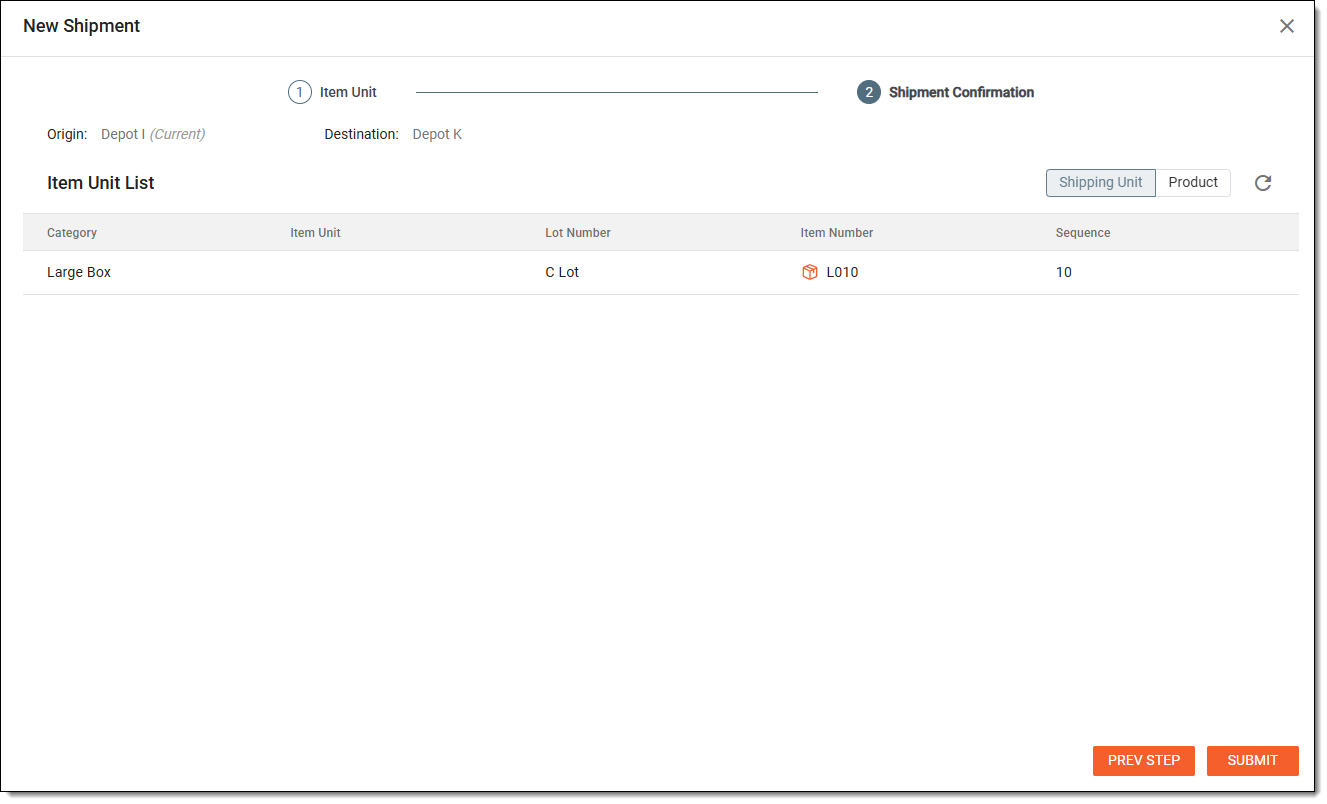 Figure 7. Reviewing shipment details
-
After reviewing the details, select
 to confirm your shipment request and place the order with the supply depot.
Tip
If needed, select
 to return to the previous step and modify your request.
Upon submitting, you have created the supply shipment request for a certain quantity of items or for all the items that belong to the specified sequence number range. An email is sent to the recipients of the supply depot to notify them of the requested shipment. The user can also manually resend the email if needed.