Add supply depot to site
To satisfy the dispensation process at sites, you have to establish a constant supply of drugs to replenish the inventory. For the most part, the role of the supplier belongs to the depots. In IWRS, you can add certain depots to set the steady supply relationship between them and the site.
-
In the IWRS application header, select the SITE tab.
-
On the Site List page that opens, in the table, select the site code of your interest.
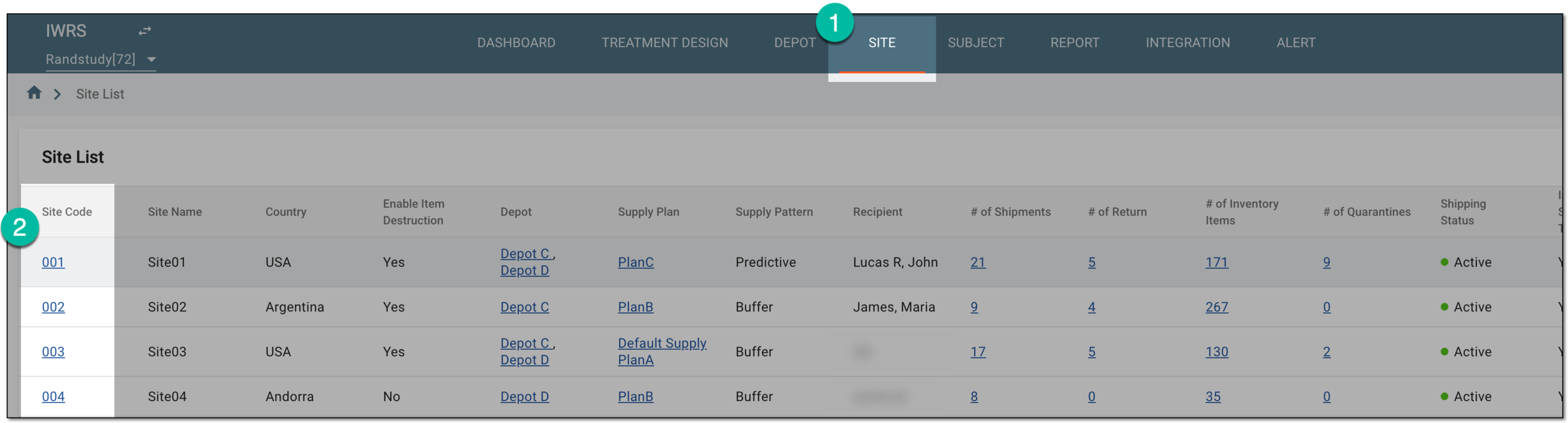 Figure 1. Selecting site to open its details
-
On the page that opens, in the left pane, select the Set Depot subtab.
-
On the Set Depot page that opens, on the far right, select New Item
 .
. Figure 2. Selecting to add new supply depot to site
-
In the Add dialog that opens, complete the supply settings as explained in the following table.
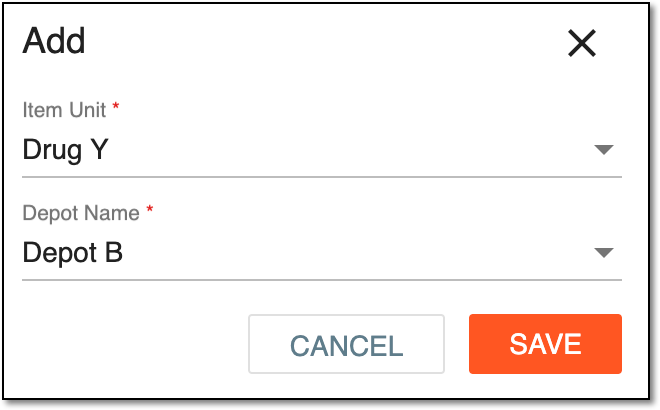 Figure 3. Adding new depot to site
Tip
In the following table, mandatory elements are marked with an asterisk (*).
Element
Details
Item Unit*
Select the item unit you need to have supplied.
Depot Name*
Select the depot name that can supply the selected item unit.
SAVE
Select
 to save the implemented changes.
CANCEL
Select
 to dismiss the changes without saving.
Upon saving, the new supply depot is added to a site. You can also set up a return depot for a site.