View manually disabled status report
The Manually Disabled Status report displays the entities of your study—visits, forms, and records—that are manually disabled by the EDC users.
-
In the EDC application header, select the REPORTS tab.
-
On the page that opens, in the left pane, select the CRF Status subtab to expand the list of available reports and select Manually Disabled Status.
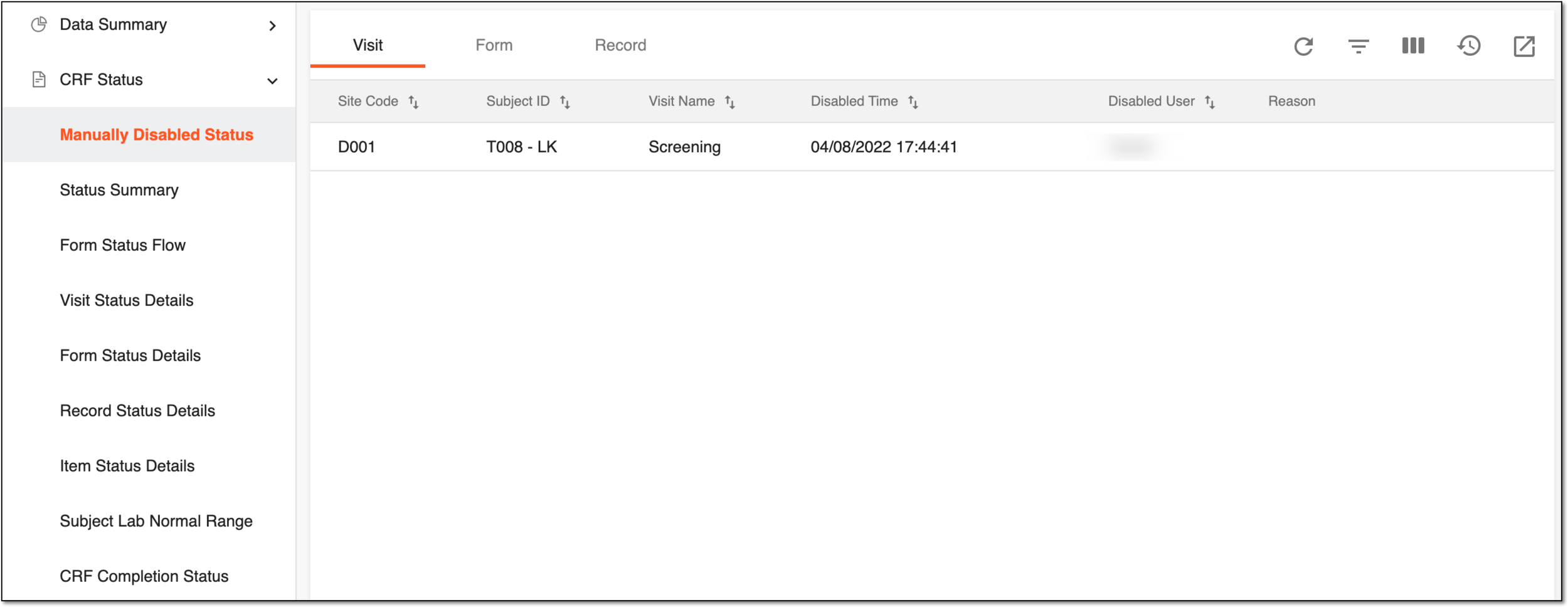 Figure 1. Viewing manually disabled visit details
For your convenience and better data perception, the report data is presented in three tabs:
-
Visit: the report comprises data on the manually canceled visits, the site and subject for which the visit has been originally created, the user who has canceled the visit, and the reason why.
-
Form: the report comprises data on the manually disabled forms, the site, subject, and visit for which the form has been intended, the user who has disabled the form, the time when it happened, and the reason why.
-
Record: the report comprises data on the manually disabled records within the forms, the site, subject, and visit for which the record has been intended, the user who has disabled the form, the time when it happened, and the reason why.
-
Once the report details are studied, you can leave the page or perform other suggested manipulations.