Label package list
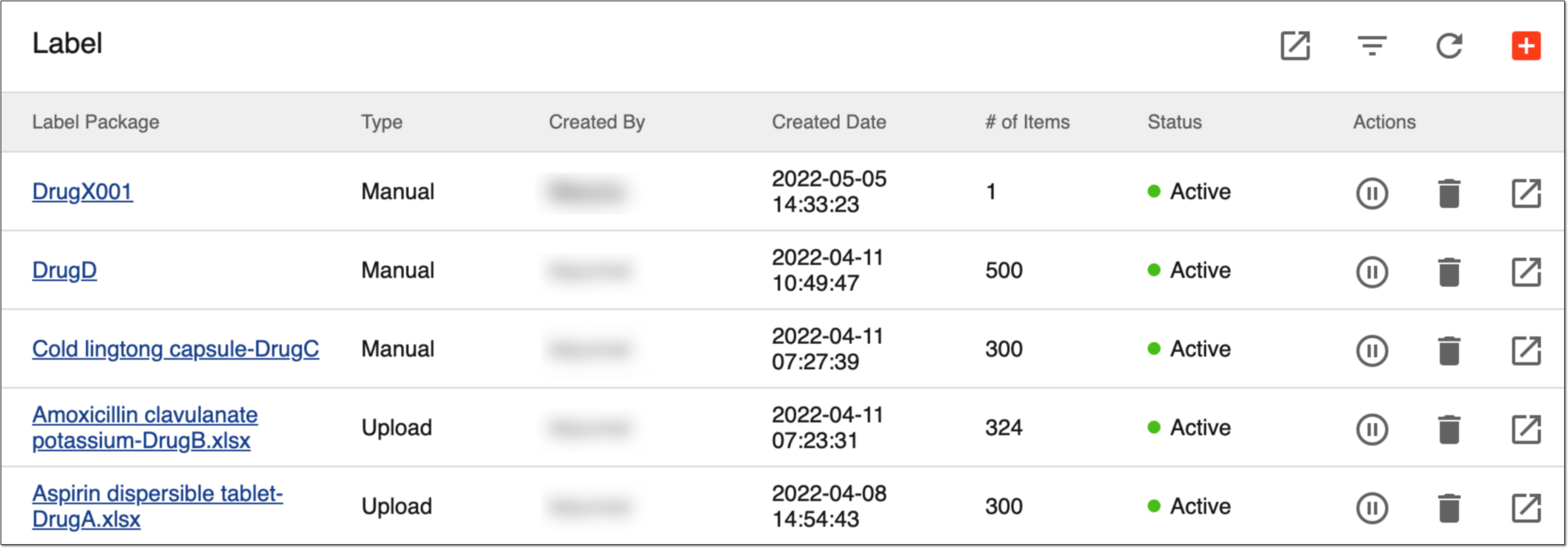
All the label packages previously created in the IWRS system are displayed under TREATMENT DESIGN > Label.
The label packages have the following attributes explained in the following table.
|
Column |
Details |
|---|---|
|
Label Package |
Represents the name of the label package. Select it to go to the item list of the label package. |
|
Type |
Represents the type of the label package:
|
|
Created By |
Represents the name of the user who has created the label package. |
|
Created Date |
Represents the date and time when the label package has been generated. |
|
# of Items |
Represents the number of labels in this package. |
|
Status |
Represents the status of the label package:
|
The following actions can be applied to label packages you see in the list:
-
Activate/Inactivate a label package: to make a label package active/inactive so that it can be used/cannot be used in the system, respectively.
-
Export a label package: to download a list of label packages as a separate XLSX spreadsheet and work with it offline.
-
Delete a label package: to delete label packages that are no longer needed.