View safety distribution task details
By adding the safety distribution tasks in PV, you automate the process of sending out the safety data reports to investigators (PIs), clinical research coordinators (CRCs), clinical research associates (CRAs), and other responsible study personnel.
Once the safety data is distributed, you can access all the pertinent details of the task in the Distributed status for review purposes and to perform some available actions.
-
In the PV application header, select the ICSR tab.
-
On the page that opens, from the left pane, select Safety Distribution.
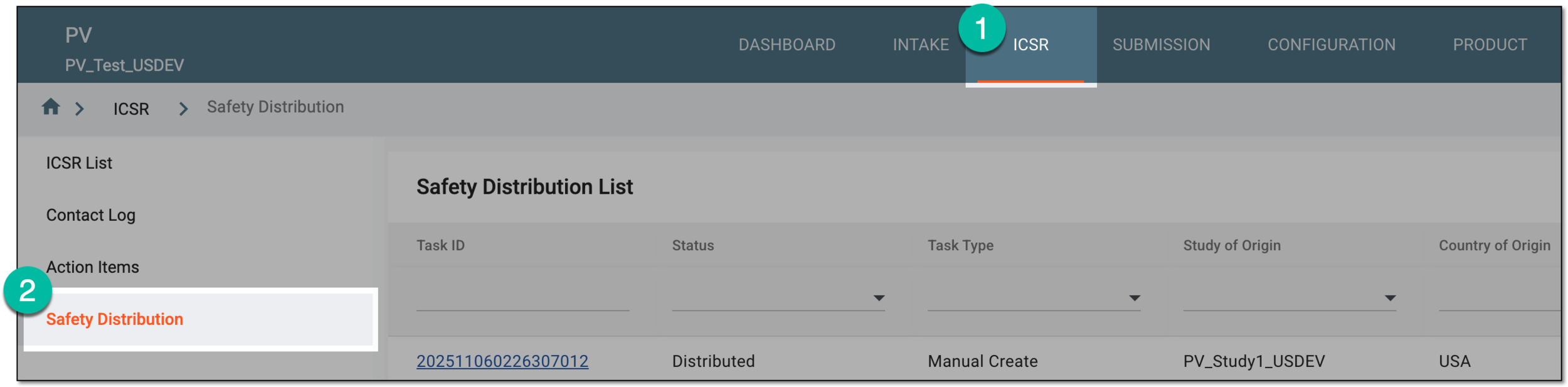 Figure 1. Accessing safety distribution
-
In Safety Distribution List, locate the task according to which you want to distribute safety data. Then select the task ID or from the Actions column, select View
 .
. Figure 2. Accessing distributed task details
-
On the task details page, view the available details and perform actions as explained in the following table.
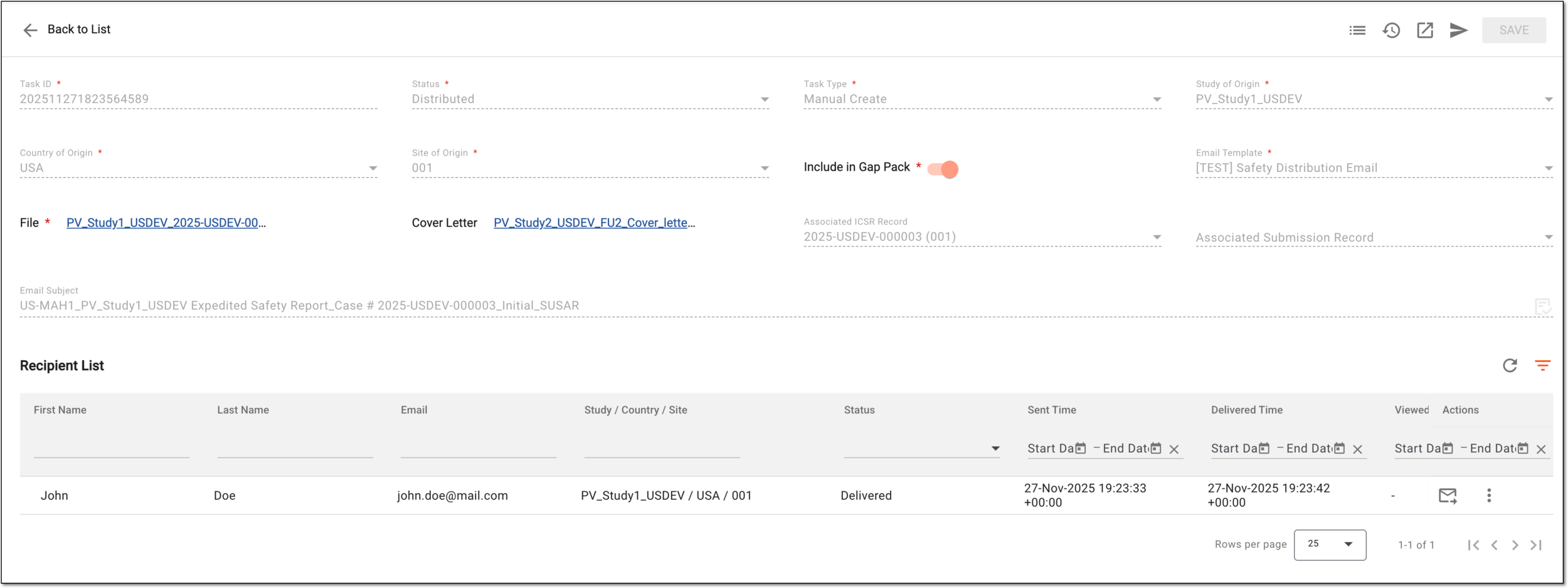 Figure 3. Viewing details of distributed task
Element
Details
Task ID
Represents the unique identifier of the safety distribution task.
Status*
Represents the current status of the safety distribution task; for the task whose data is sent out, is set to Distributed.
Task Type*
Represents the method of how the safety distribution task was added to the system; for the task being created from scratch is set to Manual Create.
Study of Origin*
Represents the study to which the safety data belongs (for which the SUSAR, SAE, or other event occurred).
Country of Origin*
Represents the country where the safety data for the occurred event was collected.
Site of Origin*
Represents the unique identifier of the site where the safety data was collected.
Include in Gap Pack*
The positioning of the toggle (not editable) indicates the following:
-
If turned on, the report sent with this safety distribution task can be used in the future safety data distributions sent according to new tasks.
For instance, the current safety distribution task for Site 001 has Include in Gap Pack enabled when the safety data is sent to the recipients of Site 001.
Then the safety distribution task is created for Site 002, with Include in Gap Pack also enabled. Once you distribute the safety data according to this new task, the safety data report already distributed to Site 001 is now automatically sent to Site 002.
-
If turned off, the data is distributed once to the intended site, and no further automation events are expected for this safety distribution task.
Email Template*
Represents the template outlining the contents of the safety distribution letter.
The email templates are predefined according to the business requirements of the sponsor by EDETEK administrators upon request.File*
Represents the linked name of the safety data report file that was distributed according to this task. Select the link to download the file to your computer.
Cover Letter
Represents the linked name of the cover letter file with auxiliary details on your safety report. Select the link to download the file to your computer.
Associated ICSR Record
Represents the unique identifier of the ICSR existing in PV that relates to the safety data distributed according to this task.
Associated Submission Record
Represents the unique identifier of the submission record created in PV for the ICSR related to the safety data distributed according to this task.
Email Subject
Represents the subject of the letter sent out according to this safety distribution task.
Workspace toolbar actions
Audit Trail
Select
 to access the descriptive log of operations—from recipient selection to data sending and delivery details.
Change History
Select
 to access the structured log of operations—from recipient selection to data sending and delivery details.
Export
Select
 to extract the safety report pertaining to this task.
Distribute
Select
 to distribute the safety data
again to the same or different sites.
to distribute the safety data
again to the same or different sites.Recipient List
First Name
Represents the first name of the recipient to whom the safety data was sent.
Last Name
Represents the last name of the recipient to whom the safety data was sent.
Email
Represents the email address of the recipient to which the safety data was sent.
Study / Country / Site
Represents the name of the study, country, and site code—divided by a slash—where the safety data recipient is operating.
Status
Represents the current status of the safety data delivery as follows:
-
Sent: the safety data email is sent by the PV system but not yet delivered to the recipient.
-
Delivered: the safety data email is already delivered to the recipient but not yet viewed by them.
-
Viewed: the safety data email is already opened by the recipient.
-
Bounced: the mail server of the recipient rejected the email.
-
Failed: technical failure occurred, preventing safety data distribution.
Sent Time
Represents the exact date, time, and time zone indicator when the safety data email is sent by the PV system.
Delivered Time
Represents the exact date, time, and time zone indicator when the safety data email is delivered to the recipient's email.
Viewed Time
Represents the exact date, time, and time zone indicator when the safety data email is opened by the recipient.
Creator
Represents the name of the PV user who created the safety distribution task.
Created Time
Represents the exact date, time, and time zone indicator when the safety distribution task was created.
Modified By
Represents the name of the user who performed the latest modification action to the safety distribution task or displays system if the latest change was introduced automatically by the PV system.
Modified Time
Represents the exact date, time, and time zone indicator of the latest modification action.
Recipient list actions
Resend
Select
 to send the report again to the same recipients, for instance, for technical reasons.
Audit Trail
Select
to access the descriptive log of operations—from task creation to adding recipients and other details.Change History
Select
to access the structured log of operations—from task creation to adding recipients and other details.Back to List
Select
 to discard the changes without saving and return to Safety Distribution List.
 -
You have reviewed the details of the distributed task.